免费在线玩 Mine - Survival and Creative
在浏览器中游玩 Mine - Survival and Creative,这是一款 生存 游戏。请先查看下方的操作方式、功能和兼容性说明,准备好后再点击开始游戏。
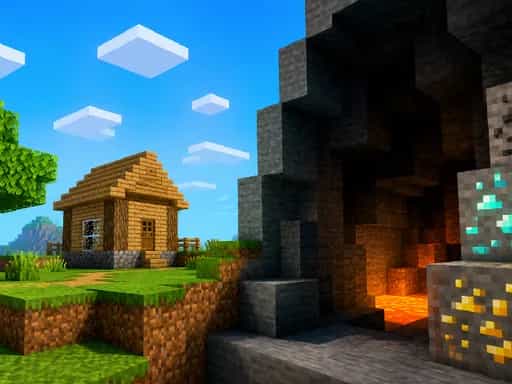
Mine - Survival and Creative












本月最受欢迎
查看所有结果 »






















Mine - Survival and Creative
技术规格
操作指南
- 1. Read the tutorial
Start the game and follow the on-screen tutorial to learn the controls shown for your device.
- 2. Gather and craft early gear
Collect wood and stone first, then craft a crafting table, basic tools and torches.
- 3. Manage health and hunger
Watch your health and hunger bars and find food before going on longer mining trips.
- 4. Upgrade before going deeper
Mine better ores as you find them and upgrade your gear before exploring deeper caves.
核心功能
关于 Mine - Survival and Creative
在 Mine - Survival and Creative 中采集资源、制作装备并建造基地,或切换到创造模式获得无限方块和飞行能力。免费在线畅玩。
What's in this guide
Mine - Survival and Creative 是一款可以在浏览器中游玩的方块搭建冒险游戏。你将在方块状的三维世界中采集资源、制作工具并建造基地,还可以选择专注生存的回合或自由建造的回合。游戏基于 HTML5 运行,支持 PC、手机、平板和 Chromebook,无需下载。
在 Mine - Survival and Creative 中你要做什么
你的核心循环是收集材料、将其制作成工具和装备,然后用它们探索更远的地方。在生存模式中,你从零开始,从木头和石头逐步发展。生命值和饥饿值都会随时间下降,因此你需要寻找食物,保持体力,同时向更深处挖掘以获取更好的矿石。
创造模式则去除了这些压力。飞行功能已开启,调色板中的所有方块都可以使用,因此你可以专注于建造大型项目,而无需先收集材料。
如何游玩 Mine - Survival and Creative
- 开始游戏并阅读屏幕上的教程,其中会展示游戏使用的操作方式。
- 先收集木头和石头,然后制作工作台、基础工具和火把。
- 留意生命值和饥饿值条,在踏上更长的旅程前猎取动物或种植食物。
- 发现更好的矿石时就开采,并在进入更深的洞穴前升级装备。
- 夜晚检查你的基地,因为在生存模式中,敌对生物会在天黑后出现。
Mine - Survival and Creative 操作方式
游戏在 PC 上使用鼠标和键盘,在手机和平板上使用触控。在触控设备上,操作方式为屏幕上的摇杆和动作按钮;如果它们遮挡了视野,请将设备横屏使用。游戏内教程会显示适合你设备的具体操作方式。
每次游戏会有哪些变化
两种主要游玩模式是生存和创造。生存模式专注于采矿、制作、食物以及保持存活,而创造模式让你可以飞行,并使用完整的方块调色板自由建造。世界是程序生成的,因此每个世界都有各自的森林、山脉和洞穴等待探索。你的世界会保存在游戏中,之后可以随时返回。成就系统也为你提供了生存之外的目标。
技巧与策略
- 尽早收集木头和石头,因为你的大部分初始工具和工作台都依赖它们。
- 开始长时间挖掘前在背包中备好食物,避免因饥饿而被迫返回基地。
- 天黑前用火把照亮基地和附近的道路,因为在生存模式中,怪物会在夜间出现。
- 一旦找到更好的矿石就立即升级工具和护甲,而不要用简陋的装备继续深入。
- 在你经常需要的资源附近建造庇护所,让每次往返都更短。
- 先在创造模式中规划大型建筑,准备好接受挑战后再在生存模式中实现该布局。
- 在触控设备上使用横屏,以免摇杆和按钮遮挡你需要看到的画面。
更多你喜欢的游戏
操作说明
常见问题
如何游玩 Mine - Survival and Creative?
生存模式和创造模式有什么区别?
Mine - Survival and Creative 会保存进度吗?
"Mine - Survival and Creative" and related names may be trademarks of their respective owners. This page is an informational game directory only; ZGames.io is not sponsored by or affiliated with trademark holders unless a specific game page says otherwise.
游戏视频: Mine - Survival and Creative
OFFICIAL SOURCES & SITES
玩家评论
暂无评论
成为第一位分享反馈并为这款游戏评分的人!