Play Traffic Jam 3D Online Free
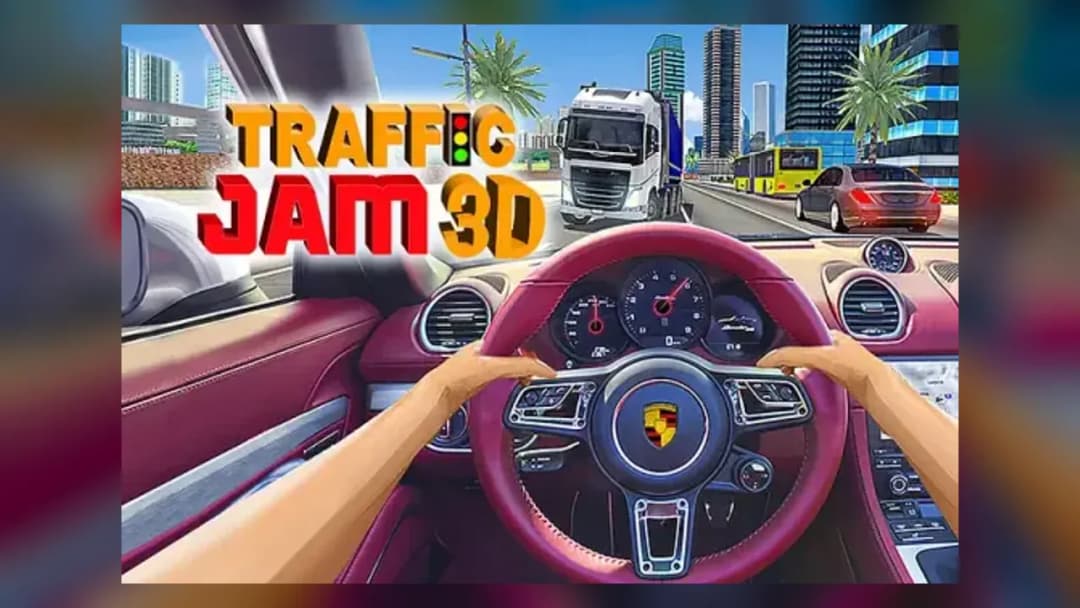
Play Traffic Jam 3D, a Driving game available in your browser. Review the controls, features, and compatibility notes below, then choose Play when you are ready.
Advertisement














Advertisement
Most Popular This Month
View All results »



































Traffic Jam 3D
TECHNICAL SPECIFICATIONS
OPERATIONAL GUIDE
- 1. Pick a mode and map
Choose Career, Infinite, Time, or One-Way, then select Highway, Desert, or City and set traffic density.
- 2. Accelerate and hold a lane
Press the Up Arrow to reach full speed and settle into an outer lane to see gaps early.
- 3. Bank near-miss bonuses
Flick one lane over at the last moment to pass cars within inches and trigger scoring multipliers.
- 4. Upgrade in the garage
Spend earned coins on handling first, then top speed, to raise your car's Performance Rating safely.
CORE FEATURES
Advertisement
About Traffic Jam 3D
Weave your car through dense highway lanes in Traffic Jam 3D, scoring near-miss and opposite-lane bonuses across 4 modes and 3 maps. Play Traffic Jam 3D...
What's in this guide

Weaving Lanes at Full Speed in Traffic Jam 3D online
In Traffic Jam 3D online you thread a speeding car through packed highway lanes, slipping between vehicles millimeters apart to bank near-miss points while never lifting off the throttle. The whole game is about reading traffic gaps a second before they close — one hesitation and you clip a bumper.
Unlike a checkpoint racer, this is a survival-scoring driving game: distance, speed and clean overtakes feed your coin total, which you spend in the garage on faster cars. It runs instantly in-browser, which is why players search for Traffic Jam 3D unblocked to load it at school or work with no download.
| Game | Traffic Jam 3D |
|---|---|
| Category | driving |
| Modes | Career, Infinite (Endless), Time, One-Way |
| Maps | Highway, Desert, City |
| Controls | Arrow keys / touch buttons |
| Platforms | PC, Mobile, Chromebook |
The Coin-and-Score Loop That Drives Traffic Jam 3D
Points come from three stacked sources: raw distance, sustained high speed, and risk bonuses. A near-miss — passing a car within inches — pops a multiplier, and driving into oncoming lanes in opposite-direction sections pays the biggest opposite-lane bonus. Crashing ends the run instantly and banks whatever coins you earned. Those coins are the only currency for the garage, so every run is a farming session.
Traffic Jam 3D controls on Desktop and Mobile
The Traffic Jam 3D controls differ by device, which causes most confusion:
- PC: Up Arrow to accelerate, Down Arrow to brake/reverse, Left and Right Arrows to change lanes and steer.
- Mobile / touch: on-screen left/right buttons steer while acceleration is often automatic; a brake button slows you.
Control layout can vary slightly by embed version, so if arrow keys feel unresponsive, click the game window first to focus it.
The Four Traffic Jam 3D game modes
Learning how to play Traffic Jam 3D means knowing what each of the four Traffic Jam 3D game modes rewards:
- Career mode — structured level objectives (reach a checkpoint, hit a point target, or cover a set distance) that unlock progressively.
- Infinite / Endless — pure survival; drive as far as possible without crashing.
- Time — score as many points as you can before the clock runs out.
- One-Way / directional — traffic funnels for high-density overtaking runs.
Before a run you can choose a map among Highway, Desert and City, and adjust the scenario (traffic density and time of day) to tune difficulty.
The Garage: Traffic Jam 3D cars and upgrades
Coins buy new vehicles and upgrade Traffic Jam 3D cars and upgrades like top speed, acceleration and handling, raising a car's overall Performance Rating. Faster cars score more per second but leave less reaction time — balance PR against your reflexes rather than always buying the priciest ride.
Advanced tactics for Traffic Jam 3D online
- Hold a lane on the outer edge, then flick one lane over only at the last moment to trigger back-to-back near-miss bonuses.
- In One-Way sections, ride the oncoming lane briefly for opposite-lane multipliers, then bail before a head-on.
- In Time mode, prioritize density over caution — more cars means more scoring passes per second.
- Upgrade handling before top speed; a twitchy car at max speed costs more crashes than it earns points.
Why won't my progress save?
Some players report being shown as "Guest" and losing access to earned cars. This is usually a login/session issue on the host portal, not the game itself — sign in before playing and avoid clearing cookies mid-session. If Traffic Jam 3D won't load, disable your ad blocker or open it in a private/incognito window.
Similar Games on ZGames
If the lane-threading rush of Traffic Jam 3D online hooks you, these arcade games and driving picks deliver a similar thrill:
- Tap Drift — one-tap cornering that rewards the same split-second timing.
- Horizon Chase — arcade highway racing with escalating traffic pressure.
- Rocket Goal — fast reaction-based scoring under a countdown.
- Crafty Car — car-driving challenge with garage upgrades.
Browse more HTML5 games and the popular games hub for the latest traffic games. At its core, Traffic Jam 3D is about one nerve-testing choice made over and over: how close will you cut the next gap? Master that, and the coins — and the supercars — follow.
Advertisement
More Games You'll Love
Controls
Frequently asked questions
How many game modes does Traffic Jam 3D have?
What are the controls for Traffic Jam 3D?
How do you score points and earn coins in Traffic Jam 3D?
Why am I shown as a Guest and can't use my earned cars?
Is Traffic Jam 3D unblocked at school?
"Traffic Jam 3D" and related names may be trademarks of their respective owners. This page is an informational game directory only; ZGames.io is not sponsored by or affiliated with trademark holders unless a specific game page says otherwise.
Gameplay Video: Traffic Jam 3D
OFFICIAL SOURCES & SITES
Player Reviews
No Reviews Yet
Be the first to share your feedback and rate this game!
Submit Your Review
Keep exploring