Play Words of Wonder Unblocked Online Free
Play Words of Wonder Unblocked, a Puzzle game available in your browser. Review the controls, features, and compatibility notes below, then choose Play when you are ready.
Advertisement
Words of Wonder Unblocked



















Advertisement
Most Popular This Month
View All results »



































Words of Wonder Unblocked
TECHNICAL SPECIFICATIONS
OPERATIONAL GUIDE
CORE FEATURES
Advertisement
About Words of Wonder Unblocked
Play Words of Wonder online for free: link letters, build words, and clear puzzle boards in an unblocked browser game with no download on any device.
What's in this guide
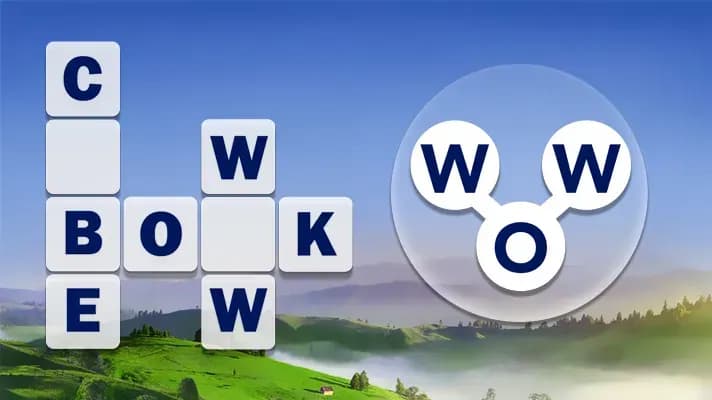
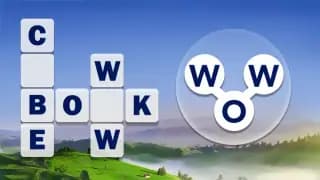
Words of Wonder is an HTML5 word puzzle game built around letter linking, crossword completion, and vocabulary pattern recognition. Players connect letters from a compact wheel to form valid words, then place those words into a structured board where each solved answer reveals new cross letters. Because it runs as a browser game, it supports instant play on PC, mobile, tablet, and Chromebook without requiring a separate installer.
The design favors calm precision over reflex speed. The core loop asks the player to read the board, estimate word length, test letter order, and use discovered letters as anchors. That makes Words of Wonder free-to-play friendly and especially suitable for short sessions, classroom breaks, and mobile gaming where clean touch input matters more than heavy graphics hardware.
Game NameWords of WonderCategoryGamesTechnologyHTML5 / Browser NativePlatformsPC, Mobile, Tablet, ChromebookRequires Download?No, Instant PlayWhat's In This Guide
- About Words of Wonder
- Complete Controls & Mechanics
- Advanced Strategies & Tips
- How to Play Unblocked at School
- Platforms & Versions
- Known Glitches & Quirks
- Top Alternatives & Competitors
About Words of Wonder
Words of Wonder belongs to the modern browser-native word puzzle lineage that grew from newspaper crosswords, anagram wheels, and mobile word-link games. Its appeal comes from a simple input model: the player does not type full answers manually; the player selects letters in order. That one design choice reduces friction and makes vocabulary solving feel physical, almost like tracing a route through language.
The game uses lightweight HTML5 presentation rather than complex 3D rendering. Most of the action occurs through interface states: selected letters highlight, valid words snap into the board, and solved cells persist as puzzle information. The engine does not need heavy physics, but it does need responsive pointer tracking, reliable hit detection on letter nodes, and fast board updates after every submission.
Culturally, Words of Wonder fits the same daily-brain-training space as word searches and crossword apps. It rewards pattern memory, not twitch reactions. The best players read vowels first, identify common consonant clusters, and treat every solved word as data for the next one.
- Engine & Tech: The HTML5 game uses browser-native rendering and input handling, which keeps frame pacing stable on common devices.
- Accessibility: Low system demand helps it run on Chromebooks because the board, letters, and animations require minimal GPU load.
- Updates: Version details can vary by host, but the format supports additional level packs, refreshed dictionaries, and interface tuning.
Complete Controls & Mechanics in Words of Wonder
Controls in Words of Wonder are built for direct selection. On desktop, the player uses the mouse to click or drag across letters. On mobile, the same action becomes a finger swipe. The game reads the sequence, compares it against the puzzle dictionary, and either accepts the word, rejects it, or stores it as a bonus answer.
Input latency matters more than it appears. A good word-link game must register each letter cleanly without accidentally skipping over neighboring nodes. The best tactic is to drag deliberately through the center of each letter circle, especially on small screens where dense layouts can make diagonal paths less forgiving.
The main mechanical tension comes from limited information. The letter wheel offers all required ingredients, but the board hides the exact answers. Crossword intersections create a logic system: one solved word exposes letters for another slot, turning guesses into deductions.
- Selection: Click, tap, or drag across letters in the order needed to spell a word.
- Submission: Release the pointer or finish the sequence to test the word against the current board.
- Mechanics: The puzzle relies on dictionary validation, crossword intersections, bonus-word detection, and hint reveals rather than gravity or momentum.
Advanced Strategies & Tips for Words of Wonder
Strong Words of Wonder play starts before the first swipe. Count the empty cells, separate short slots from long slots, and look for repeated crossing positions. Short words often use common structures such as vowel-consonant-vowel patterns, while longer words frequently expose the board's intended theme or hardest letter combination.
Resource management centers on hints. A hint has maximum value when it reveals a crossing letter in a long answer, because that single cell can clarify two words at once. Do not spend hints just because the first answer feels slow. Rotate the available letters mentally and test common endings first.
High-efficiency routing means solving the easiest confirmed words first, then using the board to attack the uncertain ones. Avoid random swiping when only one or two slots remain. At that point, the grid contains enough information to solve logically.
- Perfect Your Timing: Pause after each accepted word and re-read the grid; rushing causes duplicate attempts and missed crossings.
- Manage Resources/Speed: Save hints for four-letter or longer words with uncommon consonants.
- Avoid Common Mistakes: Do not ignore bonus words, but do not let them distract from filling the required board.
- Optimize Runs: Solve short anchors first, then use revealed letters to complete the longest remaining slot.
How to Play Words of Wonder Unblocked at School
Words of Wonder unblocked means the game can be accessed through a browser page without installing a desktop executable. Modern HTML5 games differ from old Flash games because they do not require a deprecated plugin. They load assets through the web page, then run interface logic in the browser sandbox.
School and work networks often restrict downloads, installers, and unknown applications. A Words of Wonder browser game avoids those categories because it uses standard web technology. Availability still depends on local network policy, but the no download format makes it Chromebook compatible and safer than executable-based games.
- What is Unblocked: It usually refers to browser access that does not require installing files or changing device settings.
- Chromebook Support: The game runs in the browser and stores active play in memory during the session.
- Browser Native: No executables are required, which keeps access simple on managed devices.
Platforms & Versions
You can play Words of Wonder online through a modern browser on Windows, macOS, ChromeOS, Android, and iOS. The desktop version benefits from precise mouse control and a wider board view. The mobile version benefits from natural swipe input, which matches the letter-link mechanic extremely well.
The Words of Wonder HTML5 game does not need a high-end processor. Its lightweight interface makes it a practical Chromebook game, especially compared with 3D titles that depend on WebGL-heavy scenes. For most players, the best version is the instant play browser version because it preserves the core puzzle loop with no account friction.
- Browser Version: Fast access, no download, and simple tab-based play make it the most flexible option.
- Mobile Experience: Touch controls let players trace words quickly with one finger.
Known Glitches & Quirks
Word puzzle engines rarely break dramatically, but small quirks can appear around touch paths and word validation. On compact screens, a fast diagonal swipe may miss a letter if the finger crosses the edge of the input circle. Slower, centered swipes reduce that issue.
Dictionary quirks also shape play. Some real words may not count if they are outside the selected word list, while some bonus words may register without appearing on the main board. Treat the accepted dictionary as the game's rulebook, not a complete language authority.
- Input Quirks: Releasing too early can submit an incomplete word, especially on mobile.
- Visual Desync: Brief highlight delays may occur on older devices, but the board state usually corrects after submission.
Top Alternatives & Competitors
Words of Wonder competes most directly with word-link and crossword-fill games. Compared with a pure word search, it demands more reconstruction because the player must build answers from a limited letter set. Compared with a traditional crossword, it removes clue reading and replaces it with anagram logic.
Its pacing sits between casual spelling games and stricter vocabulary tests. Wordscapes offers a similar anagram-to-crossword loop, while classic crossword apps emphasize clue interpretation. Words of Wonder works best for players who enjoy deduction without timer pressure.
- Wordscapes: Similar letter-wheel solving, but presentation and level structure may differ by version.
- Classic Crosswords: More clue-driven and knowledge-heavy, while Words of Wonder focuses on letter recombination.
Similar Games on ZGames
If you enjoy Words of Wonder, you may also like these games:
Conclusion
Words of Wonder succeeds because it turns vocabulary into a clean mechanical puzzle. You scan, connect, confirm, and use every solved letter as evidence. The rules stay simple, but the best boards demand careful reading and disciplined hint use.
Play Words of Wonder online free on ZGames.io if you want a no download browser game that works on mobile, desktop, tablet, and Chromebook. It is fast to load, easy to understand, and sturdy enough for quick puzzle sessions anywhere your browser runs.
Advertisement
More Games You'll Love
Controls
Frequently asked questions
How many levels does Words of Wonder have?
What is the best way to use hints in Words of Wonder?
How do bonus words work in Words of Wonder?
Why do later Words of Wonder puzzles feel harder?
"Words of Wonder Unblocked" and related names may be trademarks of their respective owners. This page is an informational game directory only; ZGames.io is not sponsored by or affiliated with trademark holders unless a specific game page says otherwise.
Player Reviews
No Reviews Yet
Be the first to share your feedback and rate this game!
Submit Your Review
Keep exploring