Play Coloring Book: Cartoon Veggies Online Free
Play Coloring Book: Cartoon Veggies, a Coloring Games game available in your browser. Review the controls, features, and compatibility notes below, then choose Play when you are ready.
Advertisement

Coloring Book: Cartoon Veggies

















Advertisement
Most Popular This Month
View All results »


































- Home
- Coloring Games
- Coloring Book: Cartoon Veggies
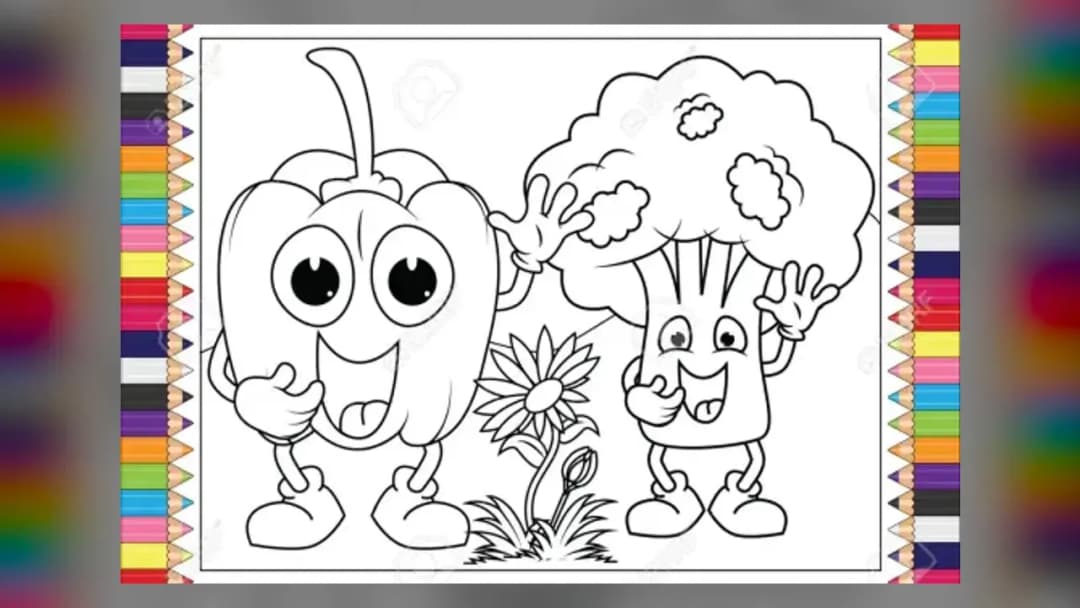
Coloring Book: Cartoon Veggies
TECHNICAL SPECIFICATIONS
OPERATIONAL GUIDE
- 1. Pick a cartoon veggie
Open the picture menu and select a vegetable outline — carrot, tomato, pepper or another cartoon veggie — to load its canvas.
- 2. Load a color
Click or tap a shade on the palette strip to load it onto your pencil.
- 3. Fill the section
Click or tap inside an outlined region of the veggie to apply the color; work from the largest area to the smallest details.
- 4. Erase and refine
Select the eraser to clear any mistake, then re-color the region until the veggie looks the way you want.
CORE FEATURES
Advertisement
About Coloring Book: Cartoon Veggies
Fill cheerful cartoon carrots, peppers and peas with color using tap-and-fill pencils in Coloring Book: Cartoon Veggies. Pick palettes, undo mistakes and...
What's in this guide

What You Actually Do in Coloring Book: Cartoon Veggies
In Coloring Book: Cartoon Veggies you pick a smiling cartoon vegetable — think a round tomato, a leafy carrot, a grinning bell pepper or a pod of peas — and fill its outlined sections with color one region at a time. There is no timer, no failure state, and no score chasing you: you simply select a shade, tap a blank area, and watch the veggie come to life. It is a calm, tap-and-fill online coloring game built for short creative sessions.
The whole experience revolves around the palette-and-canvas loop that defines the genre: choose a pencil or brush, choose a color, and paint. Because the vegetables are drawn in a friendly cartoon style with bold black outlines, each image reads like a printable coloring sheet that never needs ink. That makes it a natural fit for anyone who searches for vegetable coloring pages for kids but wants to color on a screen instead of paper.
Unlike a static printable, this cartoon coloring book game lets you erase, swap colors instantly, and experiment without wasting a page. If you dislike how the eggplant's purple turned out, you re-color it in a second. That reset-friendly freedom is the core appeal of playing Coloring Book: Cartoon Veggies online.
| Game | Coloring Book: Cartoon Veggies |
|---|---|
| Category | coloring-games |
| Genre | Creative / Coloring |
| Theme | Cartoon vegetables and veggies |
| Modes | Single-player |
The Core Coloring Loop and Palette System
Every session in Coloring Book: Cartoon Veggies follows the same satisfying rhythm. You browse the selection of cartoon veggie outlines, open one, and are handed a set of colors and drawing tools. From there the objective is entirely self-directed: complete a picture that looks the way you want it to look.
Selecting Colors and Filling Vegetable Sections
The vegetable coloring book layout typically presents a color strip or palette alongside the canvas. You tap a color to load your pencil, then tap or drag inside an outlined region of the veggie to apply it. Because the artwork uses clean cartoon outlines, colors stay within the lines, which is what makes this a friendly kids coloring experience rather than a fiddly one.
Undo, Erase, and Re-Color Freedom
The standout advantage of this online coloring game over free printable vegetable coloring pages is the eraser. Made a green carrot by accident? Grab the eraser tool, clear the region, and try again. This trial-and-error loop encourages experimentation, letting younger players learn color choices with zero waste.
Controls for Coloring Book: Cartoon Veggies
Coloring games in this style are built around a single, simple input scheme. On desktop, you use the mouse; on mobile and tablet, you tap and drag. Here is how the typical controls map:
| Action | Input |
|---|---|
| Select a pencil or color | Left click / tap the palette |
| Fill a vegetable section | Left click / tap inside the outline |
| Erase a mistake | Select eraser, then click / tap the area |
| Choose a new veggie | Return to the picture menu |
If you are wondering how to play Coloring Book: Cartoon Veggies with no instructions on screen, that mouse-and-tap pattern covers everything you need.
The Cartoon Vegetables You Can Color
The appeal of this title over a generic online coloring game is its consistent veggie theme. Expect a rotating cast of cheerful produce — carrots, tomatoes, peppers, peas, corn, broccoli and similar cartoon veggies — each with expressive faces and simple shapes that suit early colorers. The bold outlines double as gentle guidance, so a preschooler filling a cartoon carrot gets tidy results while an older player can layer shades for depth.
Advanced Coloring Tips and Strategy
- Base color first, details last: Fill the largest region of each cartoon veggie before touching small areas like leaves or highlights, so you avoid stray marks.
- Use two greens on leafy tops: Color the carrot or radish leaves with a light and a dark green to fake shading and make the veggie pop.
- Keep the eraser handy: Because re-coloring is free, block in bold colors quickly, then clean up edges with the eraser rather than working slowly.
- Match natural palettes for realism, or invert them for fun: A blue tomato or rainbow pepper is a great creative challenge for kids exploring vegetable coloring.
For Parents
Coloring Book: Cartoon Veggies is a low-stakes, screen-friendly creative activity with no combat, no chat, and no fail states — an easy pick if you were searching for vegetable coloring pages for kids. There is no timer pressure, which makes it a calm alternative to fast arcade titles. Because it runs in the browser as an HTML5 title, it works on shared family devices without a download.
Similar Coloring Games on ZGames
- California Roll Sushi: Sara's Cooking Class — another kid-friendly, food-themed creative activity with the same relaxed pace.
- Happy Valentine's Day Coloring Book — same tap-and-fill coloring mechanic with a seasonal theme.
- Dotted Girl: Coloring Book — a character-focused coloring book with the same palette-and-canvas loop.
- Coloring Book: Shopkins — cartoon-style coloring pages ideal if you enjoyed filling in the cartoon veggies.
Browse more relaxing picks in coloring games or explore the full HTML5 games library for other instant-play titles.
Whether you fill a cartoon carrot in its natural orange or paint the whole basket of veggies in wild colors, Coloring Book: Cartoon Veggies keeps that simple tap-fill-undo loop at its heart. Pick a smiling vegetable, load your palette, and color your first page online free right now.
Advertisement
More Games You'll Love
Controls
Frequently asked questions
How do you erase a mistake in Coloring Book: Cartoon Veggies?
What controls does Coloring Book: Cartoon Veggies use?
Is there a way to color outside the lines in Coloring Book: Cartoon Veggies?
Do I need to download anything to play Coloring Book: Cartoon Veggies?
What kinds of vegetables can you color in the game?
"Coloring Book: Cartoon Veggies" and related names may be trademarks of their respective owners. This page is an informational game directory only; ZGames.io is not sponsored by or affiliated with trademark holders unless a specific game page says otherwise.
Gameplay Video: Coloring Book: Cartoon Veggies
OFFICIAL SOURCES & SITES
Player Reviews
No Reviews Yet
Be the first to share your feedback and rate this game!
Submit Your Review
Keep exploring