Play High School Teacher Games Life Online Free
Play High School Teacher Games Life, a Casual game available in your browser. Review the controls, features, and compatibility notes below, then choose Play when you are ready.
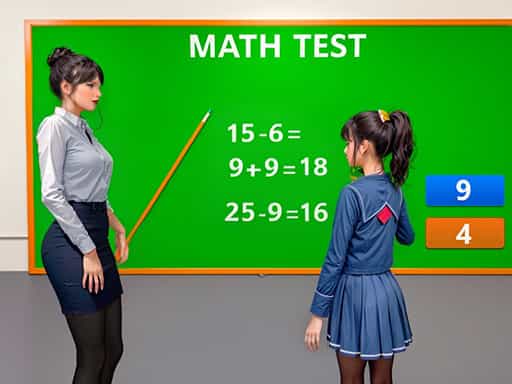
High School Teacher Games Life

















Most Popular This Month
View All results »






























Game Details
How to Play
- 1. Move through the school
Use WASD to walk and Left Shift to sprint between classrooms so you reach lessons on time.
- 2. Interact with students
Press F when a prompt appears to perform the action and progress your teaching routine.
- 3. Pick a mode
Choose Career Mode for the full journey, Mission Mode for tasks, or Quiz Mode for student quizzes.
- 4. Check instructions
Press I to open the instructions screen before starting a challenging mission.
Game Features
About High School Teacher Games Life
Roam a 3D school as a teacher across Career, Mission and Quiz modes with WASD movement and a dedicated F action key. Manage daily routines and grade...
What's in this guide
What You Actually Do in High School Teacher Games Life online
In High School Teacher Games Life online, you step into the shoes of a high school teacher and walk the halls in a 3D school environment, where your job is to manage a daily teaching routine rather than just complete menu-driven mini-games. From the first minute you are moving with WASD, sprinting between classrooms, and pressing the action key to interact with students, desks, and school objects.
Unlike typical school games, this browser build leans into a more realistic teaching environment: you explore the campus, keep your schedule on track, and complete teaching challenges that test whether you can actually run a classroom. It plays as a free-roam high school teacher simulator split into three distinct game modes.
| Game | High School Teacher Games Life |
|---|---|
| Category | simulation / casual |
| Modes | Career, Mission, Quiz |
| Controls | WASD, Shift, Ctrl, P/Tab, F, I |
| Platform | Browser (HTML5) |
Career, Mission and Quiz Mode explained
Career Mode
Career Mode puts you through the full journey of a high school teacher, letting you manage daily school life — moving through lessons, handling routine responsibilities, and progressing as a staff member instead of a one-off level.
Mission Mode
Mission Mode tasks you with completing exciting and challenging objectives that specifically test your teaching skills. Each mission is a self-contained goal, making it the best mode for short sessions.
Quiz Mode
Quiz Mode has you conduct quizzes and practical sessions with students, turning the simulation into an interactive education loop where you run the questions rather than answer them.
High School Teacher Games Life controls
The High School Teacher Games Life controls are keyboard-based and consistent across every portal that hosts this build:
| Input | Action |
|---|---|
| WASD | Move around the school |
| Left Shift | Sprint |
| F | Action / interact |
| Ctrl | Settings |
| P / Tab | Pause |
| I | Instructions |
How to play High School Teacher Games Life without wasting time
New to the loop? For how to play High School Teacher Games Life efficiently: hold Left Shift to sprint between distant classrooms so you never miss a scheduled lesson, and press F only when prompts appear on students or objects to avoid breaking your routine timer. Open the I menu early to read the full instruction set before committing to Career Mode, since Mission Mode objectives assume you already know the movement layout.
Is it the same as the mobile app?
No. A separate Android app called High School Teacher Games Life exists from a different developer with an anime/yandere school theme and offline role-play. This browser version — the one you play here — is the HTML5 build with the Career/Mission/Quiz structure and WASD controls described above. The two are different products with different mechanics.
Playing High School Teacher Games Life unblocked at school
Because this is a browser HTML5 title with no download, it runs on Chromebooks and low-spec school machines. Many players look for high school teacher games life unblocked so they can load it on classroom computers; it opens directly in the browser tab with no installer required.
Similar school and simulator games on ZGames
If you like this school life simulator game and this style of teacher life simulator game, try these picks and browse more in education games or new games:
- Electron Dash — fast reflex scoring for when you want a break from routine management.
- Fast Food Rush — another daily-shift management loop where timing decides your success.
- Fun Race 3D — 3D obstacle movement that shares this game's WASD-style navigation feel.
- Rope Rescue Puzzle — a brainy challenge mode fan if you enjoy Quiz Mode's logic.
From sprinting to a lesson in Career Mode to grading students in Quiz Mode, High School Teacher Games Life online turns the everyday job of teaching into a free-roam campus sim. Load it in your browser, learn the WASD and F keys, and run your own classroom.
More Games You'll Love
Controls
Frequently asked questions
What are the controls for High School Teacher Games Life?
What game modes does High School Teacher Games Life have?
Is the browser High School Teacher Games Life the same as the mobile app?
Can I play High School Teacher Games Life unblocked at school?
Who made High School Teacher Games Life?
"High School Teacher Games Life" and related names may be trademarks of their respective owners. This page is an informational game directory only; ZGames.io is not sponsored by or affiliated with trademark holders unless a specific game page says otherwise.
Gameplay Video: High School Teacher Games Life
OFFICIAL SOURCES & SITES
Player Reviews
No Reviews Yet
Be the first to share your feedback and rate this game!
Submit Your Review
Keep exploring