Play Rocket League Unblocked Online Free
Play Rocket League Unblocked, a Sports game available in your browser. Review the controls, features, and compatibility notes below, then choose Play when you are ready.
Advertisement






Advertisement
Most Popular This Month
View All results »














TECHNICAL SPECIFICATIONS
OPERATIONAL GUIDE
CORE FEATURES
Advertisement
About Rocket League Unblocked
Play Rocket League online free with no download. Score boost-powered car-soccer goals in an unblocked browser arena for PC, mobile, and Chromebook now.
What's in this guide
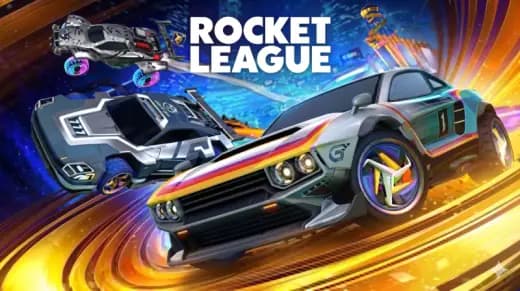
Rocket League is a physics-based car soccer game built around one simple rule: hit the giant ball into the opponent’s goal before they do it to you. This browser version keeps the core appeal intact through HTML5 and browser-native rendering, allowing instant play on PC, mobile, tablet, and Chromebook without a local installer.
The experience belongs to the modern WebGL era of browser gaming. Instead of relying on Flash or platform-specific files, it runs through the browser’s graphics pipeline, using keyboard, touch, and game-like input timing to translate steering, jumping, boosting, and collisions into readable match action.
Game NameRocket LeagueCategoryGamesTechnologyHTML5 / Browser NativePlatformsPC, Mobile, Tablet, ChromebookRequires Download?No, Instant PlayWhat's In This Guide
- About Rocket League
- Complete Rocket League Controls & Mechanics
- Advanced Strategies & Tips
- How to Play Unblocked at School
- Known Glitches & Quirks
- Top Alternatives & Competitors
About Rocket League
Rocket League popularized the idea that sports games could feel like stunt driving without losing competitive clarity. The original concept fused arena soccer with rocket-powered vehicles, then let physics create the drama. Every touch matters because the ball reacts to speed, angle, height, and timing.
The design philosophy works because the player does not press a pass button or a shoot button. You drive the car into the ball. That physical contact creates shots, clears, blocks, pinches, and chaotic mistakes. The result feels readable for new players and brutal at high skill levels.
As a Rocket League browser game on ZGames.io, the emphasis shifts toward accessibility. Players can open the page, load the match, and test the handling quickly. That makes it useful for short sessions, Chromebook gaming, and mobile gaming where instant play matters more than deep setup menus.
- Engine & Tech: HTML5 and WebGL-style rendering allow the arena, car, and ball to update inside the browser at playable frame rates.
- Accessibility: Low-end devices benefit from compact assets, simple arenas, and browser memory management instead of heavy desktop installation.
- Updates: Browser builds may change over time as performance, controls, or compatibility improve.
Complete Rocket League Controls & Mechanics
Rocket League feels sharp because your hands manage three jobs at once: steering the vehicle, reading the ball, and deciding when to leave the ground. A clean touch starts before impact. You point the nose, control speed, and choose whether to jump, boost, or stay grounded.
Input latency matters. On keyboard, short taps produce cleaner corrections than holding a direction too long. On touch screens, the challenge comes from separating steering from action buttons. Good players keep the car under control first, then add boost only when the line to the ball makes sense.
The collision model rewards momentum. A slow car creates soft touches. A fast car creates clears and powerful shots. Hitting the ball with the corner of the car adds sideways force, while front-bumper contact produces direct pressure toward the target.
- Movement: Use WASD or arrow keys to accelerate, brake, reverse, and steer. On mobile, use the on-screen controls with short, deliberate inputs.
- Action: Jump to meet bouncing balls, boost to accelerate, and combine both for aerial touches when the ball rises above the car.
- Mechanics: Gravity pulls the car and ball back into the arena, while momentum determines shot power, rebounds, and recovery speed.
Advanced Strategies & Tips
Strong Rocket League play starts with restraint. Chasing every ball creates double-commits, empty nets, and weak clears. The better route is to predict the next bounce, arrive early, and hit the ball with a purpose: shoot, pass, clear, stall, or challenge.
Boost management separates reckless speed from real pressure. Use boost to reach a decisive play, not to decorate movement. Small pads along the field often matter more than a risky full boost pickup because they let you stay involved without abandoning defense.
High-score routing in timed or arcade-style versions depends on quick recoveries. After every hit, land on your wheels, point toward the next play, and avoid flipping into dead space. Recovery frames decide whether you get a second touch or watch the ball roll behind you.
- Perfect Your Timing: Jump slightly before the ball reaches peak height so your car meets it while rising, not falling.
- Manage Resources/Speed: Spend boost on shots, saves, and recoveries; coast when the ball has no immediate threat.
- Avoid Common Mistakes: Do not drive directly under bouncing balls unless you plan to fake or block.
- Optimize Runs: Use side-wall rebounds to redirect the ball faster than turning in the center of the field.
How to Play Unblocked at School
A Rocket League unblocked page works differently from old executable games. Modern HTML5 games load through the browser, render with web standards, and avoid local installation. That makes them easier to access on managed devices when the site itself is permitted by the network.
School and workplace rules still matter. The technical advantage is simple: a Rocket League HTML5 game does not require an installer, launcher, or system-level permission. It uses browser memory during the session, then closes when the tab closes.
- Chromebook Support: Fully compatible with many school devices because it runs through the browser and uses lightweight assets.
- Browser Native: No executables are required, which keeps play simple on restricted laptops and shared devices.
Known Glitches & Quirks
Physics-driven car games always produce edge cases. Fast impacts can create unusual rebounds when the ball contacts a wall, car, and floor in quick succession. These moments look strange, but they also create the improvisational style that makes the format memorable.
Browser performance can affect perception. If a device drops frames, a touch may appear late or a rebound may look sharper than expected. Closing heavy tabs, using a stable browser, and keeping inputs short can reduce visual desync.
- Physics Quirks: Corner pinches can launch the ball faster than a normal shot when the car traps it against the wall at speed.
- Visual Desync: Minor clipping can appear when the car lands awkwardly after a jump or wall contact.
Top Alternatives & Competitors
Rocket League sits between racing, soccer, and arcade physics. Compared with pure racing games, it asks for spatial reading instead of lap optimization. Compared with standard sports games, it removes scripted animations and forces every shot to come from physical positioning.
Players who like speed may prefer endless runners or reaction games, while players who like precision may move toward rhythm platformers. Rocket League remains different because its difficulty curve comes from interaction: ball, car, wall, teammate, opponent, and timer all collide at once.
- Competitor 1: Slope offers purer speed and reflex control, but it lacks ball physics and team positioning.
- Competitor 2: Geometry Dash demands fixed-pattern timing, while Rocket League rewards adaptive reads and improvised recovery.
Similar Games on ZGames
If you enjoy Rocket League, you may also like these games:
Conclusion
Rocket League works because the fun comes from direct control. You steer, jump, boost, miss, recover, and strike again. The browser format keeps that loop fast and practical, especially for players who want Rocket League free with no download.
Play Rocket League online through ZGames.io when you want an instant car-soccer match on desktop, mobile, tablet, or Chromebook. The rules stay simple, but the physics keep producing new angles, awkward saves, and satisfying goals.
Advertisement
More Games You'll Love
Controls
Frequently asked questions
How do you control aerial hits in Rocket League?
What is the best team rotation strategy in Rocket League?
Why does the ball bounce differently off walls in Rocket League?
How do boosts change match strategy in Rocket League?
"Rocket League Unblocked" and related names may be trademarks of their respective owners. This page is an informational game directory only; ZGames.io is not sponsored by or affiliated with trademark holders unless a specific game page says otherwise.
OFFICIAL SOURCES & SITES
Player Reviews
No Reviews Yet
Be the first to share your feedback and rate this game!
Submit Your Review
Keep exploring