Play Rocket Soccer Derby Online Free
Play Rocket Soccer Derby, a Sports game available in your browser. Review the controls, features, and compatibility notes below, then choose Play when you are ready.
Advertisement

Advertisement
Most Popular This Month
View All results »TECHNICAL SPECIFICATIONS

OPERATIONAL GUIDE
- 1. Line up an angled Rocket Soccer Derby touch
Use WASD to approach the side of the ball that is opposite your intended target. Ease off before contact if a full-speed hit would send the ball across your own goal.
- 2. Trigger Rocket Soccer Derby nitro
Hold Left Shift for a burst of speed. Reserve it for kickoffs, reachable loose balls, recovery runs, and emergency saves rather than spending it while already in good position.
- 3. Jump into a Rocket Soccer Derby rebound
Press Spacebar when the ball is bouncing above bumper height. Keep steering through the approach so the front or corner of the car meets the ball rather than passing underneath it.
- 4. Switch the Rocket Soccer Derby camera
Press F to change the camera view. Make the switch before committing to a challenge so you can reassess the ball, both goals, and nearby vehicles.
- 5. Advance through the Rocket Soccer Derby league
Enter league competition and work from Beginners League through Intermediate League to Expert League. Use the money and cogs awarded by league play for vehicle upgrades.
CORE FEATURES
Advertisement
About Rocket Soccer Derby
Drive and boost a car to knock the ball into the rival goal. Climb three league tiers, earning money and cogs for upgrades. Play Rocket Soccer Derby...
What's in this guide
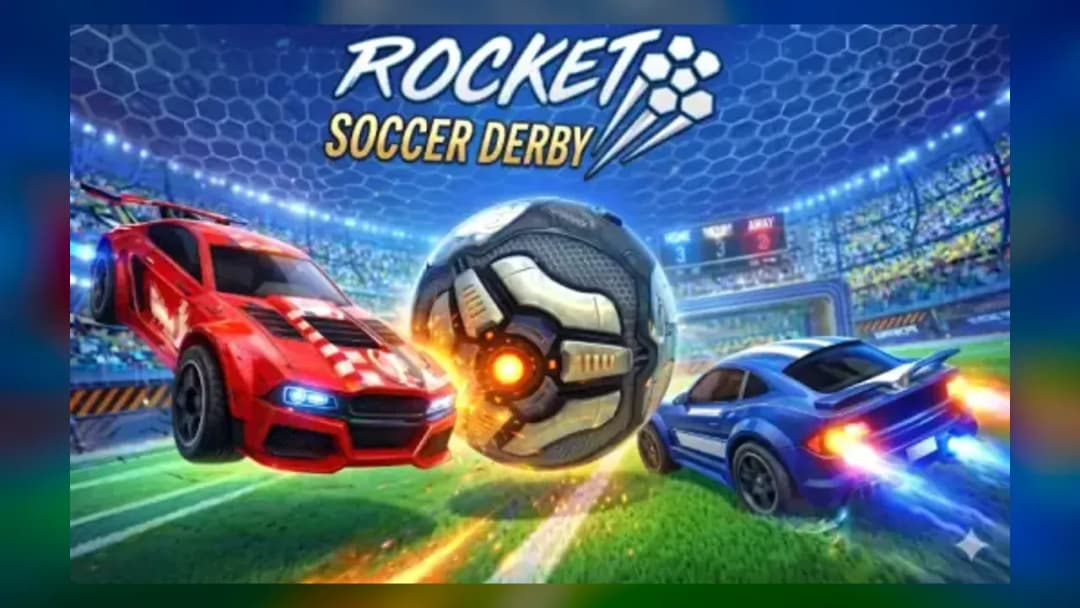
Rocket Soccer Derby online puts you behind a car rather than a footballer: steer across the pitch, collide with an oversized ball, and drive it into the opposing goal. Nitro changes who reaches a loose ball first, jumping lets you challenge a bounce, and the angle of your bumper determines whether a touch becomes a shot, clearance, or dangerous own-goal pass.
This is the central appeal of Rocket Soccer Derby gameplay. Driving quickly is useful, but positioning the car on the correct side of the ball matters more than simply chasing it. Quick Match provides an immediate contest, while the league path runs through three named tiers and awards money and cogs for upgrading the car.
Searchers looking to play Rocket Soccer Derby should also know that browser and native-mobile descriptions are often mixed together. This guide separates verified desktop browser controls from features documented for the iPhone, iPad, and historical Android app, avoiding unsupported promises about a specific build.
| Game | Rocket Soccer Derby |
|---|---|
| Category | Sports and driving |
| Core objective | Strike the ball with a car and send it into the opposing goal |
| Browser modes | Quick Match and league competition |
| League tiers | Beginners League, Intermediate League, Expert League |
| Desktop controls | WASD, Left Shift, Spacebar, F |
| Native platforms | iPhone, iPad, and historically Android |
| Browser credit | No Pressure Studios; Poki also names Destruction Crew as creator |
| Mobile developer | Rabbit Mountain |
How Rocket Soccer Derby turns driving into goal scoring
The match loop is easy to understand: move into the ball, direct it toward the rival goal, and prevent the other side from doing the same at your end. The difficult part is that the car does not possess or pass the ball like a conventional soccer player. Every action is a collision. Your speed, heading, and contact point combine to determine where the ball travels.
A straight hit through the center of the ball generally sends it along the car's current line. Contacting one side creates a more angled result. That makes setup important: if the goal is to your left, approach from the ball's right side rather than driving at whichever surface is closest. The same rule works in defense—get between the ball and your own goal before trying to clear it.
Rocket Soccer Derby scoring and defensive recovery
A successful attack ends when the ball enters the opposing goal. The inspected sources do not publish a dependable match timer, score limit, tiebreak formula, or browser opponent type, so those details should be read from the active build rather than assumed. The native version history does document overtime, but that does not prove that every browser edition uses the same rule.
Missing the ball is costly because the car retains momentum and may end up behind the play. After a failed challenge, turn toward your own goal instead of following the ball from the wrong side. This recovery route restores a useful defensive angle and reduces the chance that a second reckless challenge leaves the goal completely open.
Rocket Soccer Derby rebounds and controlled touches
Not every touch should be a maximum-speed shot. A lighter first contact can keep the ball near the front of the car and create a better second approach. When the ball rebounds or rises above bumper height, use the verified jump input to contest it. Begin with grounded touches, however, because a mistimed jump can carry the car past the ball and remove it from the next play.
Use the pitch as a spatial problem. Before accelerating, identify the ball, the rival goal, your own goal, and the likely rebound direction. That short check is the difference between a useful clearance and striking the ball laterally into an opponent's path.
Rocket Soccer Derby controls and keyboard input
The verified desktop Rocket Soccer Derby controls come from Poki's exact-title page. Use WASD to drive and steer, Left Shift for nitro, Spacebar to jump, and F to change the camera. Poki limits its supported-device statement for that edition to desktop, so touch controls should not be inferred for the browser build.
| Rocket Soccer Derby action | Desktop key | Practical use |
|---|---|---|
| Drive and steer | WASD | Approach the useful side of the ball and rotate back toward goal |
| Nitro | Left Shift | Win a kickoff, reach a loose ball, or recover on defense |
| Jump | Spacebar | Challenge a bounce or contact the ball above bumper height |
| Change camera | F | Alternate views for ball tracking and wider field awareness |
How to boost in Rocket Soccer Derby without wasting nitro
Players asking how to boost in Rocket Soccer Derby should hold Left Shift. The tactical answer is more important than the key: use nitro when added speed changes the result. Good moments include the opening race, a genuinely reachable loose ball, a recovery after overcommitting, or a last defensive run. Boosting while pointed away from the play only makes the correction harder.
How to play Rocket Soccer Derby with camera awareness
For anyone searching how to play Rocket Soccer Derby, press F before a challenge when the current view hides the goal or nearby traffic. One view may make the ball easier to follow while another provides better awareness of the pitch. Avoid switching at the instant of contact because the visual change can disrupt the steering correction needed to meet the ball cleanly.
Rocket Soccer Derby Quick Match and three-league progression
Rocket Soccer Derby Quick Match
Quick Match is the direct route into the car-soccer loop. Use it to learn steering response, judge the effect of angled contact, and establish how early the car must turn before a challenge. It is also the sensible place to test camera preference before committing to the longer progression structure.
Rocket Soccer Derby Beginners, Intermediate, and Expert leagues
League progression is explicitly divided into Beginners League, Intermediate League, and Expert League. The names indicate the advancement order, but the sources do not provide a trustworthy table of required wins, opponent difficulty values, or promotion thresholds. Avoid guides claiming exact requirements unless those numbers are visible in the current build.
League competition awards in-game money and cogs used for car upgrades. If you are researching how to earn money and cogs, league play is the verified method. No reliable source in the brief establishes a single best upgrade sequence or complete price table, so choose upgrades according to the weakness you can actually observe rather than following an invented universal build.
Rocket Soccer Derby strategy for cleaner shots and saves
- Take the outside route to the ball. Circle toward the side opposite your target. This produces a goal-facing contact angle instead of nudging the ball harmlessly across the pitch.
- Brake the chase mentality. If an opponent is already closer and facing the ball, retreat toward goal. Arriving second at full speed often creates a collision without creating possession.
- Use nitro as a decision multiplier. Press Left Shift only when winning the next contact matters. Keep a reserve for recovery because a missed boosted challenge carries the car far out of position.
- Clear away from the middle. When defending, aim a side of the car through the ball so the resulting touch moves away from the front of your goal rather than directly across it.
- Jump after reading the bounce. Press Spacebar when the ball's rising path is clear. Jumping on prediction alone is riskier than waiting to confirm that a normal bumper touch will not reach it.
- Switch camera before committing. Tap F while approaching, reacquire the target line, and then accelerate. A late camera change can turn a prepared shot into a miss.
These tactics are practical deductions from the verified steering, nitro, jump, camera, rebound, and scoring mechanics. They are not presented as an official strategy manual or as hidden game rules.
Rocket Soccer Derby mobile, browser, and version history
The desktop browser edition is verified by Poki, which dates its portal release to February 2020 and its latest listed Poki update to November 2020. Poki currently credits No Pressure Studios and also states that Destruction Crew created the game. The exact catalog endpoint is reachable, but its build metadata is not exposed, so an engine should not be claimed.
The Apple listing verifies iPhone and iPad support under Rabbit Mountain. Its history records version 1.0.1 on February 13, 2018 and version 1.2.2 on March 22, 2023, when improved graphics were noted. Android is historically supported by package identifier com.destructioncrew.soccerleague; archival listing data reports version 1.2.5 from December 8, 2023 and removal from Google Play in June 2026. That removal date is archival rather than a live Google Play confirmation.
Rocket Soccer Derby native-app features
The native app advertises real-time online 3-versus-3 competition, jumping, vehicle damage or deformation, customization, achievements, and leveling. Apple's update history also documents offline training, league mode, cloud saving, HUD scaling, friend matches, overtime, double-jump options, and cosmetic categories such as bumpers, hats, decals, and patterns.
Those details should not be silently applied to the browser build. In particular, do not promise browser friend codes, mobile touch support, cross-platform matchmaking, cloud synchronization, or 3-versus-3 play unless the loaded edition displays them. Likewise, a request for Rocket Soccer Derby free describes search intent, not proof that every historical native listing, cosmetic, or progression option has identical pricing.
Rocket Soccer Derby identity versus Rocket League and SocCar
Rocket Soccer Derby is not Rocket League, Rocket League Sideswipe, Rocket Car Soccer, or SocCar. They share the broad concept of cars striking a ball, but titles, developers, controls, modes, progression, and package identities differ. Rocket Soccer Derby has its own named three-league path, money-and-cogs upgrade economy, desktop control scheme, and mobile package history.
This distinction matters because search pages sometimes redirect the title to generic car soccer games or describe mechanics belonging to SocCar. Claims about weapons, wall jumps, shooting other vehicles, or SocCar's controls should not be transferred to Rocket Soccer Derby without direct evidence.
Rocket Soccer Derby troubleshooting for loading, lag, and input
Rocket Soccer Derby blank or black game area
If the player remains blank, wait for the initial load, refresh once, and verify that the browser permits the site's required game content. Disable only the extension that appears to interfere, then retry; do not remove security controls indiscriminately. A private window can help identify a cache or extension conflict, although progress stored locally may not appear there.
Rocket Soccer Derby controls not responding
Click inside the game area before pressing WASD. Close any search box, address bar, or menu that has keyboard focus. If Spacebar scrolls the page instead of jumping, refocus the player. Reconnect the keyboard and reload if necessary, but avoid assuming unsupported alternate keys or controller mappings.
Rocket Soccer Derby lag or low frame rate
Close demanding background tabs, stop unnecessary video streams, and reduce browser zoom or any in-game visual option the active build actually provides. A stable connection matters for native online matches, but local rendering load can also cause stutter. Apple notes improved graphics in a mobile update; that does not establish a browser graphics menu.
Rocket Soccer Derby unblocked search safety
Rocket Soccer Derby unblocked is a common query, but no page can guarantee access through a school or workplace network. Use an authorized game page and follow the network owner's rules; do not attempt to bypass filters, device management, or security policies. If access is restricted, play later on a permitted personal connection.
Rocket Soccer Derby guidance for parents
Apple assigns the native app a 4+ age rating and lists English. The core activity is stylized vehicle soccer, and the app description includes car damage or deformation rather than realistic injury. Parents should still review any online interaction, friend-match tools, advertisements, data practices, and purchase prompts visible in the specific edition their child uses.
No inspected first-party source documents subtitles, color-blind modes, control remapping, screen-reader support, or other formal accessibility options. Keyboard-only desktop controls may also be difficult for some players. Families should test the current build rather than relying on unsupported accessibility claims from third-party portals.
Similar games after Rocket Soccer Derby on ZGames
If the collision timing is your favorite part of Rocket Soccer Derby, explore more sports games, action games, and arcade games. Players who enjoy its steering and recovery loop can also browse driving games through the popular games, new games, best games, and HTML5 games hubs.
- Perfect Orbit — trades car-to-ball contact for timing-based launches while retaining the appeal of improving impact angles.
- Drift Max 3D — emphasizes steering control and managing vehicle momentum through corners.
- Motor Sport Challenge Type R — offers another vehicle-focused challenge for players who enjoy precise driving inputs.
- Summer Rider 3D — tests fast reactions and route control in a different 3D movement setting.
Rocket Soccer Derby works because every goal begins with a driving decision: which side of the ball to approach, when to spend nitro, and whether a jump will help or remove the car from the play. Learn those choices in Quick Match, then carry the same controlled angles through Beginners, Intermediate, and Expert league competition.
Advertisement
More Games You'll Love
Controls
Frequently asked questions
How do you boost in Rocket Soccer Derby on a keyboard?
How do you jump and hit a bouncing ball in Rocket Soccer Derby?
How do you change the camera in Rocket Soccer Derby?
How does league progression work in Rocket Soccer Derby?
How do you earn money and cogs for Rocket Soccer Derby upgrades?
What should I do when Rocket Soccer Derby controls are not responding?
Is Rocket Soccer Derby the same game as Rocket League?
What is different between Rocket Soccer Derby browser and mobile editions?
"Rocket Soccer Derby" and related names may be trademarks of their respective owners. This page is an informational game directory only; ZGames.io is not sponsored by or affiliated with trademark holders unless a specific game page says otherwise.
Gameplay Video: Rocket Soccer Derby
OFFICIAL SOURCES & SITES
Player Reviews
No Reviews Yet
Be the first to share your feedback and rate this game!
Submit Your Review
Keep exploring