Play College Girl Coloring Dress Up Unblocked Online Free
Play College Girl Coloring Dress Up Unblocked, a Coloring Games game available in your browser. Review the controls, features, and compatibility notes below, then choose Play when you are ready.
Advertisement

College Girl Coloring Dress Up Unblocked


















Advertisement
Most Popular This Month
View All results »



































- Home
- Coloring Games
- College Girl Coloring Dress Up Unblocked

College Girl Coloring Dress Up Unblocked
TECHNICAL SPECIFICATIONS
OPERATIONAL GUIDE
- 1. Select a Palette Color
Click or tap a swatch before coloring. Pick a dominant shade for the main outfit, then save accent colors for shoes, bags, and small accessories.
- 2. Fill Outfit Regions
Tap specific clothing sections to apply the active color. Work from large garment areas to smaller details so the design stays balanced.
- 3. Color Hair and Accessories
Use separate tones for hair, bags, jewelry, and shoes. This prevents the character from blending into one flat block of color.
- 4. Adjust the Campus Look
Review the full illustration after each major color choice. Replace clashing colors by selecting a new swatch and tapping the same region again.
- 5. Finish the Design
Complete every major area of the image, then replay with a new theme such as pastel, school-uniform, bold contrast, or monochrome fashion.
CORE FEATURES
Advertisement
About College Girl Coloring Dress Up Unblocked
Play College Girl Coloring online free: color campus outfits, tune palettes, and style looks in an unblocked browser game with no download on any device.
What's in this guide
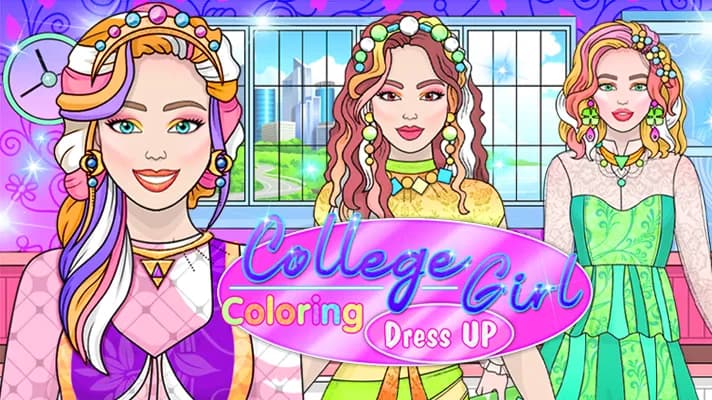
College Girl Coloring is a browser-native HTML5 coloring and dress-up game built around quick creative input rather than reflex combat or timed scoring. Players use a mouse, trackpad, or touchscreen to select color swatches and apply them to a college-themed fashion illustration. Because it runs as an HTML5 game inside the browser, the experience works on PC, mobile, tablet, and Chromebook without an installer, external launcher, or high-end graphics hardware.
The game belongs to the casual fashion coloring category, where the main loop centers on choosing palettes, filling outlined regions, and revising the final look until the character reads clearly on screen. The appeal comes from immediate feedback: one tap changes a dress panel, hairstyle, accessory, or background element. That makes College Girl Coloring Dress Up free-to-play, accessible, and practical for short sessions, especially for players who want instant play during a break.
Game NameCollege Girl Coloring Dress UpCategoryGamesTechnologyHTML5 / Browser NativePlatformsPC, Mobile, Tablet, ChromebookRequires Download?No, Instant PlayWhat's In This Guide
- About College Girl Coloring Dress Up
- Complete Controls & Mechanics
- Advanced Strategies & Tips
- How to Play Unblocked at School
- Platforms & Versions
- Known Glitches & Quirks
- Top Alternatives & Competitors
About College Girl Coloring Dress Up
College Girl Coloring Dress Up follows a long line of digital coloring books and fashion-maker games that moved from Flash websites into modern HTML5 browser game formats. The design philosophy is simple: remove friction, put the character art on screen immediately, and let the player make visible style decisions with almost no rule explanation. Instead of simulating cloth physics or complex animation, the game emphasizes clean hit areas, strong outlines, and fast color replacement.
The cultural hook is the college-fashion theme. School bags, casual tops, skirts, shoes, and hairstyle choices give players a familiar framework for outfit planning. The game does not need a story campaign to work. It gives players a character canvas and asks them to build a visual identity through color harmony, contrast, and small accessory choices.
Technically, the experience usually relies on 2D canvas or DOM-based rendering rather than heavy WebGL scenes. That matters because low-end laptops and school Chromebooks can render flat vector-like art with stable responsiveness. Input events map directly to image regions, so the game feels crisp even without high frame-rate animation.
- Engine & Tech: HTML5 browser rendering keeps the page lightweight, with color changes displayed instantly after pointer input.
- Accessibility: Simple tap targets and low hardware demand make it friendly for mobile gaming, touchscreens, and Chromebook compatible classrooms.
- Updates: Developer and update history are unknown, but the format supports easy art-page and palette additions.
Complete Controls & Mechanics for College Girl Coloring
The controls revolve around direct selection. On desktop, the player clicks a palette swatch, then clicks the outlined clothing, hair, face, accessory, or background region they want to recolor. On mobile, the same action becomes tap-to-select and tap-to-fill. No keyboard movement, aiming, jumping, drifting, or combat inputs interfere with the core loop.
Input latency feels minimal because each action triggers a simple state change: the game stores the active color, checks the clicked region, and redraws that segment. Collision detection in this context means hit detection against predefined art zones, not physical object collision. The better the region mapping, the cleaner the coloring experience feels.
There is no gravity, acceleration curve, or momentum system in the platformer sense. The “physics” of the game is visual logic: strong contrast helps small accessories stay readable, similar shades create smoother fashion sets, and overusing one saturated color can flatten the whole composition. The player’s hands do very little, but each click carries a design consequence.
- Movement: There is no character movement; the cursor or fingertip moves between palette and image regions.
- Action: The main action is applying the selected color to a targeted section of the illustration.
- Mechanics: Region-based fill logic replaces freehand brushwork, making the game cleaner for younger players and touchscreens.
Advanced Strategies & Tips for College Girl Coloring Dress Up
Advanced play in College Girl Coloring Dress Up is not about speedrunning a boss or mastering frame-perfect jumps. It is about making fast, disciplined visual choices. Start with the outfit’s largest area because it controls the whole palette. A jacket, dress, or top should establish the dominant mood before smaller details enter the image.
Use a three-tone system. Pick one main color, one accent, and one neutral. For example, a navy outfit with pink accessories and white shoes reads cleaner than five unrelated saturated colors fighting for attention. If the background is bright, keep the outfit slightly darker. If the hair is dark, avoid putting the same dark tone on collars or shoulder details.
Players who want polished results should evaluate the image after every three or four fills. The common mistake is coloring every visible object immediately without checking balance. A better route is large clothing first, hair second, shoes and bag third, then final small accents. This order prevents messy palette drift.
- Perfect Your Timing: Pause after major fills and check whether the character silhouette still separates from the background.
- Manage Resources/Speed: Treat palette slots like limited design tools; repeat colors intentionally instead of randomly.
- Avoid Common Mistakes: Do not use the same shade for hair, jacket, and background unless you want a flat image.
- Optimize Runs: Build themed looks such as pastel campus, bold streetwear, monochrome uniform, or warm autumn style.
How to Play Unblocked at School
“Unblocked” means the game can load through a browser without requiring a local executable, app store install, or blocked plugin. Modern HTML5 games replaced Flash-era dependencies with standard web technologies that school devices already support. A College Girl Coloring Dress Up unblocked session typically runs as page code, images, and browser input rather than a separate program.
This difference matters on managed Chromebooks. Schools often restrict downloads and unknown files, but browser-native games can run in RAM after the page loads. Network rules still depend on each institution, but a no download browser game has fewer technical barriers than a Windows executable or mobile app package.
- What is Unblocked: It describes browser access without installing files or using external launchers.
- Chromebook Support: The game works well on school-style devices because it relies on lightweight 2D rendering.
- Browser Native: No executables are required, making play College Girl Coloring Dress Up on Chromebook a practical search intent.
Platforms & Versions
The browser version is the primary way to play College Girl Coloring Dress Up online. It launches quickly, saves device storage, and avoids the friction of app permissions. On PC, the mouse gives precise palette and region selection. On laptops and Chromebooks, a trackpad works because the game does not require rapid directional input.
Mobile play changes the feel in a useful way. Touch controls make the game feel closer to a digital coloring book, especially on tablets where larger art regions are easier to tap. The College Girl Coloring Dress Up mobile experience benefits from portrait-friendly short sessions, though very small screens may make accessory regions harder to select cleanly.
- Browser Version: Best for instant play, no download access, and quick switching between casual games.
- Mobile Experience: Tap controls suit coloring mechanics, with larger screens offering better accuracy for small details.
Known Glitches & Quirks
Coloring games usually avoid severe bugs because they use limited mechanics, but small quirks can still appear. The most common issue is region ambiguity: a tap near a border may color the neighboring clothing panel instead of the intended accessory. This is a hitbox problem, not player failure.
Another quirk comes from screen scaling. On some browsers, zoom levels or device rotation can slightly shift visual art from tap zones until the page refreshes. These issues rarely break progress, and most can be fixed by resizing the browser, returning to default zoom, or tapping closer to the center of a region.
- Physics Quirks: The game has no movement physics, but its fill zones can behave like invisible collision boxes around art regions.
- Visual Desync: Minor scaling mismatch may make tiny accessories harder to target on compact mobile displays.
Top Alternatives & Competitors
Compared with traditional dress-up games, College Girl Coloring Dress Up puts more weight on color selection and less on swapping clothing models. Many fashion games focus on choosing premade outfits, while this one asks the player to define the look through palette decisions. That makes it slower, calmer, and more visual-design focused.
Compared with action browser titles or online multiplayer games, the challenge curve is almost entirely self-directed. There are no enemies, timers, or leaderboard routes. The competition is personal taste: can the player create a cleaner campus outfit on the next attempt?
- Fashion Dress Up: Similar theme, but usually built around selecting garments instead of recoloring fixed art regions.
- Digital Coloring Books: Similar mechanics, though College Girl Coloring Dress Up adds a specific school-fashion identity.
Similar Games on ZGames
If you enjoy College Girl Coloring Dress Up, you may also like these games:
Conclusion
College Girl Coloring works because it removes every obstacle between the player and the canvas. The core loop is direct: choose a color, tap a region, judge the result, and improve the outfit. That clarity makes it a strong free browser game for fashion fans, casual players, and anyone who prefers relaxed creativity over reflex pressure.
Play College Girl Coloring Dress Up free in your browser when you want a lightweight HTML5 game with no download, mobile support, and Chromebook compatible controls. It will not test your reaction time. It tests your eye for color, balance, and campus style.
Advertisement
More Games You'll Love
Controls
Frequently asked questions
How many coloring scenes are in College Girl Coloring Dress Up?
What color combinations work best for outfits in College Girl Coloring Dress Up?
Does College Girl Coloring Dress Up have multiplayer design battles?
How do you fix a wrong color choice in College Girl Coloring Dress Up?
"College Girl Coloring Dress Up Unblocked" and related names may be trademarks of their respective owners. This page is an informational game directory only; ZGames.io is not sponsored by or affiliated with trademark holders unless a specific game page says otherwise.
Gameplay Video: College Girl Coloring Dress Up Unblocked
OFFICIAL SOURCES & SITES
Player Reviews
No Reviews Yet
Be the first to share your feedback and rate this game!
Submit Your Review
Keep exploring