Play Jewel Coloring Online Free
Play Jewel Coloring, a Puzzle game available in your browser. Review the controls, features, and compatibility notes below, then choose Play when you are ready.
Advertisement




















Advertisement
Most Popular This Month
View All results »

































TECHNICAL SPECIFICATIONS
OPERATIONAL GUIDE
- 1. Select a jewel
Click or tap a gem to select it — tapping a color group selects all matching gems at once.
- 2. Move it to the tray
Drag your selected gems into the holding tray at the bottom of the screen, watching the limited slots.
- 3. Place gems in matching slots
Tap gems in the tray onto the opened board spaces that match their color to lock them in.
- 4. Reveal the pixel art
Sort every misplaced gem into its correct spot to complete the sparkling pixel art picture.
CORE FEATURES
Advertisement
About Jewel Coloring
Sort scattered gems into color-coded slots to reveal sparkling pixel art, one tap at a time. Unlock extra tray storage as you clear each board — no timer...
What's in this guide
What You Actually Do in Jewel Coloring Online
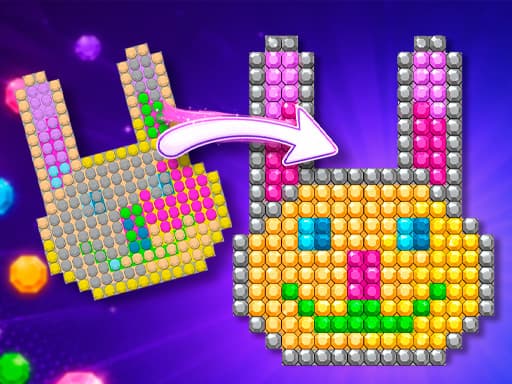
In Jewel Coloring online you act as a master jeweler sorting scattered crystals into color-coded slots until a hidden pixel art picture sparkles into view. You tap a jewel, drop it into a holding tray, then place it onto the matching colored space on the board. There are no timers and no move limits — every level is a calm sorting puzzle you solve at your own pace.
The twist that makes this a genuine color sorting game rather than a simple match-three is the tray economy: the bottom tray only holds a few jewels at once, so you must think about the order you pull gems off the board. Overfill it and you stall. Clear a section and the game rewards you with extra storage.
Across hundreds of colorful boards, the gems always start scrambled — colors that don't match at all — and your job is to untangle them into their correct positions to complete each pixel art puzzle.
| Game | Jewel Coloring |
|---|---|
| Category | puzzle |
| Genre | Color sorting / pixel art |
| Controls | Mouse / touch, scroll to zoom |
| Modes | Single player |
| Platforms | PC, Mobile, Chromebook (HTML5) |
The Jewel Coloring Sorting Loop Explained
Each board follows one rule: you can only move gems that are in the wrong spot. Correctly placed jewels lock in place. You open colored spaces on the board, then tap gems that match those colors and move them into position. Because the tray is your only working space, the puzzle becomes a shuffle-and-shift logic challenge — a proper jewel sorting game where planning beats clicking fast.
The Tray Storage Mechanic
The tray at the bottom starts tiny. Every time you finish part of a picture, extra storage unlocks, and removing jewels from the board frees a little space too. Managing this bottleneck is the whole strategy of Jewel Coloring online free play.
Jewel Coloring Controls: How to Play
Here is the full Jewel Coloring controls set — this is the core of any Jewel Coloring how to play guide:
- Left click / tap — select a jewel; if it's a color group, you select all of them at once.
- Drag to tray — move selected gems into the bottom holding tray.
- Tap a matching slot — place a tray gem onto an opened, same-colored board space.
- Mouse wheel / pinch — zoom in and out to read tight pixel clusters.
Jewel Coloring Tips and Strategy
These Jewel Coloring tips cut solving time on busy boards:
- Empty the tray before grabbing groups — selecting a color group can flood a small tray, so leave room first.
- Clear the densest cluster early — removing crowded gems frees the most board space fastest.
- Zoom in on edges — outer pixels often hide single mismatched gems that block completion.
- Place, don't hoard — every correct placement locks a gem and shrinks the problem.
Why the Jewel Coloring Game Feels Relaxing
Because the Jewel Coloring game has no clock and no fail state, it reads as a meditative activity: colorful precious gems become canvases for spectacular pixelated images. The satisfaction comes from watching a scrambled grid resolve into a recognizable picture — a payoff most puzzle games rush you past.
Similar Games on ZGames
If you like to play Jewel Coloring free, these sorting and reveal-style puzzle games hit the same calm-brain-teaser note:
- Magic and Wizards Mahjong — same tile-matching-to-clear-the-board satisfaction, with a fantasy theme.
- 2048 Cupcakes — another no-timer number-and-color merge puzzle you solve at your own pace.
- Farm Merge Valley — combine and organize items to reveal progress, like sorting gems into slots.
- Angry Birds — a lighter physics puzzle change of pace when you want action over sorting.
Browse more HTML5 games or the full popular games hub for similar relaxing picks.
Sort every scattered crystal, unlock each tray upgrade, and watch a fresh pixel art picture sparkle to life — that reveal is the whole reason to play Jewel Coloring online, and there's no timer stopping you from enjoying it.
Advertisement
More Games You'll Love
Controls
Frequently asked questions
How do you get more tray space in Jewel Coloring?
Why can't I move some gems in Jewel Coloring?
Is there a time limit in Jewel Coloring?
How do you zoom in on the pixel art in Jewel Coloring?
What is the difference between Jewel Coloring online and the app?
"Jewel Coloring" and related names may be trademarks of their respective owners. This page is an informational game directory only; ZGames.io is not sponsored by or affiliated with trademark holders unless a specific game page says otherwise.
Gameplay Video: Jewel Coloring
OFFICIAL SOURCES & SITES
Player Reviews
No Reviews Yet
Be the first to share your feedback and rate this game!
Submit Your Review
Keep exploring