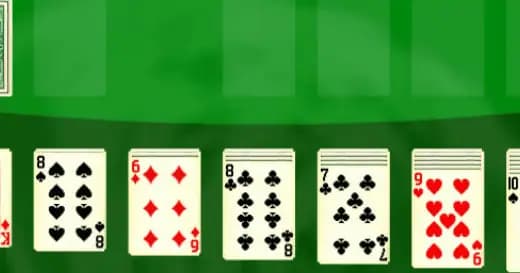
Play Canasta Royale Offline Online Free
Play Canasta Royale Offline, a Card game available in your browser. Review the controls, features, and compatibility notes below, then choose Play when you are ready.


Canasta Royale Offline














Most Popular This Month
View All results »


























Canasta Royale Offline
Game Details
How to Play
Game Features
About Canasta Royale Offline
Canasta Royale Offline is a free browser card game with a standard deck. Click to pick and play cards, form a canasta of seven and score big. No download.
What's in this guide
Canasta Royale Offline is a browser card game based on canasta, the classic game from the rummy family. It is played with a standard deck of cards, runs in HTML5 on PC and Chromebook browsers, and is set up as a single-player game against the computer. You can play Canasta Royale Offline online for free with no download.
What You Do in Canasta Royale Offline
Each round is built around your hand and the cards on the table. Canasta is a rummy-style game, so your aim is to gather cards into groups of matching ranks, called melds, and to score as many points as you can. Most of your decisions come down to which cards to keep, which to play onto your melds, and when to take cards from the discard pile.
Because the game is played with one mouse button, every move comes down to choosing a card or a pile and clicking it. Careful reading of the table matters as much as the cards you hold.
How to Play Canasta Royale Offline
- Start a game and wait for the cards to be dealt to you and laid out on the table.
- Sort your hand and look for ranks you already hold more than one of, since these are the start of your melds.
- On your turn, click with the left mouse button to play cards onto the table and add them to your melds.
- Watch which cards your opponent discards, because these show which ranks they are not trying to collect.
- Keep playing turn by turn until the round ends, then check the points scored for your melds and any cards still left in your hand.
Canasta Royale Offline Controls
| Action | Mouse |
|---|---|
| Select and play cards | Left mouse button |
All moves in the game are made with the left mouse button. No other controls are needed to play.
What Changes Between Sessions
The game is set up for one player against the computer, so every session is a solo game. Each new game deals a fresh hand, which means your options change from round to round even when you follow the same approach. The game does not offer separate levels, characters or unlockable items, so there is nothing to unlock between sessions.
Tips and Strategy for Canasta Royale Offline
- Start building melds early by keeping pairs and sets of the same rank. Each meld you start is a base you can add to on later turns.
- Track what your opponent picks up from the discard pile. Their pickups show which ranks they are collecting, so avoid discarding those ranks when you can.
- Do not rush to empty your hand. Keeping a few cards back can protect your position and your score.
- Look at the discard pile before every turn. A card you need may be on top, and taking it can open a larger meld.
- Keep a mental note of which ranks have already appeared on the table, so you know which cards are still likely to come up.
- Finish a round only when your points justify it. Going out early can leave you with a lower score than a longer round would give.
- Play one round at a time and review the score after each one, so you can see which meld choices helped most.
For more card games, try Scorpion Solitaire, Golf Solitaire, or browse the Card games category.
More Games You'll Love
Controls
Frequently asked questions
Can I play Canasta Royale Offline with friends?
Which devices can run Canasta Royale Offline?
"Canasta Royale Offline" and related names may be trademarks of their respective owners. This page is an informational game directory only; ZGames.io is not sponsored by or affiliated with trademark holders unless a specific game page says otherwise.
Player Reviews
No Reviews Yet
Be the first to share your feedback and rate this game!
Submit Your Review
Keep exploring