Play Gorilla Tag Online Free
Play Gorilla Tag, a Action game available in your browser. Review the controls, features, and compatibility notes below, then choose Play when you are ready.
Advertisement



















Advertisement
Most Popular This Month
View All results »



































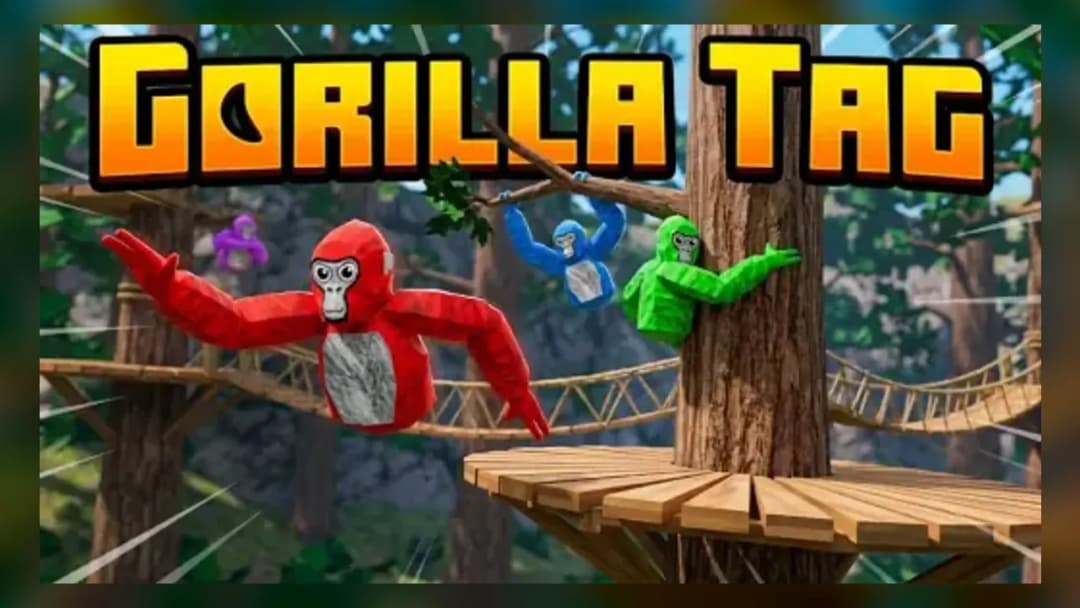
Gorilla Tag
Game Details
How to Play
- 1. Learn the arena routes
Spend your first minute running a full loop of the arena, testing ramps and climbable spots so you always know at least two paths to safety from any point.
- 2. Master short directional bursts
Practice tapping WASD or the arrow keys in short bursts rather than holding them down, so you can start and stop quickly when lining up a tag or dodging one.
- 3. Use diagonals to intercept opponents
When chasing, aim your movement toward where an opponent will be rather than directly at their current position, approaching from a diagonal line to close distance faster.
- 4. Combine height with surprise drops
Climb or move to higher ground when possible, then drop diagonally onto an opponent’s path to catch them off guard and secure an easier tag.
- 5. Turn chases into counter-tags
When being pursued, lead your chaser toward a corner or obstacle, then cut sharply past them so you can immediately pivot and attempt a tag from behind.
Game Features
Advertisement
About Gorilla Tag
Play Gorilla Tag online in your browser. Dash, jump, and climb around the arena with WASD or touch controls as you time your tags and escape pursuing...
What's in this guide

The standout twist in this Gorilla Tag online fangame is how it turns a VR arm-swing movement concept into simple WASD and touch controls, while still keeping the pressure of fast chases and last-second tags. Instead of flailing your arms in a headset, you’re steering and jumping through an arena with tight corners and climbable paths, looking for the perfect angle to tag or escape.
This page helps you solve the main search problem around Gorilla Tag online: understanding what this browser version actually is, how to control it, and how it differs from the official VR game. If you’re trying to play Gorilla Tag free in your browser and keep running into confusing clones or broken controls, use this guide as a clear reference.
Below you’ll find a breakdown of how to play Gorilla Tag in this HTML5 version, what the controls do, and how to adjust your playstyle if you’re familiar with the VR original. Everything here is based on the verified catalog and official information about the VR game, clearly separated so you know what’s canon and what’s fangame behavior.
Quick facts for this Gorilla Tag browser game
| Game | Gorilla Tag (browser fangame) |
|---|---|
| Category | action |
| Technology | HTML5 |
| Platform | Browser |
| Core input | WASD / Arrow keys and touch controls |
Gorilla Tag online vs official VR Gorilla Tag: what’s the difference?
Search results can be confusing because the name "Gorilla Tag" refers to two very different experiences:
- Official Gorilla Tag – A VR-only multiplayer tag game by Another Axiom for Meta Quest, SteamVR, and PSVR2. You move by swinging your arms and pushing off virtual surfaces, and you need a VR headset and motion controllers to play.
- This Gorilla Tag browser game – An HTML5 fangame inspired by the same chase-and-tag idea. It runs in a normal browser window and replaces arm-swing locomotion with keyboard and touch controls.
There is no official HTML5 or browser port of Gorilla Tag from the developer. Any Gorilla Tag browser game, including this one, is a separate fangame built to capture the feel of chasing and tagging without VR hardware.
If you came here hoping to practice exact VR movement, you should know upfront that this is not a one-to-one recreation. However, it can still help you understand positioning, timing tags, and how to outmaneuver someone in a tight arena.
How to play this Gorilla Tag browser game efficiently
In this Gorilla Tag browser game, your main loop is simple: move, line up a tag, and avoid getting tagged. That simplicity opens the door to surprisingly tense chases, especially once you learn how to cut paths and use vertical space.
Core objective: tag without getting tagged
Your character moves around an arena that’s designed for short, sharp encounters. When you close distance on another player or target, you attempt to tag them — usually by getting close enough and triggering the game’s tag detection based on proximity and timing. If roles switch and you’re the one being chased, you must reverse that logic and prioritize escape routes.
This loop makes awareness critical. Instead of wandering aimlessly, think in terms of short objectives:
- Identify where opponents are heading.
- Choose a route that intercepts them instead of just following.
- Adjust your jump timing so you arrive at the same height and position.
Movement basics: steering and speed
On desktop, this Gorilla Tag browser game uses familiar action-game movement rather than VR-specific gestures. Your speed and direction come from the keys you hold, and your job is to translate that into smart routes.
General movement ideas that help in most matches:
- Plan curves, not zigzags – Smooth turns keep your momentum; constant sharp switches cost time.
- Think two corners ahead – When you turn one corner, already know which way you’ll turn at the next, especially when chased.
- Stay off predictable center lines – Cutting across the center of the arena makes you easy to intercept; use edges and side paths instead.
Using height and climbable areas
The catalog notes that mobile controls support climbing, and the arena is built to support vertical moves. While the exact climb input may vary slightly per browser or device, the intention is clear: verticality should change how you chase and escape.
To get more value from height:
- Break line of sight by climbing just high enough that a pursuer has to guess your landing spot.
- Jump down diagonally toward your target rather than straight down; this lets you combine falling speed with forward movement.
- Use ledges as decision points – pause for half a second to see where opponents are going, then drop onto their likely path.
Gorilla Tag controls in the HTML5 browser version
If you’ve searched for "Gorilla Tag controls" and mostly found VR diagrams, this section focuses specifically on the browser version you can play here.
Desktop keyboard controls
On desktop and laptop, the game uses standard movement keys:
- W / Up Arrow – Move forward in the direction you’re facing.
- S / Down Arrow – Move backward to create space or bait a pursuer.
- A / Left Arrow – Strafe or turn left, depending on how the browser build handles rotation.
- D / Right Arrow – Strafe or turn right.
The catalog specifies that you "Use WASD or arrow keys to move, jump, and steer through the arena". That means some builds may map jumping to a directional key combination or additional key, but the core idea is that your keyboard handles all navigation and aerial movement.
Mobile and touch controls
On supported mobile devices, the game exposes touch controls:
- On-screen directional areas or buttons let you move and steer.
- Taps and swipes drive movement, jumps, and climbing actions.
- Precise taps are important for timing tags when you’re close to an opponent.
Because browsers and screen sizes differ, the exact layout of these controls can vary, but the logic stays the same: touch gestures replace the WASD or arrow keys you would use on desktop.
Step-by-step: how to play Gorilla Tag online in your browser
To make it easier to actually play Gorilla Tag online instead of just reading about it, here’s a short, practical flow you can follow the first time you load the game on Z Games.
1. Get comfortable with a full lap of the arena
Before worrying about tags, spend a minute just mapping the arena. Run a full loop around the outer edges, then cut through the middle and try any ramps or climbable areas you can safely reach. Your goal is to know at least two different routes from any point back to a safe area.
2. Practice short sprints and sudden stops
This Gorilla Tag browser game relies heavily on quick bursts of speed. Use short key presses to start and stop rather than holding a direction constantly. Learn how far you travel during a half-second press versus a full second; that sense of distance helps you time tags without overshooting.
3. Approach from diagonals, not straight lines
When going for a tag, avoid running directly behind someone in a straight line. Instead, imagine a triangle: one point where they are, one where they’ll be, and one where you can intercept diagonally. Move toward that intercept point to close distance more efficiently.
4. Turn defense into counter-attacks
If you’re being chased, look for chances to reverse the chase. For example, run toward a wall or platform, use a sharp turn or jump to slip past your pursuer, and immediately pivot into a diagonal path behind them. Many players overcommit when chasing, which leaves them open to a quick counter-tag.
Troubleshooting common Gorilla Tag browser issues
Because this is an HTML5 Gorilla Tag browser game running in an embedded frame, some players hit basic technical snags. Here are practical, search-focused answers.
Why don’t my keys work when I start the game?
Most of the time, the game simply doesn’t have focus. Click once inside the game window, then try moving with WASD or the arrow keys. If it still fails:
- Refresh the page and wait for the game to load before pressing keys.
- Disable any browser extensions that block third-party iframes.
- Try a different browser if your current one restricts embedded content heavily.
Why is movement laggy or stuttering?
HTML5 action games share resources with the rest of your browser tabs. To reduce stutter:
- Close extra tabs, especially video streaming or heavy web apps.
- Switch your browser to a performance or gaming profile if available.
- On laptops, plug into power so the system does not throttle CPU speed.
The game doesn’t fit my mobile screen. What now?
Rotate your device to landscape, then reload the page so the game can resize. If touch controls are still misaligned, zoom out in your browser or use the “request desktop site” option to give the game more horizontal space.
What Gorilla Tag veterans should know before trying this browser version
If you’re familiar with the official VR Gorilla Tag, this browser game will feel both familiar and very different. Understanding those differences helps you adjust your expectations and playstyle.
- No true arm-swing locomotion – Official Gorilla Tag is built around physically moving your arms to walk, run, and climb. Here, all of that is abstracted into simple keys or taps, so skill focuses on route planning and timing rather than physical technique.
- Less emphasis on physical endurance – The VR game can be physically demanding. This HTML5 version removes that layer, making it more about mental prediction and key accuracy.
- Arena scale is smaller – Because it runs in a browser, the arena is tuned for quick rounds and short sightlines, not large, sprawling maps.
You can still work on chase fundamentals that carry over conceptually to VR: anticipating opponent routes, using cover to break line of sight, and attacking from advantageous angles.
Is Gorilla Tag free here, and how does that compare to the official game?
This Gorilla Tag browser game is a Gorilla Tag free experience hosted as an HTML5 embed. There is no purchase prompt or separate installer; you just load it in your browser and play.
By contrast, official Gorilla Tag uses a different model depending on platform, as documented in public store listings and rating information: it is free-to-play with cosmetic purchases on Meta Quest and PSVR2, while the Steam version is a paid download that includes in-game currency. None of those official purchases or accounts connect to this browser fangame.
Who is this Gorilla Tag browser game best for?
This Gorilla Tag browser game makes sense if:
- You want to play Gorilla Tag online on a device that can’t run VR.
- You’re curious about tag-and-chase arenas before deciding whether to invest in a headset.
- You prefer low-friction action games you can drop into for a quick round from almost any browser.
If you own a VR headset and want the full social and physical experience, the official Gorilla Tag is still the reference point. Think of this browser game as a lightweight, accessible spin on the same basic idea.
Similar action games on Z Games worth trying
If you enjoy sprinting, dodging, and outmaneuvering rivals in this Gorilla Tag browser game, a few other titles on Z Games scratch similar action-game instincts.
- EvoWars.io unblocked — Grow your warrior by collecting orbs and outplaying opponents in close-quarters arena battles.
- Ninja Run Online — Test your reflexes with fast-paced running and jumping through obstacle-filled stages.
- Call of Duty — Jump into more traditional shooting-focused action if you like tense reactions and positioning.
- God Simulator — Swap from tagging and dodging to experimenting with powerful abilities in a more sandbox-style experience.
Why this browser version of Gorilla Tag is still worth a few rounds
Even without VR arm-swing movement, this Gorilla Tag browser game captures the heart of tag: the moment you cut a perfect line, land a clean tag, and slip away in a single motion. If you like compact, timing-heavy action games, it’s an easy way to chase that feeling straight from your browser.
Advertisement
More Games You'll Love
Controls
Frequently asked questions
Is this the official Gorilla Tag game in my browser?
How do I move and jump in the Gorilla Tag browser game?
What is the goal when I play this Gorilla Tag browser game?
Why does movement in this Gorilla Tag browser game feel different from VR Gorilla Tag?
Can I practice Gorilla Tag strategies here before playing on a VR headset?
The Gorilla Tag browser game is not responding to my keys. What can I do?
"Gorilla Tag" and related names may be trademarks of their respective owners. This page is an informational game directory only; ZGames.io is not sponsored by or affiliated with trademark holders unless a specific game page says otherwise.
Gameplay Video: Gorilla Tag
OFFICIAL SOURCES & SITES
Player Reviews
No Reviews Yet
Be the first to share your feedback and rate this game!
Submit Your Review
Keep exploring