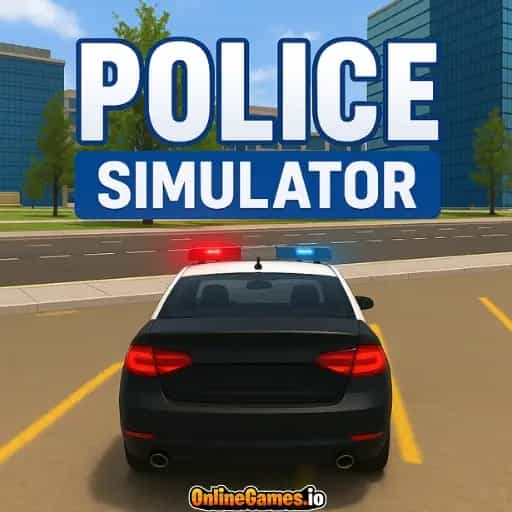
Play Police Simulator Online Free
Play Police Simulator, a Driving game available in your browser. Review the controls, features, and compatibility notes below, then choose Play when you are ready.



















Most Popular This Month
View All results »
































Police Simulator
Game Details
How to Play
- 1. Open the game in your browser
Launch Police Simulator in your browser; it is listed for PC, mobile, tablet and Chromebook.
- 2. Drive to your first call
Use WASD or the arrow keys to navigate the city and reach the incident for your mission.
- 3. Complete the mission
Enforce traffic laws or chase the suspect, depending on the task you accepted.
- 4. Spend coins in the Garage
Use the coins you earn from completed missions to buy cars, and press ESC to open the Garage.
Game Features
About Police Simulator
Play Police Simulator in your browser. Drive a police car through the city, complete missions and chase suspects with keyboard and mouse. Play it free now.
What's in this guide
What You Do in Police Simulator
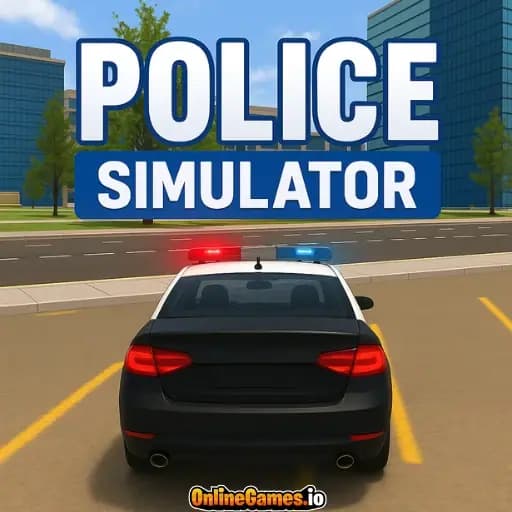
Police Simulator is a browser driving game in which you control a police car and navigate through a city while completing various missions. Your job is to patrol the streets, respond to calls, enforce traffic laws and chase suspects. It is a single-player game, so every mission is played by you alone.
A typical round is a loop of driving, reacting and returning to patrol. You drive through city streets to reach an incident, deal with it, and then look for the next task. Missions can include high-speed pursuits as well as other police duties, so the pace shifts between calm patrol and short bursts of chasing. This suits players who enjoy driving games with a job to do rather than a simple race.
How to Play Police Simulator
- Open the game in your browser. It runs in HTML5 and is listed for PC, mobile, tablet and Chromebook, so no separate install is needed.
- Use your keyboard and mouse to get your police car moving and learn the layout of the city before you accept a job.
- Work through a mission. Respond to the call, follow the route to the incident, and handle what you find, whether that means enforcing traffic laws or chasing a suspect.
- Finish missions to progress. Completing them levels you up and earns coins, which you can spend on cars in the Garage.
Your aim in each session is to complete missions and build up your garage. Keep an eye on the mission you accepted, since the task decides whether you patrol or pursue.
Police Simulator Controls
| Action | Keys |
|---|---|
| Drive the police car | WASD or arrow keys |
| Pause and open the Garage | ESC |
| Navigate the city with the mouse | Mouse |
The game uses keyboard and mouse input. Only the controls above are documented, so check the in-game prompts for anything else.
What Changes Between Sessions
Your main progression is the mission list and your garage. As you complete missions you level up and earn coins, and you can use those coins to buy cars, which gives you different vehicles for different jobs. Check the Garage in your own game to see which cars you can buy and use.
Missions and Garage Progress
New missions come as you advance, and each one asks for a different response. Some are patrol and traffic tasks, while others are chases. Your car choice can change how a chase plays out, so the garage matters as much as the map.
Tips and Strategy for Police Simulator
- Learn the city layout early. Knowing the shortcuts between districts helps you reach calls faster and cut off suspects.
- Pick the car for the job. A faster vehicle suits pursuits, while a steadier one can be better for routine patrol.
- Save coins for the cars you will use most, rather than buying the first option you can afford.
- Do not rush a chase into a crowded junction. Slow down for turns so you keep control of the car.
- Open the Garage with ESC between missions to review your options before accepting the next call.
- Read each mission's task before you set off, so you know whether to enforce traffic laws or chase a suspect.
More Games You'll Love
Controls
Frequently asked questions
How do I get new cars in Police Simulator?
"Police Simulator" and related names may be trademarks of their respective owners. This page is an informational game directory only; ZGames.io is not sponsored by or affiliated with trademark holders unless a specific game page says otherwise.
Gameplay Video: Police Simulator
OFFICIAL SOURCES & SITES
Player Reviews
No Reviews Yet
Be the first to share your feedback and rate this game!
Submit Your Review
Keep exploring