Play Zen Solitaire Online Free
Play Zen Solitaire, a Puzzle game available in your browser. Review the controls, features, and compatibility notes below, then choose Play when you are ready.
Advertisement




















Advertisement
Most Popular This Month
View All results »


































Zen Solitaire
TECHNICAL SPECIFICATIONS
OPERATIONAL GUIDE
- 1. Start a foundation with an Ace
Drag any exposed Ace from the tableau into an empty foundation cell above the board.
- 2. Build the tableau in alternating colors
Stack cards in descending order alternating red and black, such as a red 7 onto a black 8.
- 3. Draw from the stock
When no move remains, tap the stock to flip cards using Draw 1 or Draw 3 mode.
- 4. Fill empty columns with Kings
Move a King into any empty tableau column to open space and free buried cards.
CORE FEATURES
Advertisement
About Zen Solitaire
Zen Solitaire online sorts a 52-card Klondike deck into four Ace-to-King suit foundations. Choose Draw 1 or Draw 3, use unlimited undos, and beat your...
What's in this guide
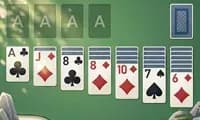
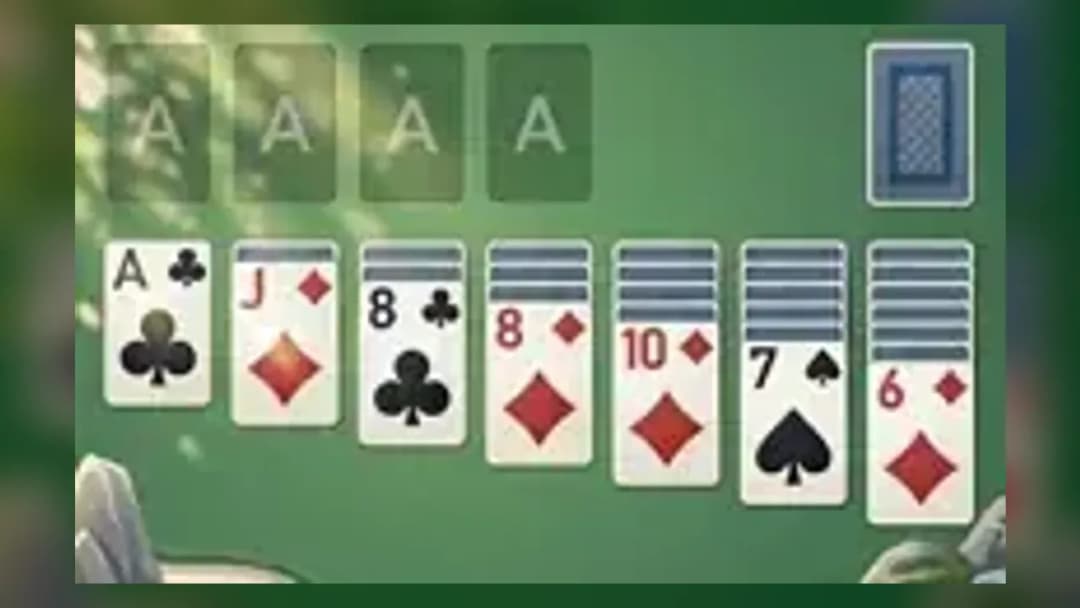
In Zen Solitaire online you move a full 52-card deck out of a seven-column tableau and into four foundation cells, building each cell up by suit from Ace to King while a soothing melody plays behind a calm landscape. The very first thing you do is scan the tableau for an exposed Ace, drop it into an empty foundation cell, then chain descending, alternating-color cards to free the buried aces underneath.
Unlike a plain deal-and-hope layout, this Klondike build tracks your score, move count and time at the bottom of the screen, so every session is a chance to beat your own record. That combination of quiet visuals and measurable progress is what makes play Zen Solitaire sessions feel meditative rather than stressful.
Below is a complete rules, controls and strategy guide covering the details most listing pages skip.
| Game | Zen Solitaire |
|---|---|
| Category | Card / Puzzle |
| Base ruleset | Klondike (Patience) |
| Deck | Single 52-card deck |
| Modes | Draw 1 and Draw 3 |
| Controls | Mouse drag / touch drag |
How to play Zen Solitaire: tableau, foundations and draw pile
The Zen Solitaire klondike objective is simple to state and hard to master: sort every card by number and suit into the four empty cells above the board. Cards are dealt into seven tableau columns; the leftovers form the stock (spare) pile. Only Aces start a foundation, and each foundation then builds A-2-3 up to King in one suit.
Zen Solitaire rules for stacking cards
Within the tableau you stack in descending order with alternating colors — a red 7 goes on a black 8, a black 6 goes on that red 7, and so on. You can move a valid sequence as a group. Empty tableau columns accept only a King (or a King-led run), which is the key to clearing space.
Using the stock and the draw pile
When no tableau move exists, tap the stock to reveal fresh cards. This is where the two Draw 1 and Draw 3 modes matter. Draw 1 flips a single card each time, giving you access to every stock card in order. Draw 3 flips three at once, so you must plan around which of the three is playable.
Zen Solitaire controls and interface aids
The Zen Solitaire controls are pure point-and-drag: on desktop, click and hold a card to drag it onto a legal target; on mobile, drag with your finger or use auto-move to the foundation. Two buttons rescue almost any mistake — Undo reverses your last move, and Hint highlights an available play when you're stuck. Guaranteed-solvable deals mean a lost game is a strategy problem, not bad luck.
Advanced strategy to win the free Zen Solitaire game
- Empty a column early — only Kings fill gaps, so play Kings from the stock into open columns to unlock deep stacks.
- Don't rush cards to the foundation; a low card sent up too soon can leave a tableau move impossible later.
- In Draw 3, cycle the stock once fully before committing so you know which cards you can reach.
- Turn a face-down card at every opportunity — exposing hidden cards is worth more than a foundation move.
- Watch the move counter: fewer moves plus faster time equals a higher Zen Solitaire online score.
Zen Solitaire vs. Solitaire Zen and Earth Edition
Search results mix up several titles. The reordered solitaire zen name, and "Zen Earth Edition," are separate products with different art and publishers, while mobile "Zen Solitaire – Classic Card" apps add daily challenges and themes. This browser build keeps the Zen Solitaire classic card core — standard Klondike with a Zen presentation — so you get the same familiar Patience rules without a download.
Similar card and arcade games on ZGames
- Color Shooter — quick, low-pressure sessions like a solitaire round.
- Football Bros — a light pick-up-and-play break between deals.
- Punchers Unblocked — instant browser play with no install.
- Tank Arena — another one-more-round score chaser.
Browse more relaxing brain teasers in arcade games and the HTML5 games hub.
Come back to that first exposed Ace, chain your reds and blacks down the tableau, and let the timer push you toward a cleaner win — that quiet, measurable climb is the whole point of Zen Solitaire.
Advertisement
More Games You'll Love
Controls
Frequently asked questions
What is the difference between Draw 1 and Draw 3 modes in Zen Solitaire?
Is Zen Solitaire the same as Solitaire Zen?
How do you clear an empty column in Zen Solitaire?
Can you undo a mistake in Zen Solitaire?
Are Zen Solitaire deals always winnable?
"Zen Solitaire" and related names may be trademarks of their respective owners. This page is an informational game directory only; ZGames.io is not sponsored by or affiliated with trademark holders unless a specific game page says otherwise.
Gameplay Video: Zen Solitaire
OFFICIAL SOURCES & SITES
Player Reviews
No Reviews Yet
Be the first to share your feedback and rate this game!
Submit Your Review
Keep exploring