Play Crunch Locked Online Free
Play Crunch Locked, a Puzzle game available in your browser. Review the controls, features, and compatibility notes below, then choose Play when you are ready.














Most Popular This Month
View All results »
























Game Details
How to Play
- 1. Tap an unlocked segment
Click or tap a free segment to rotate it exactly 90 degrees into the next open position.
- 2. Connect pieces in order
Chain rotations to link segments together, clearing locked and blocked parts in the correct sequence.
- 3. Crunch the final piece
Reduce the structure to one remaining segment, which crunches away to clear the level.
Game Features
About Crunch Locked
Crunch Locked is a 90-degree segment-rotation puzzle where you snap shapes until one piece crunches away. Clear locked parts and blocked paths across...
What's in this guide
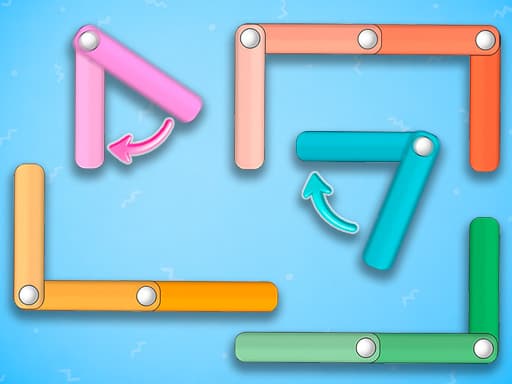
Crunch Locked online is a tap-to-rotate puzzle where every move snaps loose pieces closer together until only one segment remains — and that final piece "crunches" away to clear the board. You tap an unlocked segment, it rotates exactly 90 degrees into a new slot, and you keep connecting parts until the structure collapses into a single piece. It sounds simple, but locked parts and blocked paths mean the order of your moves decides whether a level solves or jams.
Published by GameBerry Studio and distributed as an exclusive HTML5 title on GameDistribution, this is a single-player, click-based Crunch Locked puzzle game built around careful planning rather than reflexes. There's no timer pressure in the core loop — just you, a colorful grid of segments, and the right sequence.
Below is the most detailed breakdown of how to play Crunch Locked online, including controls, strategy, and how it differs from the similarly named "Crunch Lock."
| Game | Crunch Locked |
|---|---|
| Category | Puzzle / Casual |
| Developer | GameBerry Studio |
| Mode | Single-player |
| Controls | Tap / click to rotate 90° |
| Platform | Browser (desktop & mobile) |
The Crunch Locked Objective: Collapse Every Segment Into One
Each level loads with scattered segments on the play field. Your goal is to connect them into one complete shape. When the structure reduces to a single visible segment, that last piece crunches away and the level clears. The twist is that not every segment is free to move — some are locked in place and others are blocked by overlapping shapes, so you must free the right pieces in the right order.
How Locked and Blocked Pieces Work
A locked segment can't rotate until the piece pinning it is cleared or moved aside. A blocked path means a segment physically can't swing into a spot another shape occupies. This is where the puzzle lives: you're constantly reading which move unlocks the next, planning two or three rotations ahead.
Crunch Locked Controls: One Input, Precise 90-Degree Rotation
The entire Crunch Locked controls scheme is a single action. On desktop you left-click an unlocked segment; on mobile you tap it. Each input rotates that segment exactly 90 degrees — clockwise into the next open position. There are no drag gestures, keyboard shortcuts, or combos to memorize, which makes Crunch Locked how to play easy to grasp and hard to master.
- Tap / Click — rotate the selected segment 90°
- Tap blocked piece — nothing happens; you must clear its blocker first
- No scoring timer in the core level loop — plan freely
Advanced Crunch Locked Strategy
Work backward from the final merge. Ask which single segment should remain last, then plan the rotation chain that feeds everything into it. Prioritize freeing locked pieces early — a locked segment left for later usually creates a dead end. On crowded boards, rotate edge segments before center ones so you don't block your own paths. If a level stalls, you almost always made an out-of-order rotation; reset and re-sequence rather than forcing moves.
Crunch Locked vs Crunch Lock: Not the Same Game
Search results mix two titles. Crunch Lock vs Crunch Locked matters: "Crunch Lock" (and "Crunch Lock Jam") is a separate wrench- and screw-folding puzzle hosted on other portals. The game on this page is Crunch Locked — the GameBerry Studio segment-rotation puzzle. If you came for the 90-degree snap-and-crunch mechanic, you're in the right place.
Mobile and Browser Play
Because it's built in HTML5, Crunch Locked mobile and desktop both run in-browser with no download or install. The tap-to-rotate input is identical across touch and mouse, so your strategy carries over between devices.
Similar Puzzle Games on ZGames
- Brain Lines — another connect-and-solve logic puzzle with ordered moves.
- Block Blaster — shape-snapping arcade puzzling with escalating layouts.
- Escape School Duel — quick-thinking sequencing under pressure.
- Shady Bears — a relaxing casual pick between puzzle sessions.
Explore more in arcade games, HTML5 games, and popular games.
At its heart, Crunch Locked is about one satisfying feeling: watching a tangled grid of locked segments collapse, move by careful move, until the last piece crunches away. Master the order, clear the blocks, and every level closes with that final snap.
More Games You'll Love
Controls
Frequently asked questions
How do you play Crunch Locked?
What is the goal of Crunch Locked?
Is Crunch Locked the same as Crunch Lock?
Can you play Crunch Locked on mobile?
Why can't I rotate a piece in Crunch Locked?
"Crunch Locked" and related names may be trademarks of their respective owners. This page is an informational game directory only; ZGames.io is not sponsored by or affiliated with trademark holders unless a specific game page says otherwise.
Gameplay Video: Crunch Locked
OFFICIAL SOURCES & SITES
Player Reviews
No Reviews Yet
Be the first to share your feedback and rate this game!
Submit Your Review
Keep exploring