Play Geometry: Black Wave 5 Online Free
Play Geometry: Black Wave 5, a Casual game available in your browser. Review the controls, features, and compatibility notes below, then choose Play when you are ready.
Advertisement

Geometry: Black Wave 5



















Advertisement
Most Popular This Month
View All results »


































Geometry: Black Wave 5
TECHNICAL SPECIFICATIONS
OPERATIONAL GUIDE
- 1. Control the Wave Angle
Hold click, Space, or touch to send the wave upward; release to make it drop. Use quick taps to create tight zigzag lines through narrow spaces.
- 2. Read the Corridor Shape
Watch the next two or three wall angles before you move. The safest route usually sits near the center of the tunnel, not directly against the edges.
- 3. Avoid Spike Contact
Any contact with spikes, ceilings, floors, or block corners ends the run. Leave extra space around sharp turns because the wave changes direction instantly but still travels diagonally.
- 4. Use Short Rhythm Bursts
Tap in controlled pulses during cramped sections instead of holding the input. Short bursts prevent overcorrection and help you thread repeated triangle patterns.
- 5. Restart and Memorize
Treat each crash as route information. Memorize the timing of gates, slopes, and sudden gaps so your next attempt starts reacting before the obstacle reaches the wave.
CORE FEATURES
Advertisement
About Geometry: Black Wave 5
Play Geometry: Black Wave 5 online free: steer a sharp wave through black neon tunnels in an unblocked browser game with no download on any device.
What's in this guide
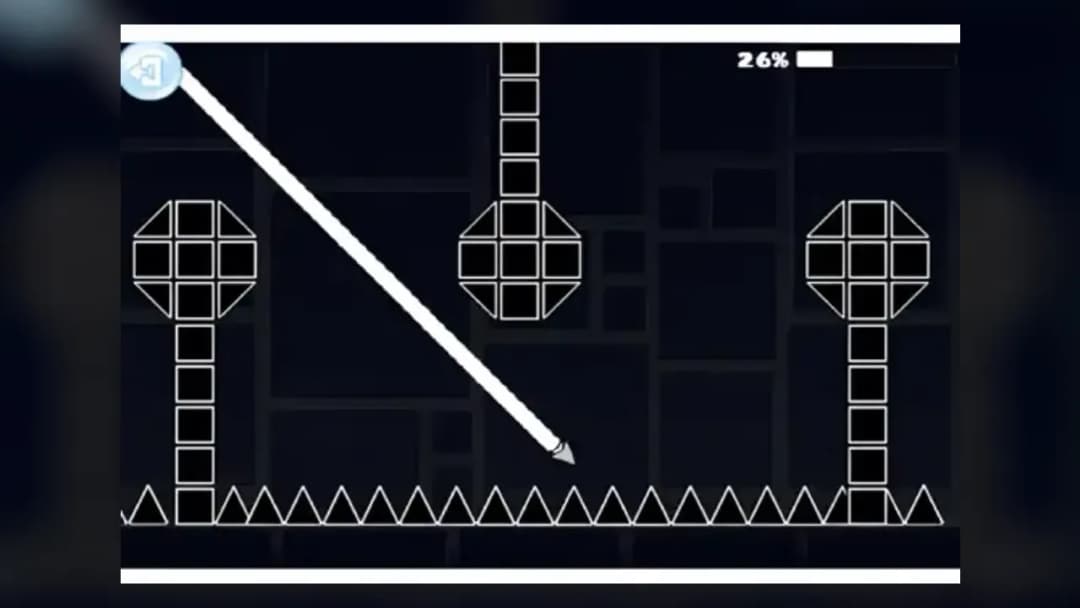
Geometry: Black Wave is a browser-native precision arcade game centered on wave-mode movement, black neon geometry, and instant-fail obstacle reading. The player controls a small diagonal-traveling wave icon through tight corridors, spike fields, angled tunnels, and sudden gaps. It uses the familiar one-button wave principle: press to rise, release to fall, and keep the line alive through constant micro-corrections.
As an HTML5 game, Geometry: Black Wave 5 runs directly in modern browsers on PC, mobile, tablet, and Chromebook hardware. The game does not require an installer, plug-in, or separate launcher. Its design favors quick restarts, clear collision rules, and low memory overhead, which makes it practical for instant play sessions on school laptops, older devices, and mobile gaming screens.
Game NameGeometry: Black Wave 5CategoryGamesTechnologyHTML5 / Browser NativePlatformsPC, Mobile, Tablet, ChromebookRequires Download?No, Instant PlayWhat's In This Guide
- About Geometry: Black Wave 5
- Complete Controls & Mechanics
- Advanced Strategies & Tips
- How to Play Unblocked at School
- Platforms & Versions
- Known Glitches & Quirks
- Top Alternatives & Competitors
About Geometry: Black Wave 5
Geometry: Black Wave 5 belongs to the modern wave-runner branch of rhythm arcade games. Instead of giving players a jump arc or a character with feet, it turns movement into a sharp diagonal signal. That single mechanic creates the whole identity: every press changes altitude, every release commits to descent, and every obstacle tests hand discipline.
The game’s design philosophy favors readability over decoration. Black backgrounds, high-contrast geometry, and hard-edged hazards let the player recognize collision danger quickly. The challenge does not come from hidden rules. It comes from forcing the player to execute clean input while the course scrolls forward and the safe path keeps shrinking.
Technically, play Geometry: Black Wave 5 online as a lightweight Geometry: Black Wave 5 browser game because the loop fits HTML5 perfectly. The renderer handles simple shapes, rapid restarts, and input polling without the overhead of a large 3D engine. On a Chromebook, that matters. Fewer assets mean fewer stalls, faster loading, and better consistency.
- Engine & Tech: HTML5 canvas or browser-native rendering supports crisp 2D geometry, stable frame pacing, and immediate reset behavior.
- Accessibility: Low-end Chromebooks can run it smoothly because the browser handles the scene in RAM with minimal storage pressure.
- Updates: Hosted versions may change layouts or menus, but the core wave-control formula remains the main attraction.
Geometry: Black Wave Controls & Mechanics
The control scheme is brutally simple. On keyboard, players usually press Space, the mouse button, or an assigned key to move upward. On touchscreens, a tap-and-hold performs the same action. Release the input and the wave drops. There is no walking, no braking, and no midair recovery button.
The feel depends on binary input and diagonal velocity. The icon does not float like a platformer character. It cuts upward or downward at a fixed angle, so the player creates a zigzag waveform by alternating press and release. Good runs come from tapping before the danger arrives, not after the spike touches the nose of the icon.
Collision detection is strict by genre standards. Walls, ceiling edges, floor blocks, and spikes act like hard boundaries. Since the wave travels diagonally, corner contact punishes sloppy routing. A safe-looking gap can kill the run if the player enters at the wrong angle. That is why Geometry: Black Wave 5 free sessions become skill drills fast.
- Movement: Use Space, mouse, or touch to rise; release to fall. Keep taps short in tight corridors.
- Action: The main action is angle control. The player threads hazards by shaping a clean zigzag path.
- Mechanics: Momentum feels immediate, but the diagonal path creates risk because every correction also moves the wave forward.
Advanced Strategies & Tips
Advanced play starts with route memory. Do not stare at the wave itself. Watch the tunnel ahead and let peripheral vision track your position. This small shift changes everything because wave games punish late reactions. The best players move before the hazard becomes urgent.
Short pulses beat long holds in most narrow sections. A long press sends the wave too high, forcing a steep release that often drives it into the opposite wall. Controlled tapping keeps the waveform shallow. In black tunnel sections, shallow movement gives you more correction time and reduces panic oversteer.
High-score routing depends on consistency, not heroics. If a section allows a wider central lane, use it. Do not scrape decorative edges for style. Treat each attempt as a data pass: identify the crash point, name the input error, and adjust the next run by one tap length or one earlier release.
- Perfect Your Timing: Release just before the wave reaches a ceiling slope, not when it touches the visual edge.
- Manage Resources/Speed: You cannot slow the scroll, so manage vertical space as your real resource.
- Avoid Common Mistakes: Never hold through a blind corner; tap lightly until the full tunnel shape appears.
- Optimize Runs: Build repeatable routes through spike clusters instead of improvising every restart.
How to Play Unblocked at School
Unblocked means the game can run through a browser page without needing an executable file, local installation, or legacy Flash plug-in. Modern HTML5 games differ from old downloadable games because the browser loads the code, draws the scene, and processes inputs inside a controlled tab. That makes Geometry: Black Wave 5 unblocked more accessible on restricted devices when the site itself is allowed.
Flash games depended on a discontinued plug-in. Executable games often require admin rights. A Geometry: Black Wave 5 HTML5 game avoids both problems. It loads like a normal web page, uses standard browser APIs, and stores little or nothing on the device. Players should still follow school or workplace rules, but the technology itself is built for safe instant play.
- What is Unblocked: It describes browser access that does not require downloads or blocked installers.
- Chromebook Support: You can play Geometry: Black Wave 5 on Chromebook because Chrome handles the game locally in the browser session.
- Browser Native: No executables are required, which keeps the experience simple and device-friendly.
Platforms & Versions
The browser version is the most direct way to play Geometry: Black Wave 5 online. It starts quickly, preserves the arcade loop, and avoids the friction of app stores. On desktop, the keyboard or mouse gives precise press lengths. That precision helps with tight spike tunnels and fast alternating sections.
Geometry: Black Wave 5 mobile works best with thumb taps on a clean screen. Touch input can feel slightly different because the finger covers part of the display, but the core rule stays identical: hold to climb, release to descend. Tablets provide extra visibility, while Chromebooks offer a strong balance of screen size and keyboard response.
- Browser Version: Best for instant play, no download access, and fast restarts after crashes.
- Mobile Experience: Touch controls convert the same wave logic into tap-and-hold rhythm play.
Known Glitches & Quirks
Most quirks in wave games come from frame timing and collision edges. If a browser drops frames during a busy moment, the wave can appear to jump slightly farther between positions. That does not usually break the game, but it can make a tight corridor feel harsher on weak hardware or overloaded tabs.
Corner clipping also creates memorable deaths. The icon may look visually close to a wall while the collision box registers contact. Serious players compensate by leaving a small safety margin around every spike tip and block corner. Closing background tabs and using a stable browser improves consistency.
- Physics Quirks: Very tight zigzags can feel different at unstable frame rates, so smooth performance matters.
- Visual Desync: Minor clipping near sharp corners can occur when the visible sprite and collision boundary feel close.
Top Alternatives & Competitors
Geometry Dash is the obvious comparison because it popularized rhythm-platform precision, instant restarts, and harsh obstacle memorization. Geometry: Black Wave 5 narrows that formula to wave control, which makes the skill test more focused. There are fewer mechanics to learn, but far less room to fake mastery.
Slope offers a different kind of reflex challenge. It uses 3D rolling momentum, lanes, and gravity-driven speed, while Geometry: Black Wave uses binary vertical direction. Subway Surfers and Temple Run 2 add collection routes and character progression; this game cares more about pure survival lines.
- Geometry Dash: Broader mechanics, stronger rhythm identity, and more varied modes.
- Slope: Faster 3D momentum, but less precise one-button waveform control.
Similar Games on ZGames
If you enjoy Geometry: Black Wave 5, you may also like these games:
Conclusion
Geometry: Black Wave is a sharp, focused browser game for players who like clean mechanics and immediate punishment. The entire experience rests on one input, but that input creates demanding routes, tense corrections, and satisfying improvement across repeated attempts.
Play Geometry: Black Wave 5 online free when you want a no download, Chromebook compatible, free-to-play HTML5 game with instant restarts. The rules are simple, the execution is not, and that contrast gives the black wave format its staying power.
Advertisement
More Games You'll Love
Controls
Frequently asked questions
How many levels does Geometry: Black Wave 5 have?
What is the best way to beat level 5 in Geometry: Black Wave 5?
Does Geometry: Black Wave 5 have multiplayer races or co-op?
Why does the wave move diagonally in Geometry: Black Wave 5?
"Geometry: Black Wave 5" and related names may be trademarks of their respective owners. This page is an informational game directory only; ZGames.io is not sponsored by or affiliated with trademark holders unless a specific game page says otherwise.
Gameplay Video: Geometry: Black Wave 5
OFFICIAL SOURCES & SITES
Player Reviews
No Reviews Yet
Be the first to share your feedback and rate this game!
Submit Your Review
Keep exploring