Play Ragdoll Archers Online Free
Play Ragdoll Archers, a Shooting game available in your browser. Review the controls, features, and compatibility notes below, then choose Play when you are ready.




















Most Popular This Month
View All results »

































Related Tags
Ragdoll Archers
Game Details
How to Play
- 1. Start a match
Launch the game in your browser and click to start playing.
- 2. Aim your bow
Hold the left mouse button to aim, adjusting the angle to set where the arrow lands.
- 3. Fire your arrow
Release the left mouse button to shoot and try to hit the enemy archer.
- 4. Manage stamina
Watch your stamina, since aiming too long or jumping drains it, and shoot apples to recover.
Game Features
About Ragdoll Archers
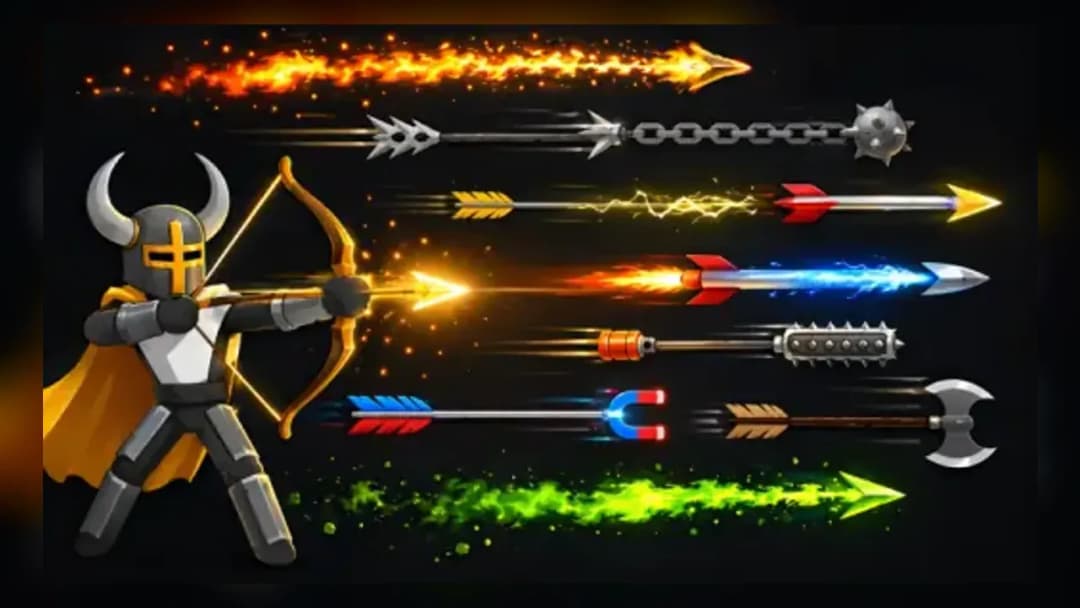
Play Ragdoll Archers and aim your bow at enemy stickman archers. Hold to aim, release to fire, and earn skulls for upgrades. Play it free in your browser.
What's in this guide

What you do in Ragdoll Archers
Ragdoll Archers is a physics-based archery game. You play a ragdoll stickman archer, aim your bow and shoot arrows at enemy archers. Your goal is to defeat enemy archers while staying alive, and to earn skulls along the way. The ragdoll physics are a big part of the fun: your character flops, tumbles and reacts when hit, so a shot can end in a result you did not plan.
Each fight is a loop of aiming, shooting and managing your health and stamina. You shoot apples to restore them, spend the skulls you earn on upgrades, and watch for occasional giant enemies, which give many skulls when defeated. Because every hit changes how the fight develops, you keep adjusting your aim and your position from one shot to the next.
How to Play Ragdoll Archers
- Launch the game in your browser and click to start playing.
- Hold the left mouse button to aim your bow. Adjust the angle to decide where the arrow will go, since the ragdoll physics affect what happens after a hit.
- Release the left mouse button to fire. A hit on the enemy archer knocks them down and scores for you.
- Keep an eye on your health and stamina. Aiming for too long or jumping drains stamina, so shoot apples when you need to recover: red apples restore health, green apples restore stamina and golden apples restore both.
- Spend the skulls you collect on upgrades to strengthen your archer for the rest of the match, and keep playing to unlock additional arrow types.
Ragdoll Archers Controls
| Action | Mouse |
|---|---|
| Aim | Hold the left mouse button |
| Fire | Release the left mouse button |
The game is controlled with the mouse: aim by holding the left button and fire by releasing it. Jumping is also part of the game, and it costs stamina, so use it with care.
What changes between sessions
You can play Ragdoll Archers in single-player mode against enemy archers. The game also offers two-player modes: a player-versus-player match, where you and a friend shoot at each other, and a co-op mode, where two players work together. Your skulls carry into upgrades, and playing more unlocks additional arrow types, so each session can leave you with a stronger archer than the one you started with.
Giant enemies appear occasionally during play. They are tougher targets, and defeating one earns a large number of skulls, which makes them worth a planned shot rather than a rushed one.
Tips and strategy
- Don't rush your shots. Holding the aim too long drains stamina, so take a clear aim, then release.
- Watch how the ragdoll physics react. A hit can knock an opponent over in ways you don't expect, so a near miss may still set up your next shot.
- Jumping costs stamina, so move only when it gives you a clear advantage over your opponent.
- Shoot apples before a risky fight. Red apples restore health, green apples restore stamina and golden apples restore both.
- Save skulls for upgrades that improve your archer instead of spending them as soon as you earn them.
- Practise your aim early in a session to learn how arrows travel and how the physics respond to a hit.
- In two-player matches, watch your partner or opponent's position and plan shots around where they are standing.
If you enjoy physics-driven archery, you might also try Ragdoll Arena or Archers Random. You can find more titles in Shooting games.
More Games You'll Love
Controls
Frequently asked questions
How do you aim and shoot in Ragdoll Archers?
What do the apples do in Ragdoll Archers?
What are skulls used for in Ragdoll Archers?
Does Ragdoll Archers have 2 player modes?
"Ragdoll Archers" and related names may be trademarks of their respective owners. This page is an informational game directory only; ZGames.io is not sponsored by or affiliated with trademark holders unless a specific game page says otherwise.
Gameplay Video: Ragdoll Archers
OFFICIAL SOURCES & SITES
Player Reviews
No Reviews Yet
Be the first to share your feedback and rate this game!
Submit Your Review
Keep exploring