Play 67 Clicker Unblocked Online Free
Play 67 Clicker Unblocked, a Clicker game available in your browser. Review the controls, features, and compatibility notes below, then choose Play when you are ready.
Advertisement

















Advertisement
Most Popular This Month
View All results »


























TECHNICAL SPECIFICATIONS
OPERATIONAL GUIDE
- 1. Tap the 67 Target
Click with the mouse or tap the screen directly on the main 67 object to generate points. Keep your cursor or thumb centered so every input registers cleanly.
- 2. Watch the Score Counter
Track how quickly your score rises after each burst of clicks. If growth slows, shift attention from raw tapping to available upgrades or multipliers.
- 3. Buy Efficient Upgrades
Spend points on upgrades when the cost makes sense compared with your current gain per click. Prioritize improvements that increase every future tap rather than tiny one-time boosts.
- 4. Maintain a Steady Rhythm
Use controlled clicking instead of frantic mashing. A consistent rhythm reduces missed inputs, keeps your hand relaxed, and helps you sustain longer high-score attempts.
- 5. Reset Your Route When Needed
If you spend points poorly or lose momentum, restart the run and apply a cleaner upgrade order. Clicker games reward routing as much as speed.
CORE FEATURES
Advertisement
About 67 Clicker Unblocked
Play 67 Clicker online free with no download required. Tap 67, stack upgrades, and chase bigger scores in this fast unblocked browser clicker game.
What's in this guide
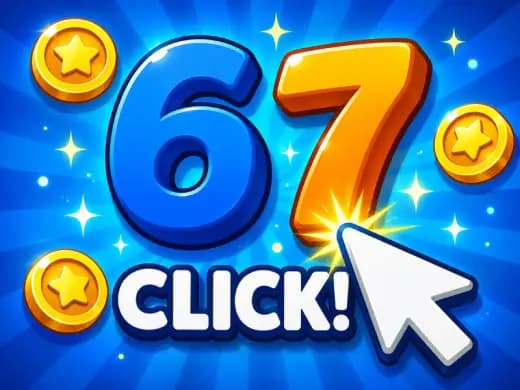
67 Clicker is a browser-native incremental clicker built around a direct input loop: the player clicks or taps the central 67 target, watches the score climb, and improves efficiency through timed spending and upgrade choices. It belongs to the modern HTML5 game category, which means it runs inside a standard web browser without a separate installer, plug-in, or executable file. On ZGames.io, the game targets instant play across PC, mobile, tablet, and Chromebook devices.
The appeal comes from measurable repetition. Every click produces feedback. Every upgrade changes the pace. The design uses a compact interface, low system requirements, and a simple control scheme that works with a mouse, trackpad, touchscreen, or Chromebook touchpad. Unlike older Flash clickers, 67 Clicker uses browser-native rendering and input handling, so the session starts quickly and keeps the focus on rhythm, score growth, and efficient decision-making.
Game Name67 ClickerCategoryGamesTechnologyHTML5 / Browser NativePlatformsPC, Mobile, Tablet, ChromebookRequires Download?No, Instant PlayWhat's In This Guide
- About 67 Clicker
- Complete Controls & Mechanics
- Advanced Strategies & Tips
- How to Play Unblocked at School
- Platforms & Versions
- Known Glitches & Quirks
- Top Alternatives & Competitors
About 67 Clicker
67 Clicker follows the lineage of incremental web games that reduced play to its purest measurable action: press, gain, upgrade, repeat. The number 67 functions as both the visual identity and the input target, giving the game a sharper meme-like hook than a generic coin or cookie. The result feels immediate. The player does not study a rulebook. The hand moves first, and the scoring system explains itself through feedback.
Its design philosophy favors low friction. A good clicker must register input quickly, display growth clearly, and keep upgrades readable. 67 Clicker uses that structure for short sessions and longer optimization runs. The physics are minimal because the game does not need character movement, gravity, or projectile simulation. Instead, the important technical layer sits in input timing, UI state changes, animation feedback, and score calculation.
Culturally, clicker games thrive because they turn tiny actions into visible escalation. 67 Clicker uses that same pressure. The fun is not only the act of clicking; it is the moment when the score curve changes and the player feels the machine accelerate.
- Engine & Tech: The 67 Clicker HTML5 game runs through browser-native code, with lightweight rendering and rapid input polling for smooth tapping.
- Accessibility: It works well on low-end Chromebooks because the game does not demand heavy 3D assets or large memory loads.
- Updates: Public developer history is unknown, so players should treat the current ZGames.io build as the authoritative playable version.
Complete Controls & Mechanics
The control scheme in 67 Clicker is intentionally direct. On desktop, the player uses the left mouse button or trackpad click. On mobile, the player taps the screen. On Chromebook, the game works with a touchpad, touchscreen where supported, or connected mouse. The important skill is not memorizing buttons; it is keeping repeated inputs accurate while reading score changes.
Input latency matters more than it first appears. A clicker with sluggish feedback feels dead, even if the math works. 67 Clicker depends on immediate confirmation after each press, so the player can build a rhythm. A steady rhythm reduces misclicks, keeps the hand relaxed, and makes upgrade timing easier to judge.
Collision detection in this context means hit registration on the clickable interface rather than physical contact between moving objects. The target area must accept clicks reliably, while menus and upgrade buttons must avoid accidental purchases. That separation creates the main mechanical tension: tap fast, but do not tap so wildly that you lose control.
- Movement: There is no character movement. Your cursor, thumb, or touchpad position becomes the movement system, so precision comes from hand placement.
- Action: The primary action is clicking or tapping the 67 target to gain score, then using earned points for upgrades when available.
- Mechanics: Momentum appears through economy growth rather than physics; upgrades can make each future click more valuable.
Advanced Strategies & Tips
Strong 67 Clicker play starts with tempo control. New players often mash as quickly as possible, then lose accuracy and tire out. Better players use short, repeatable bursts. That pattern keeps input clean and leaves enough attention to watch the score counter, upgrade costs, and payoff timing.
Resource management separates casual clicking from optimized runs. Spending too early on a weak bonus can slow growth. Waiting too long can also waste potential, because every click before a strong upgrade may produce less value than it could. The best route balances payback speed against long-term scaling.
High-score routing means thinking several purchases ahead. If an upgrade improves every future click, it can outperform a flat gain even when it looks expensive. If a boost only adds a small fixed amount, it may help early but fall behind once the score curve accelerates.
- Perfect Your Timing: Click in controlled bursts of consistent length, then pause briefly to buy upgrades without accidental taps.
- Manage Resources/Speed: Buy multipliers when they will repay their cost within your next sustained tapping cycle.
- Avoid Common Mistakes: Do not chase every button the moment it appears; compare cost against current gain first.
- Optimize Runs: Restart after inefficient spending and test a cleaner route focused on early scaling.
How to Play Unblocked at School
67 Clicker unblocked means the game can run in a browser environment without requiring a local installation or blocked executable. Older school computers often restricted Flash files, downloads, and app installs. Modern HTML5 games work differently. They load page assets through the browser, execute in a sandboxed environment, and store the active session in memory while the tab remains open.
This matters on school Chromebooks because administrators usually lock down software installation, not every simple webpage. A 67 Clicker browser game does not ask the device to install a program. It uses the browser already approved for daily use. Players should still follow local rules, but technically the format is lightweight, portable, and safer than unknown downloadable files.
- What is Unblocked: It describes access through a webpage rather than a restricted app or installer.
- Chromebook Support: The game runs locally in the browser tab using RAM and standard input devices.
- Browser Native: No executables are required, which keeps the play session simple and contained.
Platforms & Versions
67 Clicker is best understood as a web-first game. The browser version offers the cleanest path: open the page, load the HTML5 build, and play 67 Clicker online without waiting for a store download. That structure suits short breaks, classroom laptops, shared computers, and devices where storage space is limited.
On mobile, the experience changes from clicking to tapping. Touch input can feel faster for short bursts, but it also increases the chance of fatigue if the player presses too hard. On desktop, a mouse gives stronger precision. On Chromebook, a connected mouse usually outperforms a touchpad for high-score attempts, though both work.
- Browser Version: Instant access, no installation, and fast restarts make it the preferred version.
- Mobile Experience: Tap controls adapt naturally, especially for short score-pushing sessions.
Known Glitches & Quirks
Like many lightweight clicker games, 67 Clicker can show small timing quirks when the browser tab loses focus, the device enters a low-power state, or the frame rate drops during heavy background activity. These issues rarely break the game, but they can affect perceived responsiveness during fast clicking.
Another common clicker quirk involves accidental interface overlap. If a player clicks aggressively near an upgrade area, a purchase may happen earlier than intended. This is not a traditional bug; it is a consequence of high input speed inside a compact UI. Precision beats panic.
- Physics Quirks: The game has economy momentum rather than physical momentum, so the main exploit is efficient upgrade timing.
- Visual Desync: Score animation may feel slightly behind during rapid taps on slower devices, while the core count still updates.
Top Alternatives & Competitors
67 Clicker competes with classic incremental games such as Cookie Clicker and other meme-based tap games. Cookie Clicker uses a broader economy with buildings, prestige layers, and long idle sessions. 67 Clicker feels narrower and faster, with a focus on immediate tapping and a compact score chase.
Compared with idle-heavy games, 67 Clicker rewards active input more directly. That makes it better for players who want short, measurable sessions rather than a background simulation. Its difficulty curve comes from efficiency and endurance, not enemy patterns or platforming hazards.
- Cookie Clicker: Deeper economy, slower expansion, and more idle systems.
- Capybara Clicker: Similar tap-first pacing, but with a different theme and progression feel.
Similar Games on ZGames
If you enjoy 67 Clicker, you may also like these games:
Conclusion
67 Clicker works because it respects the clicker formula: immediate input, visible score growth, and simple decisions that become more interesting as the numbers rise. It is a free-to-play browser game built for instant play, quick restarts, mobile gaming, and Chromebook compatible sessions.
Play 67 Clicker free directly in your browser when you want a no download HTML5 game focused on rhythm, upgrades, and high-score efficiency. The rules are simple. The optimization is the hook.
Advertisement
More Games You'll Love
Controls
Frequently asked questions
How does scoring work in 67 Clicker?
What upgrades should I prioritize first in 67 Clicker?
Does 67 Clicker have levels or endless progression?
What is the best technique for getting a high score in 67 Clicker?
"67 Clicker Unblocked" and related names may be trademarks of their respective owners. This page is an informational game directory only; ZGames.io is not sponsored by or affiliated with trademark holders unless a specific game page says otherwise.
Gameplay Video: 67 Clicker Unblocked
OFFICIAL SOURCES & SITES
Player Reviews
No Reviews Yet
Be the first to share your feedback and rate this game!
Submit Your Review
Keep exploring