Play Going Balls Adventure 2 Online Free
Play Going Balls Adventure 2, a Racing game available in your browser. Review the controls, features, and compatibility notes below, then choose Play when you are ready.
Advertisement
Going Balls Adventure 2
















Advertisement
Most Popular This Month
View All results »




































Going Balls Adventure 2
TECHNICAL SPECIFICATIONS
OPERATIONAL GUIDE
- 1. Steer with WASD or swipe
Use WASD, arrow keys or the mouse on desktop, or tap and swipe on mobile to roll the ball along the platform.
- 2. Bank spare balls
Collect black balls as you roll to store up to five spares so a fall costs a ball instead of ending your run.
- 3. Reach the checkpoint
Roll to the checkpoint so any fall afterward respawns you there instead of restarting the level.
- 4. Grab coins and unlock skins
Sweep up coins on each platform and spend them in the menu to unlock new ball skins.
CORE FEATURES
Advertisement
About Going Balls Adventure 2
Roll the ball across guardrail-free bridges to the finish, banking up to 5 spare balls after each fall. Collect black balls and coins to unlock skins...
What's in this guide
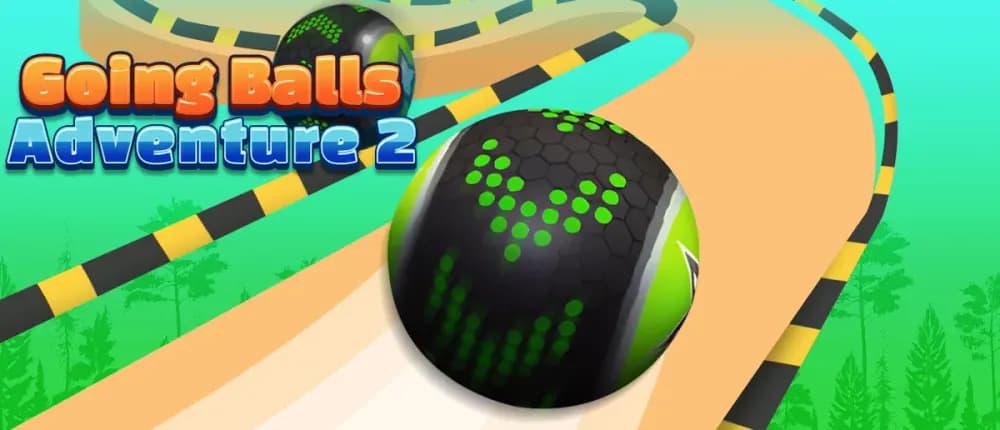
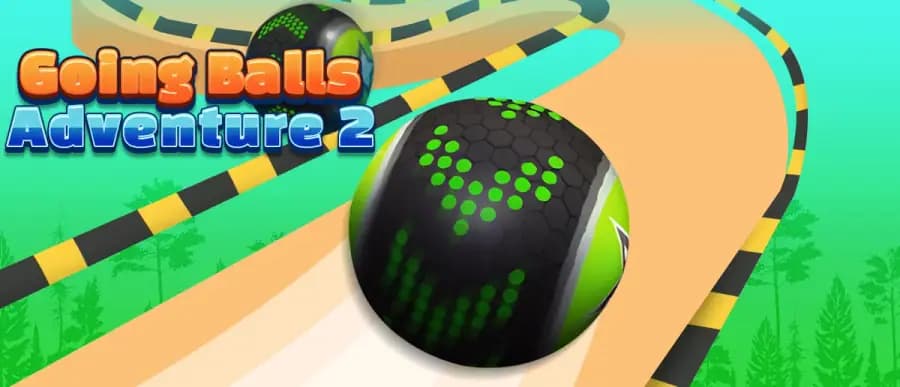
In Going Balls Adventure 2, you steer a rolling ball across a narrow floating platform, using downhill momentum to clear gaps and easing off before tight corners so you don't overshoot the edge. This is the rare ball-rolling arcade game where physics does most of the work — your job is managing speed, not just steering.
Playing Going Balls Adventure 2 online means dozens of stages that steadily strip away safety. Early levels have guardrails on both sides; later ones force you across bare bridges and hairpin corners with nothing to catch a mistimed roll. There is no time limit, so precision beats panic.
The clever twist is the spare-ball system: collect black balls to bank up to five extras, so a single fall doesn't end your run — you respawn and keep going as long as spares last.
| Game | Going Balls Adventure 2 |
|---|---|
| Category | Arcade / 3D Rolling Platformer |
| Developer | YAD |
| Release Date | November 21, 2024 |
| Platforms | PC, Mobile, Tablet, Chromebook |
| Modes | Single Player |
| Controls | WASD / Arrow keys / Mouse / Tap-swipe |
How the Going Balls Adventure 2 Level Loop Works
Your primary mission each stage is simple: reach the checkpoint and then the finish line to unlock the next level. Fall off the course and you respawn at the most recent checkpoint you passed — you never restart the whole level. The Going Balls Adventure 2 checkpoints are what make the tightening difficulty fair.
The secondary mission is scoring: sweep up every coin on the platform. Coins bank toward the shop, and collect black balls to fuel your spare-ball reserve. Grabbing all coins isn't required to advance — it's for players chasing a clean run.
Going Balls Adventure 2 Controls: WASD, Mouse and Swipe
On desktop, use the WASD controls or arrow keys to steer, or drive the ball with your mouse. On phones and tablets, tap and swipe in the direction you want to roll. The Going Balls Adventure 2 controls feel best when you feather inputs on downhill runs — full-tilt steering usually launches you off narrow ledges.
Managing Momentum on Bridges
The ball speeds up rolling downhill and slows uphill. Use a downhill slope to build enough speed for a jump, then straighten out early so you land flat on the next bridge instead of clipping its edge.
Unlocking Skins with Coins
Spend banked coins in the menu to unlock new ball skins. Chasing Going Balls Adventure 2 skins gives coin-collecting a purpose beyond score, so it's worth taking the safer, coin-rich lines even when a faster route exists.
Playing Going Balls Adventure 2 Unblocked at School
Because it's an HTML5 title that needs no downloads or installs, Going Balls Adventure 2 unblocked runs directly in the browser on Chromebooks and restricted school or work networks. Nothing to install means nothing for a filter to flag on the download side.
Going Balls Adventure vs Going Balls Adventure 2
The franchise runs Going Balls, then Going Balls Adventure, then this sequel. In the Going Balls Adventure vs Going Balls Adventure 2 comparison, the original Adventure is an endless-obstacle runner, while Adventure 2 is a level-based 3D rolling platformer with checkpoints, spare balls and skin unlocks — more structure, more forgiveness after a fall.
Advanced Tips for Playing Going Balls Adventure 2 Free
- Bank spares early — grab black balls on easy stages so you have a cushion for the guardrail-free sections.
- Release steering just before a jump so you land straight rather than rolling off sideways.
- Take the coin line on wide platforms; save aggressive shortcuts for stages you've already learned.
- Ease into corners uphill where the ball naturally slows.
Similar Rolling and Reaction Games on ZGames
- Tap Road — one-tap ball steering that trains the same corner timing.
- Geometry Vibes — rhythmic obstacle dodging with momentum control.
- Vex Hyper Dash — fast platforming with checkpoint respawns.
- Times Table Duck — a lighter arcade pick for younger players.
Explore more in arcade games and HTML5 games, or browse popular games.
Back where you started: it all comes down to reading the slopes, feathering your steering, and letting those banked spare balls turn a fall into a fresh try. Play Going Balls Adventure 2 free and see how far your momentum carries you.
Advertisement
More Games You'll Love
Controls
Frequently asked questions
What happens if you fall off the track in Going Balls Adventure 2?
Do you have to collect black balls in Going Balls Adventure 2?
Is there a time limit in Going Balls Adventure 2?
What are the controls for Going Balls Adventure 2 on desktop and mobile?
Can you play Going Balls Adventure 2 unblocked on a Chromebook?
"Going Balls Adventure 2" and related names may be trademarks of their respective owners. This page is an informational game directory only; ZGames.io is not sponsored by or affiliated with trademark holders unless a specific game page says otherwise.
Gameplay Video: Going Balls Adventure 2
OFFICIAL SOURCES & SITES
Player Reviews
No Reviews Yet
Be the first to share your feedback and rate this game!
Submit Your Review
Keep exploring