Play Neon Biker Online Free
Play Neon Biker, a Racing game available in your browser. Review the controls, features, and compatibility notes below, then choose Play when you are ready.
Advertisement











Advertisement
Most Popular This Month
View All results »



































Neon Biker
TECHNICAL SPECIFICATIONS
OPERATIONAL GUIDE
CORE FEATURES
Advertisement
About Neon Biker
Play Neon Biker online free: flip a glowing stunt bike across ramps, survive landing angles, chase clean runs, no download, unblocked browser racing.
What's in this guide
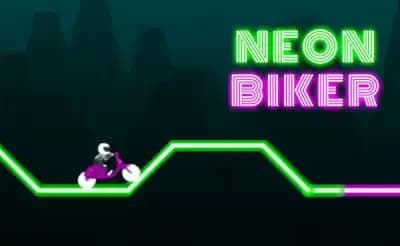
Neon Biker is a physics-based HTML5 motorcycle stunt game built for instant play in a modern web browser. The player controls a glowing bike across suspended neon tracks, using acceleration and midair rotation to survive ramps, gaps, loops, and abrupt landing zones. Its core design follows the classic trial-bike formula: the bike moves forward, gravity pulls it down, rotation decides survival, and one bad landing ends the attempt.
Because Neon Biker runs as a browser game, it does not require a client, installer, or external launcher. It targets PC, mobile, tablet, and Chromebook play through browser-native rendering, with input mapped to keyboard and touch controls. The result feels simple at first, but the real skill sits in the hands: press too long and the bike over-rotates; release too early and the front wheel drops into the track.
Game NameNeon BikerCategoryGamesTechnologyHTML5 / Browser NativePlatformsPC, Mobile, Tablet, ChromebookRequires Download?No, Instant PlayWhat's In This Guide
- About Neon Biker
- Complete Controls & Mechanics
- Advanced Strategies & Tips
- How to Play Unblocked at School
- Known Glitches & Quirks
- Top Alternatives & Competitors
About Neon Biker
Neon Biker belongs to the long-running lineage of 2D motorcycle trial games that became popular in browser arcades before mobile physics games turned one-touch stunt control into a mainstream format. The formula works because it reduces racing to a sharp physical problem: move fast, rotate correctly, and land cleanly. The neon presentation strips the scenery down to glowing track geometry, so the player reads ramps and hazards immediately.
The game’s physics model emphasizes angular momentum. The bike is not just a sprite sliding on a rail; it behaves like a body with weight, forward velocity, and rotational force. When the rider leaves a ramp, the previous speed and angle determine the arc. Player input then adjusts the pitch of the bike in the air. This creates the familiar tension of trial games: spectacular flips look stylish, but controlled landings win levels.
Its design philosophy favors quick failure and faster recovery. Levels rarely waste time with long introductions. A crash teaches one specific lesson about a ramp, platform, or landing angle, then the next attempt begins almost immediately. That loop made the genre especially strong on school laptops, Chromebooks, and phones, where players often want short, skill-heavy sessions instead of long races.
- Engine & Tech: Neon Biker uses browser-native HTML5 technology to render clean 2D geometry and process real-time input. Smooth performance depends on consistent frame pacing, because physics games feel wrong when rotation updates stutter.
- Accessibility: The visual design uses high contrast neon tracks against dark backgrounds. Low-end Chromebooks benefit from the lightweight scene design because the browser draws fewer complex assets than a full 3D racing game.
- Updates: Public information about developer support and update history remains limited. Hosted builds generally preserve the same stunt-racing structure, with level progression and instant restart as the main content loop.
Complete Controls & Mechanics
Neon Biker feels best when the player treats every input as pressure applied to a moving object. Acceleration does not simply mean “go.” It changes jump length, landing speed, and the amount of rotation needed in the air. On keyboard, the hands usually work in rhythm: one key builds speed, another corrects pitch, and both must stop before the bike lands at a dangerous angle.
Input latency matters more here than in a standard side-scroller. A late tap before landing can rotate the motorcycle past the safe zone. A heavy press after a ramp can send the rear wheel over the front. The game rewards short, deliberate corrections. Players who hold controls continuously usually crash because the physics system keeps applying force until the input stops.
Collision detection centers on practical readability. The wheels need to meet the track at a stable angle, while the rider and bike frame punish inverted or sharply tilted impacts. This makes landing geometry more important than raw distance. A jump that looks impressive can still fail if the front tire hits first and throws the chassis forward.
- Movement: Use arrow keys or WASD on keyboard, depending on the build. On touch devices, tap or hold the on-screen side controls. Forward input builds momentum, while rotation input adjusts the bike’s nose in midair.
- Action: The main action is stunt control. You accelerate into ramps, rotate during flight, and release at the right moment to place both wheels on the next platform.
- Mechanics: Gravity pulls the bike through a fixed arc after takeoff, while momentum carries it forward. Rotation changes landing angle, but it cannot fully cancel a bad launch, so ramp approach remains the most important decision.
Advanced Strategies & Tips
Strong Neon Biker players do not mash acceleration. They route levels. Before a hard jump, they identify the ramp angle, decide how much speed the gap needs, and plan the landing before leaving the ground. This turns the game from a reflex test into a repeatable stunt puzzle, where each section has a clean solution.
Frame-perfect play usually appears near steep ramps and short landing platforms. The best timing window often happens just after the bike leaves the lip of a ramp. Correct the nose early, then stop rotating before the landing. If you keep turning until impact, the physics engine reads the bike as unstable and converts a promising jump into a crash.
High-score routing depends on preserving speed without sacrificing control. Flips can help when the level gives enough air time, but unnecessary rotation adds risk. The fastest runs often look boring: measured acceleration, minimal airtime correction, flat landings, and no panic braking. Clean physics beats dramatic movement.
- Perfect Your Timing: Tap rotation as the rear wheel leaves the ramp, not after the bike is already falling. Early correction gives you a wider landing window.
- Manage Resources/Speed: Use full speed on long flat approaches, then feather the input before blind drops or narrow platforms. Speed solves gaps but creates harder landings.
- Avoid Common Mistakes: Do not hold rotation through touchdown. Release before the tires meet the track so the bike settles instead of snapping forward.
- Optimize Runs: Memorize the first failed jump in each level. Most stages hinge on one problem ramp; once you solve it, the rest becomes a rhythm section.
How to Play Unblocked at School
Neon Biker unblocked access usually matters to players on managed school networks because the game runs as an HTML5 game inside the browser rather than as a downloaded executable. Older Flash games depended on plugins that many networks blocked or removed. Modern browser games use standard web technologies that load like ordinary pages, which makes them easier to run on restricted devices when the hosting site itself remains accessible.
There is also a security difference. Executable games ask the operating system to install or run files. Browser-native games execute in the browser sandbox, which limits direct system access. For students using Chromebooks, this matters because ChromeOS already centers on web apps. To play Neon Biker on Chromebook, open the page, let the game load, and use the keyboard or touchpad without changing device settings.
- Chromebook Support: Fully compatible with school devices because it runs locally in browser memory after loading page assets.
- Browser Native: No executables are required, so the game fits the safer model used by HTML5 browser gaming.
Known Glitches & Quirks
Like many lightweight physics games, Neon Biker can produce strange moments when speed, rotation, and collision overlap at the edge of a platform. A wheel may catch a corner harder than expected, or the chassis may react sharply after landing on a seam. These quirks do not usually break the game; they create the trial-bike personality players recognize.
Speedrunners often study these edge cases because tiny collision differences can change a run. A rear-wheel tap on a ledge may save a failed jump, while a front-wheel clip can kill an otherwise perfect attempt. Browser performance can also affect feel: if a low-power device drops frames, rotation appears less precise, even when the core input remains the same.
- Physics Quirks: A near-vertical landing may sometimes bounce the bike forward if the rear wheel hits first. Skilled players can use that rebound to recover speed.
- Visual Desync: Minor clipping can occur when the glowing bike overlaps sharp track corners, especially during fast flips or awkward crash states.
Top Alternatives & Competitors
Neon Biker competes with other browser stunt and reflex games by focusing on readable physics rather than dense environments. Compared with endless runners, it gives the player more control over failure. You usually know exactly why a crash happened: too much throttle, too much rotation, or a poor landing angle. That clarity makes it highly replayable.
It also differs from pure racing games. There is no online multiplayer pack to chase, no upgrade garage, and no complex vehicle tuning. The challenge lives in execution. Players who enjoy Neon Biker free on ZGames usually prefer games where the next attempt starts quickly and mechanical skill matters more than unlock systems.
- Slope: Slope shares the same instant-reaction appeal, but it tests steering and lane reading instead of motorcycle rotation and landing control.
- Geometry Dash: Geometry Dash uses rhythm and jump timing. Neon Biker feels looser because physics, speed, and landing angle create variable outcomes.
Similar Games on ZGames
If you enjoy Neon Biker, you may also like these games:
Conclusion
Neon Biker remains effective because it understands the appeal of physics racing: every mistake belongs to the player’s hands. The bike accelerates, rotates, lands, and crashes according to visible rules. That makes each retry useful, especially when a difficult ramp finally clicks.
You can play Neon Biker online as a free-to-play browser game with no download, including on mobile devices and Chromebooks. Open the game, read the ramp, control the rotation, and let the physics decide whether your landing deserves the finish line.
Advertisement
More Games You'll Love
Controls
Frequently asked questions
How many levels does Neon Biker have?
Why does my bike keep flipping over in Neon Biker?
What is the best way to land jumps in Neon Biker?
Does Neon Biker play well on phones and tablets?
"Neon Biker" and related names may be trademarks of their respective owners. This page is an informational game directory only; ZGames.io is not sponsored by or affiliated with trademark holders unless a specific game page says otherwise.
OFFICIAL SOURCES & SITES
Player Reviews
No Reviews Yet
Be the first to share your feedback and rate this game!
Submit Your Review
Keep exploring