Play Single Line: Drawing Puzzle Online Free
Play Single Line: Drawing Puzzle, a Puzzle game available in your browser. Review the controls, features, and compatibility notes below, then choose Play when you are ready.
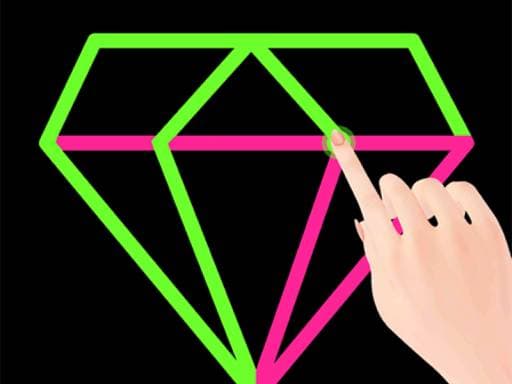
Single Line: Drawing Puzzle













Most Popular This Month
View All results »




























Game Details
How to Play
- 1. Anchor your pen
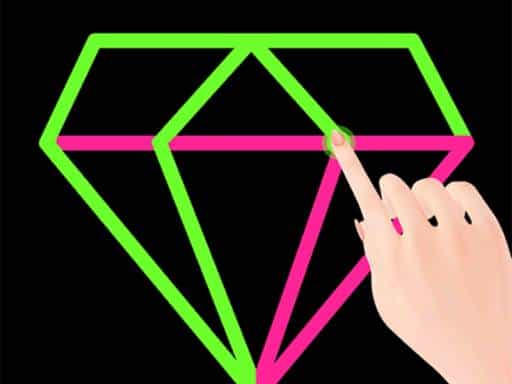
Tap or click anywhere on the wireframe figure to start tracing; pick an odd-junction point when the shape has one.
- 2. Drag across every segment
Hold and drag along the lines to color them, passing over already-colored lines freely since crossings are allowed.
- 3. Avoid retracing
Never double back along a segment you've already painted — plan a route that reaches every line exactly once.
- 4. Complete or reset
Finish when all lines are colored; if you strand an unreachable segment, reset and begin from a different junction.
Game Features
About Single Line: Drawing Puzzle
Trace every shape in one unbroken stroke without retracing any line in Single Line: Drawing Puzzle. Crossing lines is allowed, doubling back isn't. Play...
What's in this guide
In Single Line: Drawing Puzzle online you trace an entire figure using one unbroken stroke — tap a point, drag across every segment, and color the whole shape without ever lifting your finger or retracing a line you already covered. That single rule is the whole game: the shape is already drawn in faint outline, and your job is to paint all of it in one continuous motion.
The twist that separates this from a doodle toy is what you're allowed to do. You may cross over a line you've already colored in, so intersections are fine. You may not double back and re-trace a segment you've already painted. Pick the wrong starting node and some segments become unreachable — so every puzzle is really a hunt for the one correct entry point.
| Game | Single Line: Drawing Puzzle |
|---|---|
| Category | puzzle |
| Modes | Single-player |
| Platforms | PC, Mobile, Tablet (HTML5) |
| Controls | Mouse drag / touch drag |
How the One-Stroke Loop in Single Line: Drawing Puzzle Works
Each level loads a gray wireframe figure. Tap anywhere on the drawing to anchor your pen, then drag along the lines. Segments fill with color as you pass over them. The level clears the instant every line is colored. There is no score, no lives, no timer — you either complete the figure in one path or you back out and try a different route. If you strand yourself with uncolored segments you can't reach, just restart the stroke.
Why the Starting Point Decides Everything
This is a classic Eulerian-path problem in disguise. Any figure can be drawn in one stroke only if it has zero or exactly two "odd" junctions — points where an odd number of lines meet. When there are two odd junctions, you must begin at one of them and finish at the other. That single rule, once you spot it, turns a frustrating puzzle into a quick read.
Single Line: Drawing Puzzle Controls
The controls are identical across devices. On desktop, click-and-hold with the mouse and drag along the lines. On phones and tablets, tap and drag with one finger. There are no keyboard shortcuts — the whole game is pointer input. Release to stop; tap a reset or back button to clear a failed attempt.
Advanced Tips to Beat Harder Single Line Drawing Puzzle Shapes
- Count the odd junctions first. Scan the figure for any point where an odd number of lines meet. If there are exactly two, start on one of them.
- Save the dead ends for last. Spurs that only connect to one line must be the very end of your path — never trace into them early.
- Use crossings as highways. Because you can pass over colored lines, route through busy intersections freely instead of avoiding them.
- Back out early. The moment a region looks sealed off, reset rather than finishing a doomed stroke.
Single Line Drawing Puzzle vs One Line Drawing Puzzle Apps
Searches for "one line drawing puzzle" and "single line puzzle drawing" often mix up several products. The ZGames version is the browser HTML5 build you can run instantly — no install, playable as a single line draw game in any tab, and effectively single line drawing puzzle unblocked wherever the site opens. The mobile apps with near-identical names are separate downloads; this page covers the free web edition.
Similar Puzzle Games on ZGames
- Brick Tickler — another single-input logic puzzle built on clean HTML5 pointer controls.
- Cactus Pinch — careful path planning where one wrong move resets your attempt.
- Cut the Rope — physics puzzling that rewards reading the whole board before you act.
- Solitaire — a relaxed, timer-free brain game for unwinding between levels.
Browse more puzzle and brain games or jump to our popular games hub. Ready to test whether you can paint a whole picture without lifting your pen? Start a single line drawing puzzle game and find the one entry point that unlocks the figure.
More Games You'll Love
Controls
Frequently asked questions
Can you cross your own line in Single Line: Drawing Puzzle?
How do you pick the right starting point in Single Line: Drawing Puzzle?
What are the controls for Single Line: Drawing Puzzle?
Is Single Line: Drawing Puzzle the same as One Line Draw?
What do you do when you get stuck on a Single Line: Drawing Puzzle level?
"Single Line: Drawing Puzzle" and related names may be trademarks of their respective owners. This page is an informational game directory only; ZGames.io is not sponsored by or affiliated with trademark holders unless a specific game page says otherwise.
Gameplay Video: Single Line: Drawing Puzzle
OFFICIAL SOURCES & SITES
Player Reviews
No Reviews Yet
Be the first to share your feedback and rate this game!
Submit Your Review
Keep exploring