Play Color Rush Unblocked Online Free
Play Color Rush Unblocked, a Action game available in your browser. Review the controls, features, and compatibility notes below, then choose Play when you are ready.
Advertisement












Advertisement
Most Popular This Month
View All results »


















TECHNICAL SPECIFICATIONS
OPERATIONAL GUIDE
- 1. Read the Next Color
Look ahead at the upcoming gate or lane color before your character reaches it. Early recognition gives you enough time to move or switch without panic inputs.
- 2. Match Before Contact
Move into the matching lane or trigger the correct color change before touching the obstacle. A late input usually causes a collision even if your reaction feels close.
- 3. Hold a Clean Rhythm
Use short, deliberate taps instead of constant corrections. Color Rush rewards steady timing because unnecessary movement makes fast patterns harder to read.
- 4. Protect Your Streak
Prioritize safe matches over risky last-second moves. Longer streaks and longer survival produce better scores than dramatic saves that break your visual rhythm.
CORE FEATURES
Advertisement
About Color Rush Unblocked
Play Color Rush online free with no download. Swap colors, hit matching lanes, and chase combos in an unblocked browser reflex game on any device.
What's in this guide
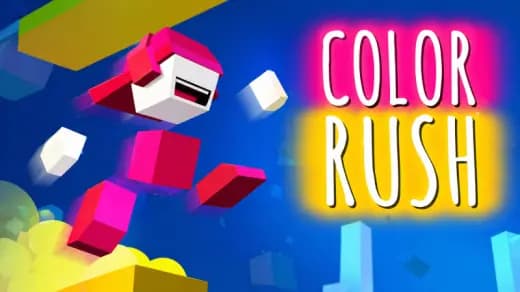
Color Rush is a browser-native arcade reflex game built around color recognition, timing, and quick directional decisions. The player reads incoming color-coded hazards or lanes, then makes a precise input before contact. Because the game runs through modern HTML5 technology, it works as an instant play browser game on PC, mobile, tablet, and Chromebook without a local installer.
The design belongs to the modern HTML5 game tradition: short rounds, immediate restarts, low input friction, and a scoring loop that rewards consistency more than luck. Color Rush is not about complex menus or slow progression. It asks one sharp question every second: can you identify the correct color, commit to the right lane, and keep your hands calm as the screen accelerates?
Game NameColor RushCategoryGamesTechnologyHTML5 / Browser NativePlatformsPC, Mobile, Tablet, ChromebookRequires Download?No, Instant PlayWhat's In This Guide
- About Color Rush
- Complete Controls & Mechanics
- Advanced Color Rush Strategies & Tips
- How to Play Unblocked at School
- Platforms & Versions
- Known Glitches & Quirks
- Top Alternatives & Competitors
About Color Rush
Color Rush reflects a wave of minimalist arcade games that became popular after browsers moved away from plug-ins and toward native HTML5 rendering. Instead of installing a client, the game loads assets directly in the browser and uses simple visual rules to create pressure. The player learns instantly: matching colors keeps the run alive; mismatching ends it.
Its design philosophy favors readability. A strong color-matching game needs high contrast, predictable collision zones, and fast restarts. Color Rush uses those principles to make failure feel fair. When the player crashes, the cause is usually visible: a late switch, a wrong lane, or an overcorrection after a fast pattern.
The physics are intentionally light. This is not a heavy platformer with long jump arcs. The core feel comes from responsive lateral movement, obstacle timing, and collision checks that test whether the character or marker matches the safe color state at the contact point.
- Engine & Tech: The browser handles rendering through HTML5 systems, commonly canvas-style drawing or WebGL-assisted layers depending on the build. The best experience targets smooth frame pacing so color changes feel immediate.
- Accessibility: Color Rush can run well on low-end Chromebooks because it uses compact assets, simple geometry, and short memory cycles instead of large 3D scenes.
- Updates: Since the listed developer is unknown, version history cannot be verified. Browser builds can still receive quiet tuning for speed, layout, and device support.
Complete Controls & Mechanics
Color Rush feels best when the controls disappear under your fingers. On keyboard, arrow keys or WASD typically handle movement or lane selection. On touch screens, taps and swipes replace keys, giving Color Rush mobile players a direct way to shift position or trigger color responses.
The most important mechanical detail is input timing. The game judges your state at collision, not when you first notice the obstacle. That means a correct idea can still fail if the input arrives a fraction too late. Strong players act before the character reaches the danger line.
Momentum stays readable rather than realistic. Many arcade browser games soften acceleration so movement feels snappy, but not teleport-like. This gives players enough control to correct small mistakes while still punishing wild side-to-side tapping.
- Movement: Use keyboard inputs on desktop or touch gestures on phones and tablets to shift into the correct color lane or alignment. Clean single taps beat repeated mashing.
- Action: Some Color Rush versions use color switching, while others focus on lane matching. In both cases, the action must happen before the collision point.
- Mechanics: Collision detection usually checks overlap between the player object and the obstacle zone. If the color or lane state matches, the run continues; if not, the round resets.
Advanced Color Rush Strategies & Tips
High-score play in Color Rush starts with eye placement. Beginners stare at the character. Better players watch the next two hazards. That tiny shift changes the game from reaction-only chaos into pattern reading. Your hands respond faster because your brain has already classified the next color.
Speed management is mental rather than mechanical. The game may accelerate, but you should not. Keep the same input rhythm for as long as possible. Panic creates extra taps, and extra taps move you away from the safe route. The cleanest runs often look boring because every input has a purpose.
Frame-perfect play matters when colors appear close together. If two obstacles arrive in rapid sequence, make the first match early enough that your next input has room. Late saves feel heroic, but they compress the timing window for the next hazard and usually kill the run seconds later.
- Perfect Your Timing: Press or tap as soon as you confirm the next required color, not when the obstacle reaches the character.
- Manage Resources/Speed: Treat screen space as your resource. Stay centered when possible so either side remains reachable.
- Avoid Common Mistakes: Do not chase a lane after you have already missed the safe timing. Reset your rhythm instead of stacking errors.
- Optimize Runs: Memorize recurring color clusters and move on the first cue. Pattern recognition cuts reaction time dramatically.
How to Play Unblocked at School
Color Rush unblocked means the game can be accessed in a browser environment where gaming pages are permitted by the network owner. Modern HTML5 games differ from older Flash games and executable PC games because they do not require plug-ins, installers, or system-level permissions. They load through standard web technologies and run inside the browser sandbox.
Players should always follow school, library, or workplace rules. The practical advantage of a Color Rush browser game is not unsafe circumvention; it is simplicity. A Chromebook can open the page, load the game into memory, and run it without changing the device. That is why searches for Color Rush no download and play Color Rush on Chromebook are common.
- What is Unblocked: It usually means the page is reachable on a network that allows browser games and does not require a separate app.
- Chromebook Support: The game is Chromebook compatible because it runs locally through the browser after loading web assets into RAM.
- Browser Native: No executable file is needed, which keeps the experience cleaner and easier to launch.
Platforms & Versions
You can play Color Rush online through a standard browser on desktop and laptop computers. The PC version gives the most precise input because physical keys provide clear directional feedback. That matters when obstacle spacing tightens and every correction needs to be short.
Color Rush mobile play works because the core rules use simple input. Touch screens remove the keyboard, but they also reduce hand travel. A tap or swipe can feel extremely fast once the player learns where to rest a thumb. Tablets offer the largest visual field, while phones favor quick short sessions.
- Browser Version: Color Rush free browser play offers instant access, fast restarts, and no storage commitment.
- Mobile Experience: Touch controls suit the quick decision loop, especially for players who prefer thumb-based arcade timing.
Known Glitches & Quirks
Like many lightweight HTML5 arcade games, Color Rush can show small quirks when frame pacing changes. If a device drops frames, an obstacle may appear to jump slightly forward. The logic still checks the game state, but the visual motion can feel sharper than expected.
Collision edges can also feel strict. When a player barely touches a wrong color boundary, the game may count the hit even though the sprite appears mostly safe. This is common in arcade collision systems because the invisible hitbox is often simpler than the visible artwork.
- Physics Quirks: Rapid lane changes may create a snap-like feel that skilled players use to correct late positions.
- Visual Desync: Minor clipping can occur near color borders, especially during fast transitions or browser slowdown.
Top Alternatives & Competitors
Color Rush shares DNA with reflex runners and rhythm platformers, but its color-first rule set gives it a sharper visual identity. Compared with obstacle runners, it cares less about distance alone and more about interpreting the next safe state under pressure.
Slope emphasizes 3D momentum and steering discipline. Geometry Dash leans on memorized jump timing and music-synced hazards. Color Rush sits between those styles: easier to understand than a full rhythm platformer, but demanding enough to punish unfocused hands.
- Slope: Faster spatial movement, heavier momentum, and a stronger 3D survival focus.
- Geometry Dash: More level memorization and jump precision, with less emphasis on color recognition.
Similar Games on ZGames
If you enjoy Color Rush, you may also like these games:
Conclusion
Color Rush works because it strips arcade design down to a brutal loop: read the color, make the move, survive the next beat. Its HTML5 foundation makes it easy to start, easy to restart, and practical across desktop browsers, mobile devices, tablets, and Chromebooks.
Play Color Rush online free on Z Games when you want a no download reflex test with clean rules and immediate feedback. The best runs come from calm hands, early reads, and the discipline to make one correct input at a time.
Advertisement
More Games You'll Love
Controls
Frequently asked questions
What is the main mechanic in Color Rush?
What is the highest score possible in Color Rush?
How do you improve reaction time in Color Rush?
Does Color Rush have multiplayer races or leaderboards?
"Color Rush Unblocked" and related names may be trademarks of their respective owners. This page is an informational game directory only; ZGames.io is not sponsored by or affiliated with trademark holders unless a specific game page says otherwise.
OFFICIAL SOURCES & SITES
Player Reviews
No Reviews Yet
Be the first to share your feedback and rate this game!
Submit Your Review
Keep exploring