Play Wacky Flip Unblocked Online Free

Play Wacky Flip Unblocked, a Sports game available in your browser. Review the controls, features, and compatibility notes below, then choose Play when you are ready.

Advertisement

Wacky Flip Unblocked

Wacky Flip Unblocked

Enjoyed Wacky Flip Unblocked? Explore the full Sports Games collection.

Advertisement

  1. Home
  2. Sports
  3. Wacky Flip Unblocked

TECHNICAL SPECIFICATIONS

Category
Sports
Technology
HTML5
Platform
Browser

OPERATIONAL GUIDE

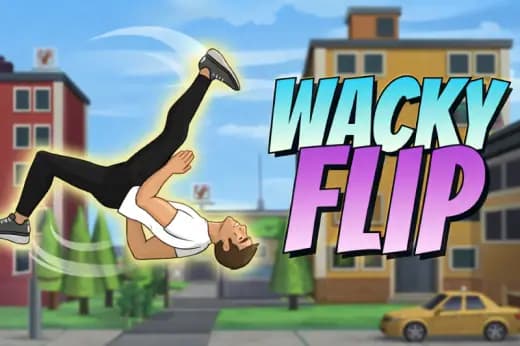
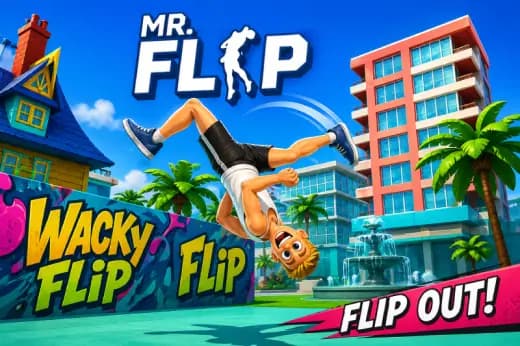
The goal in Wacky Flip is to launch your ragdoll stunt character, rotate through clean flips, and land upright inside the target zone. Better timing, controlled rotation, and stable landings produce higher scores, while crashes force a quick retry and teach you the exact rhythm of each stunt setup.

CORE FEATURES

One-tap controls for easy play
Colorful pixel art graphics
Unlockable characters using gathered coins
Endless runner style mechanics
Seamless performance on PC and mobile screens

Advertisement

About Wacky Flip Unblocked

Play Wacky Flip online free with no download required. Stick wild ragdoll backflips, nail clean landings, and enjoy an unblocked browser stunt game.

Wacky Flip Unblocked Description Image

Wacky Flip is a physics-based HTML5 browser game built around one brutally simple idea: launch a ragdoll athlete, rotate through flips, and land without folding into the floor. The player does not steer a car, fire weapons, or manage an inventory. The entire game lives in the timing of a press, a release, another hold, and a landing correction. That direct input loop makes Wacky Flip free-to-play, fast to restart, and ideal for instant play on desktop browsers, phones, tablets, and Chromebooks.

Technically, Wacky Flip belongs to the modern browser-native stunt genre. It runs through web technology rather than a downloadable executable, so the game can load inside Chrome, Edge, Safari, or Firefox with no download and no installation barrier. Its challenge comes from simulated gravity, angular momentum, collision response, and ragdoll body behavior. Every failed landing teaches something visible: too much launch force, too little airtime, late rotation, or a bad foot angle on impact.

Game NameWacky FlipCategoryGamesTechnologyHTML5 / Browser NativePlatformsPC, Mobile, Tablet, ChromebookRequires Download?No, Instant Play

What's In This Guide

About Wacky Flip

Wacky Flip follows a lineage of browser stunt games that replaced complex button layouts with readable physics. Older web games often relied on Flash plug-ins, fixed animations, and simple hitboxes. Modern HTML5 games use canvas rendering and browser-supported input events to create faster, cleaner play. Wacky Flip uses that approach well because the player immediately sees cause and effect: hold longer, jump higher; tuck longer, rotate faster; land crooked, crash harder.

The design philosophy centers on failure that feels funny but fair. A poor landing rarely looks random. The ragdoll bends, clips, bounces, or collapses because the body carries speed into the surface at a bad angle. That slapstick feedback gives the game its personality, but the scoring loop stays skill-based. The best runs come from repeatable timing, not luck.

Wacky Flip also fits the cultural rise of short-session mobile gaming and Chromebook compatible browser games. It asks for seconds, not hours. A player can attempt a stunt during a break, restart instantly, and improve through muscle memory. That makes play Wacky Flip online searches especially common among users who want a free game without an app store, account, or heavy hardware requirement.

  • Engine & Tech: The game uses browser-native HTML5 rendering, typically through canvas-style drawing and lightweight physics updates that target smooth frame pacing on common devices.
  • Accessibility: Low-end Chromebooks handle the game well because it avoids large 3D assets, complex shaders, and constant network streaming during play.
  • Updates: Public version history varies by host, so players should treat layout changes, new stunt setups, or tuning adjustments as version-dependent.

Complete Wacky Flip Controls & Mechanics

Wacky Flip feels sharp because its controls compress the entire stunt into a few meaningful inputs. On keyboard, Space commonly handles charge and rotation. On desktop, the mouse button performs the same role. On mobile, touch input replaces both. The important part is not the device; it is the press duration. The game reads how long the player holds and releases, then converts that timing into launch power and body rotation.

Input latency matters in a stunt game because a late release changes the entire arc. Wacky Flip rewards early decisions. If the player waits until the character has already tipped past vertical, the ragdoll keeps rotating because angular momentum does not vanish instantly. This gives the game weight. The body does not snap into a canned landing animation. It obeys the motion the player created.

Collision detection completes the loop. The landing surface checks body contact, impact angle, and stability. A clean feet-first landing can score well, while a shoulder-first or head-first impact usually ruins the attempt. The funniest crashes come from the same system that makes clean runs satisfying: the game lets momentum play out.

  1. Movement: Wacky Flip does not use traditional walking controls. The player manipulates launch force and airborne body position with keyboard, mouse, or touch timing.
  2. Action: The main action is the flip input. Holding it tucks the character and increases rotation speed; releasing it slows active rotation control.
  3. Mechanics: Gravity pulls the character through a fixed arc while angular momentum carries the body around its center of mass until contact with the landing area.

Advanced Wacky Flip Strategies & Tips

Strong Wacky Flip players stop reacting late and start planning the full stunt before launch. The first decision sets the run. Too little charge creates a low arc with no time to rotate. Too much charge sends the ragdoll past the target or forces a desperate landing. The best approach uses a controlled launch that gives enough hang time for one clean rotation before adding riskier multi-flip attempts.

Frame-perfect play comes from watching body landmarks. The feet matter most. New players stare at the head because crashes look dramatic there, but successful landings start when the feet swing under the hips. Release rotation slightly before the feet point down. The remaining momentum will finish the alignment.

High-score routing means choosing consistency before greed. A clean single flip usually beats a chaotic double flip that lands on one knee and tumbles out of the zone. Once a launch setup feels automatic, add a longer tuck window. Treat every extra flip as a controlled upgrade, not a panic move.

  • Perfect Your Timing: Release the rotation input when the character is just short of upright, not when the body already looks vertical.
  • Manage Resources/Speed: Use moderate launch power on tight targets and save full-power jumps for stages with longer landing distance.
  • Avoid Common Mistakes: Do not hold the flip button through descent unless you need one final rotation; late tucks cause most over-rotations.
  • Optimize Runs: Repeat the same power window several times before changing technique, then adjust one variable at a time.

How to Play Unblocked at School

A Wacky Flip unblocked page works because modern HTML5 games run inside the browser instead of launching a separate program. School and office devices often block executable files, installers, and plug-ins because those formats can change system files. A browser game uses standard web delivery. The page loads assets, stores them temporarily in memory or cache, and sends player input through normal browser events.

This technical difference matters for students using managed Chromebooks. Flash games needed unsupported plug-ins and often failed on locked-down machines. HTML5 games use the browser features already allowed for normal websites. That makes Wacky Flip no download play safer, lighter, and more practical than old executable stunt games.

  • Chromebook Support: Wacky Flip can run on school-style devices because the browser handles rendering, input, and memory without installing software.
  • Browser Native: No executables are required, which reduces compatibility problems and keeps the game simple to launch.

Known Glitches & Quirks

Physics games always create memorable edge cases, and Wacky Flip benefits from that chaos. A ragdoll can sometimes catch a corner, bounce with unexpected force, or slide after a landing that looked stable. These quirks usually come from collision resolution. When a body part intersects a surface at speed, the engine must push it out and preserve motion, which can create exaggerated rebounds.

Players also report visual clipping in games of this style when limbs pass near platforms or when the camera tracks a fast tumble. These moments rarely break the core scoring loop. Speedrunners and high-score players may even use tiny bounce behaviors to save bad landings or squeeze extra distance from a sloppy impact.

  • Physics Quirks: A near-edge landing can sometimes kick the ragdoll upward, creating an accidental recovery or a spectacular second crash.
  • Visual Desync: Limbs may clip through scenery during high-speed tumbles, especially when the body rotates quickly on impact.

Top Alternatives & Competitors

Wacky Flip competes most directly with physics stunt and reaction games, not traditional platformers. Compared with rhythm-heavy runners, it gives the player fewer inputs but more physical consequence. One press can decide the entire attempt. That makes the difficulty curve cleaner and more punishing than games that allow constant steering corrections.

Against endless runners, Wacky Flip feels more like a stunt laboratory. Subway-style games test lane changes and obstacle reading. Slope tests continuous steering under speed. Wacky Flip tests one compact skill: converting timing into a stable landing. That focus makes it easier to learn and harder to master than it first appears.

  • Flip Master: Similar stunt appeal, but Wacky Flip emphasizes quick browser access and compact landing challenges.
  • Happy Wheels: Both use ragdoll comedy, but Wacky Flip offers a cleaner score-focused loop with less level clutter.

Similar Games on ZGames

If you enjoy Wacky Flip, you may also like these games:

Conclusion

Wacky Flip succeeds because it strips stunt gameplay down to timing, rotation, gravity, and impact. The game gives players immediate feedback after every attempt, and each crash points toward a better next run. It works as a Wacky Flip browser game because the loop loads quickly, restarts instantly, and does not need a download.

Play Wacky Flip online if you want a free HTML5 game that rewards precision without burying the controls under menus. It works on PC, mobile, tablet, and Chromebook, making it a practical pick for instant browser play whenever you want one more clean landing.

Advertisement

More Games You'll Love

Controls

Hold the mouse button, Space, or the touchscreen to charge your jump, then release to launch. Hold again in midair to flip, and release early to stabilize before landing.

Frequently asked questions

How do you land flips consistently in Wacky Flip?
Release power before the jump reaches its peak, then hold the flip input only long enough to rotate once or twice. Watch the character’s feet, not the head. Stop rotating slightly early, because momentum keeps the ragdoll moving for a fraction of a second before touchdown.
Why does my character over-rotate in Wacky Flip?
Over-rotation happens when you hold the tuck or flip input too long after launch. The character keeps angular momentum even after you release, so late corrections usually fail. Use shorter presses, start with single flips, and only add extra rotation when the landing zone has enough distance.
How many stunt areas does Wacky Flip have?
Wacky Flip is built around stunt setups with different launch angles, platform distances, and landing targets. Exact stage layouts can vary by version, but the core challenge stays the same: read the ramp, control airborne rotation, and land inside the scoring zone without collapsing the ragdoll.
What is the best mobile control method for Wacky Flip?
On mobile, short tap-and-hold inputs work better than long presses. Keep your thumb near the lower half of the screen so you can release quickly. If the character spins too fast, reduce hold time rather than trying to correct the landing at the final moment.

"Wacky Flip Unblocked" and related names may be trademarks of their respective owners. This page is an informational game directory only; ZGames.io is not sponsored by or affiliated with trademark holders unless a specific game page says otherwise.

Player Reviews

No player reviews yet

No Reviews Yet

Be the first to share your feedback and rate this game!

Submit Your Review

Excellent

Keep exploring

More Sports Games

View all Sports Games »