Play Dashmetry Unblocked Online Free
Play Dashmetry Unblocked, a Casual game available in your browser. Review the controls, features, and compatibility notes below, then choose Play when you are ready.
Advertisement










Advertisement
Most Popular This Month
View All results »
























TECHNICAL SPECIFICATIONS
OPERATIONAL GUIDE
- 1. Read the Geometry
Watch the spacing between spikes, blocks, and gaps before you input. Dashmetry rewards pattern recognition because hazards appear in rhythmic chains rather than random bursts.
- 2. Time Each Jump
Press jump slightly before the edge of a platform or hazard. Short taps clear compact spikes, while longer holds carry your character over wider gaps.
- 3. Control Momentum
Avoid unnecessary inputs after landing. Let the game’s forward motion carry you when the path is flat, then react only when the next obstacle demands it.
- 4. Restart and Memorize
Use quick retries to learn each section. Repeated attempts turn difficult obstacle strings into predictable timing patterns.
CORE FEATURES
Advertisement
About Dashmetry Unblocked
Play the Dashmetry game online free with no download: sprint, jump, and react through unblocked browser obstacle courses on PC, mobile, and Chromebook.
What's in this guide
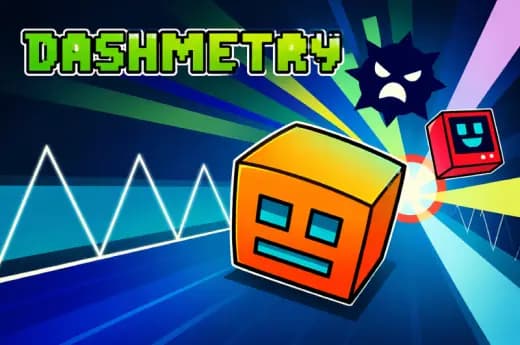
Dashmetry game is a browser-native precision arcade platformer built around fast obstacle reading, tight jump timing, and geometric level design. The game runs as an HTML5 game in modern browsers, which means players can load it directly on PC, mobile, tablet, or Chromebook without installing an executable or app package.
At its core, Dashmetry uses the same appeal that made rhythm-based obstacle games explode in browser gaming: the player performs simple inputs under severe timing pressure. You are not managing a giant move list. You are watching shapes, judging distance, pressing at the right frame, and restarting instantly when the run collapses.
Game NameDashmetryCategoryGamesTechnologyHTML5 / Browser NativePlatformsPC, Mobile, Tablet, ChromebookRequires Download?No, Instant PlayWhat's In This Guide
- About Dashmetry game
- Dashmetry game Controls & Mechanics
- Advanced Strategies & Tips
- How to Play Unblocked at School
- Platforms & Versions
- Known Glitches & Quirks
- Top Alternatives & Competitors
About Dashmetry game
Dashmetry belongs to the modern wave of lightweight browser game design, where one-button skill, quick failure, and immediate retry loops create momentum without menus getting in the way. Its design philosophy centers on readable danger: spikes, platforms, gaps, and angular structures tell the player exactly what went wrong.
The physics model feels intentionally strict. The character’s motion favors predictable arcs over floaty correction, so a bad jump usually fails because the input arrived late, not because the game hid the rule. That clarity gives Dashmetry free-to-play appeal for short sessions and serious high-score attempts.
Its cultural fit is obvious. Students, Chromebook users, mobile players, and desktop arcade fans all gravitate toward games that load fast and respect a spare minute. Dashmetry no download access matters because the browser becomes the platform, not a barrier.
- Engine & Tech: HTML5 rendering keeps the game responsive in Chrome, Edge, Firefox, and Safari-style environments.
- Accessibility: Simple inputs and low hardware demand make it friendly to school laptops and budget phones.
- Updates: Public version history is not confirmed, so players should treat available builds as browser-hosted releases.
Dashmetry game Controls & Mechanics
Dashmetry feels best when played with deliberate rhythm. Keyboard input gives the sharpest response because each press maps cleanly to movement or jumping, while touch screens trade key travel for direct tapping. Either way, the important skill is release control. Holding too long can be as deadly as pressing too late.
Collision detection in a geometry runner usually depends on simple hitboxes attached to the player and hazards. That creates a fair but unforgiving rule set. If the character clips a spike point or lands short of a platform, the run ends immediately and the player receives instant feedback.
Momentum matters because the stage pushes the pace. The player does not stop and plan every jump like a traditional platformer. Instead, Dashmetry browser game mechanics ask players to read the next shape while already moving through the current one.
- Movement: Use arrow keys, WASD, Space, mouse click, or screen tap depending on device support.
- Action: Press to jump or trigger the primary movement action; hold only when a larger gap requires extra airtime.
- Mechanics: Gravity, fixed speed, and clean collision windows create the challenge; memorization improves consistency.
Advanced Strategies & Tips
Strong Dashmetry players stop staring at the character. They watch the next obstacle cluster. That one adjustment changes everything because the game rewards anticipation more than panic reaction. Your eyes should lead your hands by at least one hazard.
For high-score routing, divide the course into patterns: single spikes, double spikes, platform stairs, low-ceiling jumps, and long gaps. Each pattern needs a different press length. Treat every failure as data about timing, not as bad luck.
The biggest veteran mistake is input stacking. Players mash after a scary save and ruin the next clean landing. Dashmetry HTML5 game timing works better with controlled taps, quiet hands, and quick restarts after obvious errors.
- Perfect Your Timing: Tap before the edge, not on it; browsers display motion continuously, but your hand needs a tiny lead.
- Manage Resources/Speed: Since speed is built into the course, manage airtime instead of trying to slow down.
- Avoid Common Mistakes: Do not hold jump through compact spike chains unless the next platform sits far away.
- Optimize Runs: Memorize the first difficult sequence until it becomes automatic, then practice the next choke point.
How to Play Unblocked at School
In gaming search, unblocked means a game can be accessed through a browser when traditional game downloads, installers, or app stores are restricted. HTML5 games differ from old Flash files and executable PC games because the browser handles rendering, input, audio, and memory inside a controlled environment.
Dashmetry unblocked access works well on many managed devices because there is no installer, no privileged file system access, and no separate launcher. The game loads like a webpage, runs in RAM, and ends when the tab closes. Network policies still vary, so access depends on the local filter.
- What is Unblocked: It describes browser access without installing software on the machine.
- Chromebook Support: Players can play Dashmetry on Chromebook through a supported browser with keyboard or touch input.
- Browser Native: No executables are required, which keeps the experience simple and safer than unknown downloads.
Platforms & Versions
Dashmetry online play is strongest on desktop browsers because physical keys give precise press and release feedback. PC and Chromebook players can use a larger screen to read obstacle spacing earlier, which helps in fast sections where hazards arrive in dense patterns.
Dashmetry mobile support changes the feel. A tap replaces a key press, and the player must account for finger placement, screen size, and visual obstruction. The tradeoff works well for short sessions because the game’s control scheme stays simple.
- Browser Version: Instant play, no installation, fast retries, and easy access from ZGames.io.
- Mobile Experience: Touch input supports quick taps, but players should keep thumbs away from the central action.
Known Glitches & Quirks
Like many browser-native arcade games, Dashmetry can feel slightly different across devices if the browser throttles performance, background tabs consume memory, or the screen refresh rate changes perceived motion. These are platform conditions rather than confirmed design flaws.
Minor visual quirks may appear when a fast-moving character overlaps angular geometry for a fraction of a second before failure. Competitive players often use these moments to understand hitbox boundaries and adjust timing earlier on the next attempt.
- Physics Quirks: Edge landings can feel strict because the collision box may fail before the sprite looks fully off the platform.
- Visual Desync: Brief clipping can happen during high-speed obstacle contact, especially on weaker devices.
Top Alternatives & Competitors
Dashmetry sits close to Geometry Dash in spirit: compact inputs, geometric hazards, and punishment for sloppy rhythm. The difference is that Dashmetry’s browser-first access makes it especially convenient for instant play sessions on school laptops, tablets, and shared PCs.
Compared with endless runners like Temple Run 2 or Subway Surfers, Dashmetry feels more surgical. Those games emphasize lane changes, pickups, and long-run improvisation. Dashmetry emphasizes exact timing, smaller windows, and memorized obstacle chains.
- Geometry Dash: Similar rhythm-platforming pressure with a broader legacy and more recognizable music-driven structure.
- Slope: Faster 3D momentum, less jumping, and more steering-based survival.
Similar Games on ZGames
If you enjoy Dashmetry, you may also like these games:
Conclusion
The Dashmetry game works because it strips arcade platforming to the essentials: see the obstacle, press with discipline, learn the pattern, and try again instantly. Its HTML5 foundation makes it practical for browser game players who want speed without setup.
Play Dashmetry online if you want a free, no download, Chromebook compatible challenge built around timing instead of menus. The best runs come from calm hands, early reads, and the willingness to restart until the geometry finally clicks.
Advertisement
More Games You'll Love
Controls
Frequently asked questions
What is the best timing strategy for Dashmetry spike sections?
How does the Dashmetry movement system work?
Why do I keep crashing after clearing obstacles in Dashmetry?
What should new players practice first in Dashmetry?
"Dashmetry Unblocked" and related names may be trademarks of their respective owners. This page is an informational game directory only; ZGames.io is not sponsored by or affiliated with trademark holders unless a specific game page says otherwise.
Gameplay Video: Dashmetry Unblocked
OFFICIAL SOURCES & SITES
Player Reviews
No Reviews Yet
Be the first to share your feedback and rate this game!
Submit Your Review
Keep exploring