Play space waves Unblocked Online Free
Play space waves Unblocked, a Arcade game available in your browser. Review the controls, features, and compatibility notes below, then choose Play when you are ready.
Advertisement
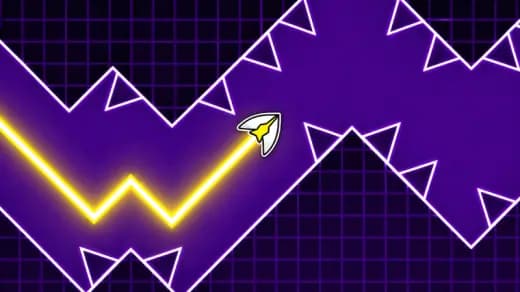
space waves Unblocked


















Advertisement
Most Popular This Month
View All results »


































space waves Unblocked
TECHNICAL SPECIFICATIONS
OPERATIONAL GUIDE
- 1. Control the Wave Angle
Hold the mouse button, Space, W, or Up Arrow to climb diagonally. Release to fall diagonally and create the signature zigzag movement path.
- 2. Thread the Corridors
Keep the arrow away from walls, spikes, and rotating hazards. Use tiny taps in narrow tunnels so the craft stays centered instead of bouncing between danger zones.
- 3. Read Hazard Patterns
Watch the shape of each corridor before reacting. Curved passages, gear clusters, and sharp gates require early inputs rather than last-second corrections.
- 4. Restart and Refine
When you crash, restart quickly and memorize the next pattern. The game rewards repeated attempts because every section teaches a safer route.
CORE FEATURES
Advertisement
About space waves Unblocked
Play space waves online free with no download. Steer a zigzag arrow through unblocked browser tunnels, dodge spikes, and survive sharp turns on any device.
What's in this guide
space waves is a browser-based arcade reflex game built around a simple but demanding movement model: hold to climb, release to drop, and steer a sharp zigzag line through hostile space corridors. The game runs as an HTML5 game in a modern browser, which means the core experience works without plug-ins, installers, or legacy Flash support.
On PC, mobile, tablet, and Chromebook, the main technical appeal comes from instant input feedback. The player does not manage inventories, dialogue trees, or long tutorials. You control one arrow-like craft, read the tunnel geometry, and survive patterns that punish sloppy timing. That direct loop makes space waves easy to understand and hard to master.
Game Namespace wavesCategoryGamesTechnologyHTML5 / Browser NativePlatformsPC, Mobile, Tablet, ChromebookRequires Download?No, Instant PlayWhat's In This Guide
- About space waves
- Complete Controls & Mechanics
- Advanced Strategies & Tips
- How to Play Unblocked at School
- Platforms & Versions
- Known Glitches & Quirks
- Top Alternatives & Competitors
About space waves
space waves belongs to the modern wave-runner branch of arcade games, a lineage shaped by one-button flight, instant restarts, and level layouts that test rhythm more than raw reaction speed. Its closest design ancestor is the wave mode popularized by precision platformers, where vertical movement flips between upward and downward diagonals instead of using standard jumping physics.
The design philosophy is ruthless in a useful way. Every wall, spike, and rotating hazard teaches spacing. The player learns that the craft has no brake, no shield, and no recovery animation. A clean path depends on maintaining a safe angle through tunnels while anticipating the next gap before the arrow reaches it.
Because the game uses browser-native HTML5 technology, it can run on common school and home devices without a separate executable. The rendering workload stays lightweight compared with large 3D titles, so the game suits mobile gaming sessions, Chromebook compatible play, and quick browser game access.
- Engine & Tech: Modern builds typically render with canvas-based or WebGL-assisted HTML5 methods, targeting smooth frame pacing and low input delay.
- Accessibility: The simple visuals help low-end devices maintain responsiveness because the browser only tracks a small player object, collision shapes, and moving hazards.
- Updates: Available versions may vary by site, but the core loop remains stable: choose a stage, survive the corridor, and restart instantly after a crash.
space waves Complete Controls & Mechanics
The control scheme defines the whole game. Pressing or holding an input sends the arrow upward at a diagonal. Releasing that input sends it downward at a diagonal. You do not steer left or right in the usual sense; the stage scrolls forward while your vertical control creates the wave pattern.
Good play feels almost musical. Long holds create steep climbs, while rapid taps flatten the movement into smaller oscillations. The collision detection demands respect because the craft usually fails the moment it touches a wall or hazard. That strict hit response keeps the rules readable.
Input latency matters more here than in slower puzzle games. A delayed tap can push the arrow into a ceiling; an early release can drop it onto a floor spike. The best technique is to control the angle before danger arrives, not after the craft has already entered the gap.
- Movement: Use mouse click, touchscreen press, Space, W, or Up Arrow depending on device support. Hold to climb; release to descend.
- Action: The main action is modulation. You shape the wave by choosing exactly how long each press lasts.
- Mechanics: The game uses constant forward motion, diagonal vertical shifts, and unforgiving collision boundaries to create pressure.
Advanced Strategies & Tips for space waves
Advanced players win by reducing unnecessary movement. New players often swing too high, panic, then dive too low. That creates wide zigzags that waste corridor space. Strong runs use compact taps that keep the arrow near the safest middle lane until the level forces a larger change.
Pattern reading beats reflex spam. When a tunnel narrows, look at the next opening and begin adjusting before the craft reaches the choke point. Rotating hazards also require patience. If a gear cluster blocks the direct line, flatten your wave briefly and pass when the opening aligns.
High-score routing depends on memorization. Since each failed attempt restarts quickly, every crash should answer one question: did you hold too long, release too early, or enter the section from a bad height? Fix that single mistake on the next run.
- Perfect Your Timing: Use micro-taps in narrow passages. A tap that lasts too long changes the angle enough to hit a ceiling.
- Manage Resources/Speed: There is usually no speed boost to manage, so your real resource is vertical space. Spend it carefully.
- Avoid Common Mistakes: Do not chase the center after every correction. Sometimes the safest line sits slightly high or low before a gate.
- Optimize Runs: Memorize the first three dangerous patterns of each level so early restarts become rare.
How to Play Unblocked at School
space waves unblocked means the game can be accessed through a browser page that does not require an installed program. Older Flash games depended on blocked plug-ins, while executable PC games often fail on managed school devices. An HTML5 browser game loads assets through the page and runs inside the browser sandbox.
This matters on Chromebooks because most school hardware restricts downloads and app installs. A no download arcade game can still run locally in RAM after the page loads, provided the website itself is reachable. Always follow local rules for device use, but technically the game fits the instant play model better than traditional software.
- What is Unblocked: It refers to access through a browser without installers, external launchers, or Flash plug-ins.
- Chromebook Support: The game works well on ChromeOS because it uses keyboard or touch input inside the browser.
- Browser Native: No executable file runs on the machine, which keeps the experience simple and lightweight.
space waves Platforms & Versions
You can play space waves online through a desktop browser, a mobile browser, a tablet, or a Chromebook. The PC version gives the most precise feel because keyboard and mouse inputs make short taps easier to repeat. That matters in late-stage corridors where tiny timing differences decide the run.
On mobile, the game shifts into a touch-first rhythm. Pressing the screen replaces keyboard input, and the shorter distance between thumb and glass can feel immediate. The tradeoff is screen coverage: your finger may hide a small part of the lower corridor, so holding the device steadily helps.
- Browser Version: Best for instant play, free-to-play access, and space waves no download sessions.
- Mobile Experience: Touch controls preserve the same hold-and-release mechanic with a more compact input motion.
Known Glitches & Quirks
Like many precision HTML5 games, space waves can feel different when the browser drops frames. A missed frame may make a hazard appear to jump slightly, even though the collision rules still follow the game state. Closing extra tabs usually improves consistency.
Some players notice edge-touch moments where the arrow appears visually close to a wall before the crash registers. This usually comes from sprite shape, hitbox shape, and screen scaling not matching perfectly. Competitive players treat the visible wall as dangerous and leave extra room.
- Physics Quirks: Very short taps can create a flatter wave, useful for threading low ceilings and floor spikes.
- Visual Desync: Browser zoom or unusual screen ratios may make thin corridors look tighter than expected.
Top Alternatives & Competitors
space waves competes most directly with rhythm-platform and reflex tunnel games. Compared with Geometry Dash, it strips away jumping, coins, and multi-mode variety to focus on the wave mechanic alone. That narrower scope makes each mistake easier to diagnose.
Compared with Slope, the challenge comes from deliberate tap rhythm rather than steering a rolling object through 3D space. Slope emphasizes momentum and lane reading; space waves emphasizes vertical angle control, collision discipline, and quick restarts.
- Geometry Dash: Similar precision timing, but broader level mechanics and more visual complexity.
- Slope: Faster 3D momentum, but less of the sharp hold-release wave rhythm.
Similar Games on ZGames
If you enjoy space waves, you may also like these games:
Conclusion
space waves works because it respects one clean idea: hold, release, survive. The game removes clutter and leaves the player alone with timing, angle control, and unforgiving obstacle layouts.
Play space waves free in your browser when you want a quick skill test with no download, strong Chromebook support, and immediate retries. It is compact, readable, and brutal in exactly the right way.
Advertisement
More Games You'll Love
Controls
Frequently asked questions
How many levels does space waves have?
What is the best technique for tight tunnels in space waves?
Do skins change the hitbox in space waves?
Why does space waves feel laggy during fast sections?
"space waves Unblocked" and related names may be trademarks of their respective owners. This page is an informational game directory only; ZGames.io is not sponsored by or affiliated with trademark holders unless a specific game page says otherwise.
Gameplay Video: space waves Unblocked
OFFICIAL SOURCES & SITES
Player Reviews
No Reviews Yet
Be the first to share your feedback and rate this game!
Submit Your Review
Keep exploring