Play Curve Rush Unblocked Online Free
Play Curve Rush Unblocked, a Adventure game available in your browser. Review the controls, features, and compatibility notes below, then choose Play when you are ready.
Advertisement















Advertisement
Most Popular This Month
View All results »
























TECHNICAL SPECIFICATIONS
OPERATIONAL GUIDE
- 1. Dive on Downslopes
Hold the mouse button, Space, or the screen while the ball is traveling down a hill to increase speed and load momentum into the next launch.
- 2. Release Before the Crest
Let go just before the top of a curve so the ball leaves the surface cleanly instead of grinding into the peak and losing speed.
- 3. Aim for Smooth Landings
Touch down on a downward slope with the ball moving in the same direction as the terrain. Clean landings preserve velocity and extend your run.
- 4. Chain Air Time
Use consecutive slopes to create higher arcs, but avoid overjumping into flat ground. Controlled air time scores better than reckless height.
- 5. Read the Terrain Ahead
Watch the next hills before you land. Early planning helps you decide whether to dive, coast, or release for the safest route.
CORE FEATURES
Advertisement
About Curve Rush Unblocked
Play Curve Rush online free with no download. Ride dunes, launch clean arcs, and chase perfect landings in an unblocked browser game on any device today.
What's in this guide
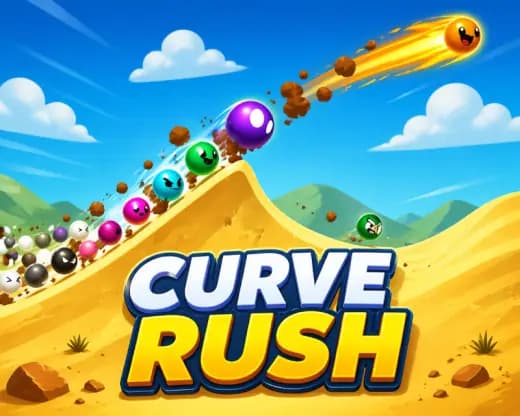
Curve Rush is a browser-based HTML5 physics runner built around one core action: timing pressure and release over curved terrain. The player controls a rolling ball across dune-like hills, using gravity, slope angle, and momentum to convert descents into jumps. Because it runs in a modern browser, the game supports instant play on PC, mobile, tablet, and Chromebook without a separate installer.
The appeal comes from a clean input model with surprisingly strict physics. Hold to dive, release to fly, and land on a matching downward curve. That sounds simple, but every mistake changes speed, angle, and trajectory. Curve Rush rewards players who read terrain early, conserve momentum, and treat each hill as a ramp rather than decoration.
Game NameCurve RushCategoryGamesTechnologyHTML5 / Browser NativePlatformsPC, Mobile, Tablet, ChromebookRequires Download?No, Instant PlayWhat's In This Guide
- About Curve Rush
- Complete Controls & Mechanics
- Advanced Strategies & Tips
- How to Play Unblocked at School
- Platforms & Versions
- Known Glitches & Quirks
- Top Alternatives & Competitors
About Curve Rush
Curve Rush belongs to the modern wave of lightweight physics arcade games that replaced older Flash runners with HTML5 browser game architecture. Instead of scripted lanes or fixed jump pads, it uses curved terrain as the main system. The player does not steer left and right. The player controls force timing, which makes the game feel closer to a momentum puzzle than a traditional endless runner.
Its design philosophy favors readable failure. When a run ends, the cause is usually clear: the ball landed too flat, hit an uphill face, or lost speed before the next crest. That clarity creates the fast restart loop that defines strong free-to-play browser games. One click starts another attempt, and every attempt teaches slope timing.
Culturally, Curve Rush fits beside high-score school and Chromebook games because it has almost no onboarding friction. The screen loads, the controls are obvious, and skill growth appears within seconds. It also avoids heavy online multiplayer systems, account gates, and large asset downloads, which helps it run well on shared devices.
- Engine & Tech: Curve Rush uses browser-native HTML5 rendering, commonly handled through Canvas or WebGL-style pipelines, with simple shapes, fast collision checks, and smooth frame pacing.
- Accessibility: Low visual overhead helps Chromebooks maintain stable performance because the game asks more from timing than from expensive 3D effects.
- Updates: Public version history is not formally documented, so players should treat visible balance or cosmetic changes as site-level updates unless the developer publishes notes.
Complete Controls & Mechanics in Curve Rush
The control scheme is intentionally narrow. On desktop, press and hold the mouse button or Space to force the ball downward. On mobile, press the screen. Release input to stop pushing downward and let momentum carry the ball into a jump. The entire game lives inside that pressure window.
Input latency matters because the best release point sits just before the crest of a hill. Press too long and the ball drives into the terrain. Release too early and the jump lacks speed. The physics model makes the ball feel heavy enough to punish panic taps but light enough to create dramatic aerial arcs when the downhill angle lines up.
Collision detection focuses on the relationship between the ball and the curved ground. Smooth contact on a descending slope preserves velocity. Contact against a rising slope cancels speed and can end the run. The result feels fair because the terrain itself communicates what the next move should be.
- Movement: Use mouse, Space, or touch to dive. There is no lane switching; forward motion comes from terrain and gravity.
- Action: Release at the lip of a hill to launch. Hold again during descent to angle the ball into the next slope.
- Mechanics: Momentum, gravity, and landing angle decide survival. The cleanest route often uses lower, faster arcs instead of huge jumps.
Advanced Strategies & Tips for Curve Rush
Strong Curve Rush players stop reacting to the current hill and start reading two hills ahead. The immediate landing decides survival, but the next crest decides scoring potential. If the coming terrain is shallow, a huge jump becomes dangerous. If the next valley is deep, a committed dive can create a powerful chain.
Frame-perfect timing mostly appears at the crest. The best release happens when the ball still has downhill speed but has not reached the point where the surface turns upward. That tiny zone converts stored velocity into flight. Late releases feel powerful for a split second, then punish the player with a harsh collision.
High-score routing favors consistency over spectacle. Big air can score well, but only if the landing line remains clean. In longer runs, the safer meta is to keep the ball low, fast, and aligned with descending slopes. Speed is useful only when the player can still control the next touchdown.
- Perfect Your Timing: Release just before the hill flattens, not after the ball reaches the peak.
- Manage Resources/Speed: Treat speed as a resource. Spend it on safe arcs, not blind launches.
- Avoid Common Mistakes: Do not hold through a crest unless the next slope is clearly below your flight path.
- Optimize Runs: Use short hops on tight terrain and save full launches for long valleys with visible landing space.
How to Play Curve Rush Unblocked at School
Curve Rush unblocked usually means the game page is accessible on a network that blocks many entertainment sites. Modern HTML5 games differ from old Flash files and downloadable executables because they run inside the browser sandbox. No installer, plug-in, or local program launch is required, which makes the experience simpler and safer for devices with locked-down settings.
Players should follow school or workplace rules when using shared networks. From a technical perspective, a Curve Rush no download browser game loads assets through standard web requests, then runs locally in RAM while the browser handles input and rendering. That is why it works well as a Chromebook compatible HTML5 game when the site itself is permitted.
- What is Unblocked: It means the page is not restricted by the local network filter and can load directly in the browser.
- Chromebook Support: The game works on ChromeOS because it uses browser input, memory, and rendering rather than installed software.
- Browser Native: No executable files or legacy Flash plug-ins are needed for instant play.
Platforms & Versions
You can play Curve Rush online through a desktop browser, a mobile browser, a tablet, or a Chromebook. The browser version is the cleanest version for most players because it removes installation steps and keeps the restart loop immediate. Keyboard and mouse provide slightly sharper release timing, especially during fast downhill sections.
Curve Rush mobile works because the single-button control scheme maps naturally to touch. A thumb press replaces Space or mouse input. The main difference is screen space: mobile players need to look farther ahead while their finger covers part of the display, so shorter controlled jumps often beat aggressive launches.
- Browser Version: Best for instant play, quick restarts, and stable controls with no download.
- Mobile Experience: Touch controls keep the same hold-and-release rhythm with minimal interface clutter.
Known Glitches & Quirks
Physics runners often produce small quirks because curved terrain creates many contact angles. In Curve Rush, the most common oddity is a landing that looks safe but loses speed because the ball touches a nearly flat segment. The engine treats the contact as impact rather than a glide, so the run feels abruptly slower.
Visual desync can also appear during fast arcs, especially on low-refresh screens. The ball may seem to clip close to a slope while the collision system calculates a clean pass or a hard hit. These moments rarely break the game, but speed-focused players learn to respect the hidden cost of steep landings.
- Physics Quirks: Near-flat landings can drain momentum even when the ball does not visibly crash.
- Visual Desync: Fast movement may create slight clipping illusions on older mobile devices or low-end Chromebooks.
Top Alternatives & Competitors
Curve Rush competes most directly with momentum arcade games where the player reads terrain at high speed. Compared with Slope, it feels less about steering reflexes and more about vertical timing. Slope asks for constant left-right correction; Curve Rush asks for precise pressure control over hills.
Compared with Geometry Dash, Curve Rush is less memorization-heavy. Geometry Dash often rewards learning obstacle layouts, while Curve Rush rewards understanding physics patterns that change the feel of every run. Temple Run 2 and Subway Surfers offer broader runner systems, but Curve Rush delivers a purer one-action skill test.
- Slope: Faster lateral control, sharper steering, and a harsher obstacle field.
- Geometry Dash: More rhythm memorization, fixed hazards, and level-based progression.
Similar Games on ZGames
If you enjoy Curve Rush, you may also like these games:
Conclusion
Curve Rush succeeds because it turns one input into a full physics language. Hold, release, land, repeat. Every slope tests timing, angle reading, and restraint. The game works as a quick mobile gaming session or a serious high-score grind on desktop.
Play Curve Rush free in your browser when you want an HTML5 game with instant play, no download, and clean skill progression. It is simple to start, hard to master, and especially strong on Chromebook devices where lightweight performance matters.
Advertisement
More Games You'll Love
Controls
Frequently asked questions
How does scoring work in Curve Rush?
What is the best way to land smoothly in Curve Rush?
How many levels are in Curve Rush?
Why does my run end suddenly in Curve Rush?
"Curve Rush Unblocked" and related names may be trademarks of their respective owners. This page is an informational game directory only; ZGames.io is not sponsored by or affiliated with trademark holders unless a specific game page says otherwise.
Gameplay Video: Curve Rush Unblocked
OFFICIAL SOURCES & SITES
Player Reviews
No Reviews Yet
Be the first to share your feedback and rate this game!
Submit Your Review
Keep exploring