Play Geometry Arrow Online Free
Play Geometry Arrow, a Arcade game available in your browser. Review the controls, features, and compatibility notes below, then choose Play when you are ready.
Advertisement


















Advertisement
Most Popular This Month
View All results »



































Geometry Arrow
TECHNICAL SPECIFICATIONS
OPERATIONAL GUIDE
CORE FEATURES
Advertisement
About Geometry Arrow
Play Geometry Arrow online free: hold, release, and thread a zigzag arrow past spikes in this unblocked browser game with no download on mobile.
What's in this guide

Geometry Arrow is a browser-native HTML5 skill game built around one of the cleanest control ideas in arcade design: press to climb, release to fall, and survive a hostile corridor of spikes, angles, and narrow gaps. The game runs directly inside a modern web browser, which makes it playable on PC, mobile, tablet, and Chromebook without an installer, plug-in, or executable file. Its appeal comes from immediate feedback. Every tap changes the arrow’s diagonal path, every wall punishes sloppy timing, and every restart teaches a slightly sharper route.
Technically, Geometry Arrow belongs to the precision runner and wave-control family of browser games. Instead of free movement, the player manages vertical momentum through binary input. That creates a compact but demanding physics loop: the arrow never stops moving forward, so success depends on reading geometry ahead of time. On capable browsers, the HTML5 canvas or WebGL-style rendering pipeline keeps shapes crisp, input response fast, and restarts almost instant. That matters because this game lives on repetition, rhythm, and tiny corrections.
Game NameGeometry ArrowCategoryGamesTechnologyHTML5 / Browser NativePlatformsPC, Mobile, Tablet, ChromebookRequires Download?No, Instant PlayWhat's In This Guide
- About Geometry Arrow
- Complete Controls & Mechanics
- Advanced Strategies & Tips
- How to Play Unblocked at School
- Known Glitches & Quirks
- Top Alternatives & Competitors
About Geometry Arrow
Geometry Arrow reflects a broader arcade tradition shaped by minimalist obstacle games, rhythm runners, and reaction-based HTML5 game design. Its exact developer and release date are not publicly confirmed, but the design clearly follows the modern browser game philosophy: reduce the control scheme to one action, then make that action brutally meaningful. The arrow is not a character with complex moves. It is a moving vector, and the level is a test of whether your timing can keep that vector alive.
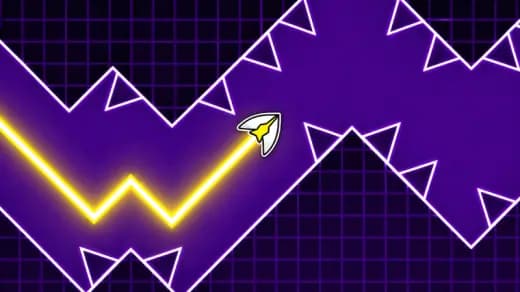
The physics engine likely uses a fixed or semi-fixed update loop that applies a constant forward speed while altering vertical velocity based on input state. Holding the control reverses or increases upward motion; releasing returns the arrow to downward travel. Collision detection checks the arrow against spikes, ceilings, floors, and angled barriers. The simplicity hides the difficulty. Because the arrow travels diagonally, a tiny delay can shift the entire path into danger.
Culturally, games like Geometry Arrow thrive because they turn failure into information. A crash does not feel random when the obstacle shape remains readable. The player sees the mistake, restarts, and adjusts the next attempt by a fraction of a second. That loop made precision browser games popular on school laptops, office breaks, and mobile gaming sessions where short attempts matter more than long campaigns.
- Engine & Tech: The game uses browser-native HTML5 rendering, allowing fast 2D shapes, responsive input polling, and smooth restarts without legacy Flash support.
- Accessibility: It runs well on low-end Chromebooks because the visual load stays light: flat geometry, limited animation overhead, and small memory demand.
- Updates: Public update history is not confirmed, so players should expect a focused arcade build rather than a live-service progression system.
Complete Geometry Arrow Controls & Mechanics
Geometry Arrow feels sharp because the control scheme gives the player direct responsibility for altitude. On keyboard, Space or the arrow keys usually provide the cleanest rhythm because the key has a clear down-and-up state. On desktop, mouse input works well for players who prefer click timing. On mobile, touch input turns the screen into a single large control surface, which suits short tap chains and quick corrections.
The critical mechanic is not movement speed. It is angle management. The arrow continues forward automatically, so your hand controls the slope of its path rather than its direction on a full plane. Holding too long sends the arrow into the ceiling. Releasing too long drops it into spikes or the floor. The best runs use rapid, controlled pulses that keep the arrow near the center of the safe lane.
Collision detection in this genre feels unforgiving because the game must decide contact at high speed against pointed shapes. That means visual clarity matters. If the arrow’s body overlaps a spike edge, the run ends even if the tip appears close to open space. Skilled players learn to treat every gap as smaller than it looks. That conservative approach reduces surprise crashes.
- Movement: Use Space, mouse, or touch to lift the arrow diagonally upward; release to let it descend. WASD or arrow-key support may vary by version, but the core action remains press and release.
- Action: There is no attack button or inventory. Your action is altitude correction, performed through taps, holds, and releases.
- Mechanics: Gravity, forward momentum, and collision boxes create the challenge. The arrow never pauses, so every input must account for the next obstacle, not just the current one.
Geometry Arrow Advanced Strategies & Tips
High-level Geometry Arrow play starts with looking ahead. New players stare at the arrow and react to danger after it arrives. Strong players watch the next corridor, pre-position the arrow before the opening, and use small taps to enter cleanly. This changes the game from panic reaction to route execution.
Frame-perfect timing matters most in narrow zigzag sections. If your browser runs at a stable refresh rate, each input produces a predictable diagonal adjustment. That consistency lets you build muscle memory. Instead of improvising every gap, you repeat a rhythm: lift, cut, stabilize, lift again. The more stable the rhythm, the fewer extreme corrections you need.
Resource management in Geometry Arrow means managing vertical space. Think of the corridor center as your safest resource. When you drift too close to a ceiling or floor, you lose reaction time. Good players sacrifice dramatic movement for control. They avoid long holds, avoid deep dives, and keep the arrow ready for the next change in slope.
- Perfect Your Timing: Tap before the arrow reaches the wall angle. Late taps create steep corrections and usually cause a second mistake immediately afterward.
- Manage Resources/Speed: Treat open space as a buffer. Stay centered so you have room to climb or fall when the next spike pattern appears.
- Avoid Common Mistakes: Do not hold through a gap just because it looks open. The exit often turns sharply, and overholding sends the arrow into the next ceiling.
- Optimize Runs: Memorize the first dangerous pattern after each restart. Surviving early sections with clean height saves attention for later, tighter sequences.
How to Play Unblocked at School
Geometry Arrow unblocked works well as a school or Chromebook game because it runs inside the browser instead of requiring a downloaded program. Older Flash games needed plug-ins that many schools disabled. Executable games trigger stricter device policies because they install files or request local system access. Modern HTML5 games avoid that problem by loading assets through standard web pages and running gameplay logic inside the browser sandbox.
This does not mean every network allows every game site. Filters can still block domains. But from a technical standpoint, a Geometry Arrow browser game has a lighter footprint than installed software. It uses normal web rendering, stores temporary data in browser memory or cache, and supports instant play. That makes Geometry Arrow no download access especially useful on managed devices where students cannot install apps.
- Chromebook Support: Fully compatible with school devices because it runs locally in RAM through the browser once the page loads.
- Browser Native: No executables are required, which avoids the risks and restrictions tied to installed game files.
Known Glitches & Quirks
Like many fast HTML5 arcade games, Geometry Arrow can feel slightly different across devices. Browser refresh rate, input hardware, and screen scaling can affect the perceived timing. A laptop keyboard may register taps more cleanly than a worn touchscreen, while a high-refresh display may make motion appear smoother. The game logic remains simple, but the player’s input chain can influence consistency.
Collision quirks usually come from fast diagonal motion against pointed geometry. When the arrow moves several pixels between frames, a collision can appear harsh if the visual overlap happens near a spike tip. Speedrunners in similar games often learn these edges and choose safer lines rather than trusting extreme near-misses. The best tactic is boring but effective: give every spike more room than your eye thinks it needs.
- Physics Quirks: Tiny micro-taps can sometimes flatten the arrow’s path just enough to pass through tight lanes more safely than long press patterns.
- Visual Desync: Minor clipping may appear on some browsers when movement, scaling, and collision checks do not visually align perfectly.
Top Alternatives & Competitors
Geometry Arrow competes most directly with rhythm-based obstacle games and endless skill runners. Compared with broader platformers, it removes jumping arcs, enemies, collectibles, and stage exploration. That narrower design makes it faster to learn and harder to master. Every obstacle asks the same question: can you control a single diagonal line under pressure?
Against popular rivals, Geometry Arrow feels more focused than many online multiplayer or progression-heavy arcade games. It does not rely on upgrades, cosmetics, or unlock systems to create tension. The difficulty curve comes from spacing, speed, and angle changes. Players who enjoy pure execution will appreciate that clarity; players who want missions or character growth may prefer larger arcade runners.
- Geometry Dash: Geometry Dash offers broader level variety, music synchronization, and multiple movement forms, while Geometry Arrow concentrates on wave-style precision.
- Slope: Slope uses 3D rolling momentum and lane steering; Geometry Arrow uses 2D press-release altitude control with sharper spike punishment.
Similar Games on ZGames
If you enjoy Geometry Arrow, you may also like these games:
Conclusion
Geometry Arrow is a compact, demanding, free-to-play HTML5 game built for instant browser sessions. It strips arcade movement down to one input and then tests timing, anticipation, and composure through increasingly dangerous geometric paths. That design makes every crash understandable and every clean passage satisfying.
You can play Geometry Arrow online free on ZGames.io with no download, no installer, and strong support for PC, mobile, tablet, and Chromebook. If you want a fast browser game that rewards precise hands instead of long tutorials, this is a sharp pick.
Advertisement
More Games You'll Love
Controls
Frequently asked questions
How does the arrow gravity mechanic work in Geometry Arrow?
What timing pattern helps with tight spike corridors in Geometry Arrow?
Why does the arrow crash when it looks like it cleared the spike?
How can I improve on later Geometry Arrow obstacle sections?
"Geometry Arrow" and related names may be trademarks of their respective owners. This page is an informational game directory only; ZGames.io is not sponsored by or affiliated with trademark holders unless a specific game page says otherwise.
OFFICIAL SOURCES & SITES
Player Reviews
No Reviews Yet
Be the first to share your feedback and rate this game!
Submit Your Review
Keep exploring