Play Slope Rider 3D Unblocked Online Free
Play Slope Rider 3D Unblocked, a Arcade game available in your browser. Review the controls, features, and compatibility notes below, then choose Play when you are ready.
Advertisement


















Advertisement
Most Popular This Month
View All results »






























TECHNICAL SPECIFICATIONS
OPERATIONAL GUIDE
CORE FEATURES
Advertisement
About Slope Rider 3D Unblocked
Play Slope Rider 3D online for free with no download. Steer downhill, dodge gaps and barriers in this unblocked browser racer on PC, mobile, Chromebook.
What's in this guide
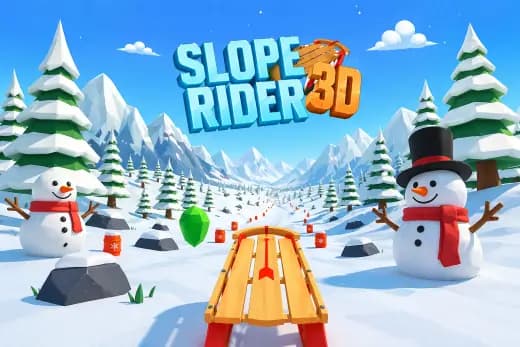
Slope Rider 3D is a browser-based downhill riding game built around fast lane correction, slope physics, and continuous obstacle reading. It belongs to the modern HTML5 game category, meaning it runs inside a web browser without a separate installer, plug-in, or executable file. On supported devices, the game uses browser-native rendering technology such as Canvas or WebGL-style 3D presentation to create a moving track, a forward camera, and responsive rider movement.
The core loop is simple but demanding: steer through a steep course, avoid barriers, survive jumps, and push for a longer distance score. Players can use PC, mobile, tablet, or Chromebook hardware because the input model only needs directional control and quick timing. That makes Slope Rider 3D no download, instant play, and suitable for short sessions where precision matters more than long tutorials.
Game NameSlope Rider 3DCategoryGamesTechnologyHTML5 / Browser NativePlatformsPC, Mobile, Tablet, ChromebookRequires Download?No, Instant PlayWhat's In This Guide
- About Slope Rider 3D
- Complete Controls & Mechanics
- Advanced Strategies & Tips
- How to Play Unblocked at School
- Known Glitches & Quirks
- Top Alternatives & Competitors
About Slope Rider 3D
Slope Rider 3D follows the design language of slope runners: a minimalist 3D track, a constantly moving player object, and hazards that force rapid decisions. The format grew from early browser arcade games that tested reflexes with simple geometry rather than scripted story scenes. The best examples work because every second asks the player to perform one clear action with their hands: steer, correct, survive.
The physics model usually centers on forward velocity, lateral acceleration, gravity, and collision boundaries. The rider moves down a sloped path while the camera tracks from behind, making the next obstacle readable but never fully comfortable. That camera angle creates pressure. You can see danger coming, but you must commit early because speed compresses the reaction window.
Its cultural appeal comes from accessibility. Slope Rider 3D free play works in a browser tab, loads quickly, and does not require account setup. It is a single-player score-chase, not an online multiplayer game, so every run depends on personal rhythm rather than matchmaking.
- Engine & Tech: The game runs as an HTML5 game with browser-native rendering, using lightweight 3D assets and fast redraw cycles for smooth motion.
- Accessibility: It performs well on low-end Chromebooks because controls are simple, assets are compact, and gameplay relies on local browser processing.
- Updates: Public version history may vary by host, so track layouts, cosmetics, or performance changes can differ between builds.
Complete Slope Rider 3D Controls & Mechanics
Slope Rider 3D feels sharp because the player constantly balances steering input against forward momentum. Pressing left or right does not merely teleport the rider into a lane; it shifts position across the slope while speed continues to pull forward. That creates the central tension. If you wait too long, the rider cannot cross the danger zone in time.
Keyboard controls usually use the arrow keys or A and D for lateral movement. On mobile, touch or swipe input fills the same role. The strongest players avoid holding a direction longer than necessary. Short taps produce cleaner corrections, especially when the path narrows or obstacles appear in staggered formations.
Collision detection defines the punishment. Barriers stop the run when the rider intersects their hitbox, while gaps punish poor alignment and late steering. The track edges matter just as much as visible objects. A clean run often comes from returning to center after every dodge, because center positioning creates the widest escape angle.
- Movement: Use arrow keys, A/D, or touch input to steer left and right across the slope while forward movement continues automatically.
- Action: The main action is not jumping on command; it is positioning for ramps, gaps, and safe lanes before the terrain forces contact.
- Mechanics: Gravity, momentum, speed scaling, and collision boxes combine to make early decisions more reliable than panic steering.
Advanced Slope Rider 3D Strategies & Tips
High-score routing in Slope Rider 3D starts with vision discipline. Do not stare at the rider. Watch the upper-middle section of the track where obstacles first become readable. This gives your hands extra time to plan movement, and in a speed-based browser game, a fraction of a second often separates a record run from a crash.
The safest strategy is controlled centralization. After each dodge, move back toward the middle unless the next pattern clearly demands an edge route. Staying wide feels aggressive, but it limits recovery options. The center line gives you access to both sides and reduces the chance of falling from overcorrection.
Veteran players also manage input rhythm. Instead of reacting to each object as a separate emergency, treat hazard chains like beats. Tap, release, tap again. This avoids the common mistake of holding a direction through one obstacle and sliding directly into the next.
- Perfect Your Timing: Begin steering as soon as a barrier lane becomes obvious, not when it reaches the rider.
- Manage Resources/Speed: Treat speed as the main resource; faster sections demand shorter, earlier inputs.
- Avoid Common Mistakes: Do not hug the edge after a successful dodge, because the next turn may remove your recovery lane.
- Optimize Runs: Favor smooth middle routes over risky edge shortcuts unless the obstacle pattern clearly opens a diagonal path.
How to Play Unblocked at School
Slope Rider 3D unblocked access usually works because modern browser games do not behave like old Flash files or installed desktop programs. Flash required a plug-in that many school networks removed for security. Executable games require downloads and operating system permissions. HTML5 games load through standard web technologies already supported by Chrome, Edge, Safari, and Firefox.
That technical difference matters on managed devices. When you play Slope Rider 3D on Chromebook, the game runs inside the browser sandbox and uses local RAM for active gameplay. ZGames.io hosts Slope Rider 3D as a browser game, so players can start quickly without installing files or changing device settings. Always follow local school or workplace rules.
- Chromebook Support: Fully compatible with school devices because it runs locally in RAM via browser.
- Browser Native: No executables required, bypassing strict device-install restrictions safely.
Known Glitches & Quirks
Like many fast 3D HTML5 games, Slope Rider 3D can show quirks when speed, camera angle, and collision geometry overlap. A rider may appear to clip near an obstacle edge even when the hitbox registers a crash. This does not always mean the game cheated; visual models and collision boxes are often separate systems.
Players may also notice momentary visual desync on low-end hardware if the browser drops frames. The game continues calculating movement, but animation can look less smooth. Closing extra tabs, using hardware acceleration, and playing in a stable browser window usually improves consistency.
- Physics Quirks: Edge contact can sometimes feel generous or harsh depending on the angle and current speed.
- Visual Desync: Minor clipping may appear when the rider passes close to barriers or track seams.
Top Alternatives & Competitors
Slope Rider 3D competes most directly with classic slope runners and reflex-based endless games. Compared with traditional Slope, it emphasizes a rider-style presentation and obstacle reading rather than pure ball rolling. The pacing remains similar: constant forward motion, rising difficulty, and instant failure after major mistakes.
It also shares DNA with games like Geometry Dash, Temple Run 2, and Subway Surfers. Geometry Dash focuses on memorized jumps and music timing. Temple Run 2 and Subway Surfers use lane switching, pickups, and character progression. Slope Rider 3D sits closer to raw physics control: fewer distractions, more steering pressure.
- Competitor 1: Slope offers a purer rolling-ball challenge with sharper geometry and a colder arcade feel.
- Competitor 2: Subway Surfers provides a broader runner structure, while Slope Rider 3D keeps the focus on downhill survival.
Similar Games on ZGames
If you enjoy Slope Rider 3D, you may also like these games:
Conclusion
Slope Rider 3D is a focused free-to-play browser game built for quick reflexes, clean steering, and repeat attempts. Its HTML5 structure makes it practical on PC, mobile, tablet, and Chromebook, while the no download format removes the friction that slows many arcade games down.
Play Slope Rider 3D online if you want a fast downhill score chase that rewards steady hands over luck. The rules are simple, the skill ceiling is real, and every crash teaches a specific lesson about timing, momentum, or positioning.
Advertisement
More Games You'll Love
Controls
Frequently asked questions
How does scoring work in Slope Rider 3D?
What is the safest way to avoid obstacles in Slope Rider 3D?
Can you unlock new riders or vehicles in Slope Rider 3D?
Why does Slope Rider 3D get harder the longer you survive?
"Slope Rider 3D Unblocked" and related names may be trademarks of their respective owners. This page is an informational game directory only; ZGames.io is not sponsored by or affiliated with trademark holders unless a specific game page says otherwise.
OFFICIAL SOURCES & SITES
Player Reviews
No Reviews Yet
Be the first to share your feedback and rate this game!
Submit Your Review
Keep exploring