Play Plonky Unblocked Online Free
Play Plonky Unblocked, a Adventure game available in your browser. Review the controls, features, and compatibility notes below, then choose Play when you are ready.
Advertisement

















Advertisement
Most Popular This Month
View All results »



































Plonky Unblocked
TECHNICAL SPECIFICATIONS
OPERATIONAL GUIDE
CORE FEATURES
Advertisement
About Plonky Unblocked
Play Plonky game online free with no download. Guide a floppy ragdoll through switches, lifts and traps in this unblocked browser physics puzzler on...
What's in this guide
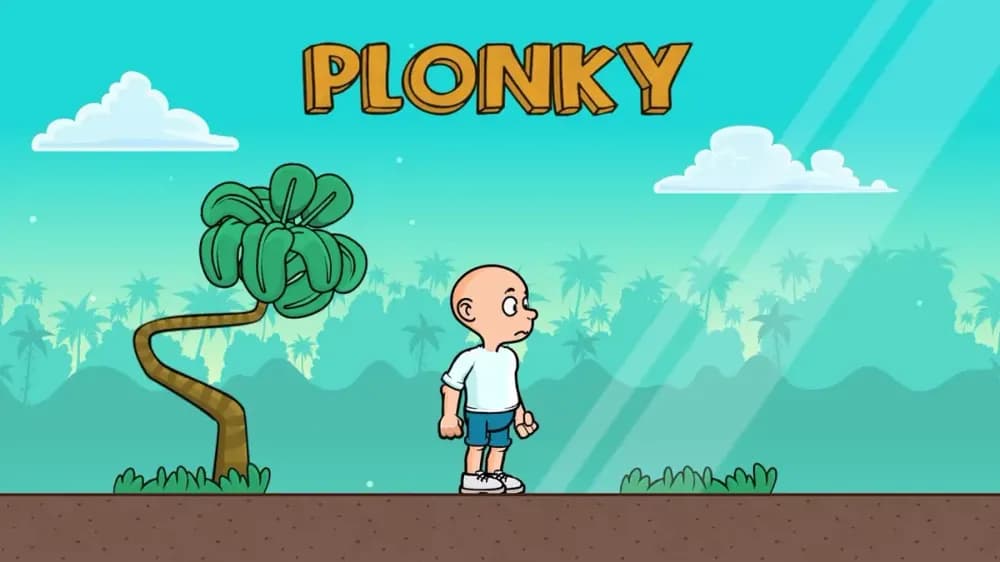
Plonky game is a browser-based HTML5 physics platformer built around unstable movement, ragdoll balance, obstacle timing, and short-session puzzle routing. The player controls a floppy character through compact hazard courses where every input affects posture, speed, and landing angle. Because the game runs directly in a modern browser, it works as an instant play experience on PC, mobile, tablet, and Chromebook without an installer, launcher, or separate app store account.
At its core, Plonky treats movement as a physical problem rather than a simple left-to-right sprint. The player does not merely press forward and win. Each jump, slope, platform edge, and collision can rotate the character, shift momentum, or create a recovery problem. That makes the Plonky browser game especially readable for players who like trial-and-error skill games: failure teaches timing, and clean movement immediately feels earned.
Game NamePlonkyCategoryGamesTechnologyHTML5 / Browser NativePlatformsPC, Mobile, Tablet, ChromebookRequires Download?No, Instant PlayWhat's In This Guide
- About Plonky
- Complete Controls & Mechanics
- Advanced Strategies & Tips
- How to Play Unblocked at School
- Platforms & Versions
- Known Glitches & Quirks
- Top Alternatives & Competitors
About Plonky Game
Plonky belongs to the modern wave of compact HTML5 game design: fast loading, physics-driven, and built for repeat attempts. Instead of relying on long cutscenes or complex upgrade trees, it focuses on tactile problem solving. The player reads an obstacle, tests a movement pattern, crashes, adjusts, and tries again. That loop gives the Plonky game its identity.
The design philosophy comes from ragdoll platformers and browser stunt games where instability creates comedy and difficulty at the same time. Plonky’s challenge does not need enemies in every room. Gravity, leverage, moving platforms, and poor landings provide enough pressure. A tiny mistake can turn a controlled jump into a sideways collapse, but the recovery window keeps the game from feeling unfair.
Technically, Plonky works well as a Plonky HTML5 game because it relies on browser-native rendering and lightweight physics calculations. Modern Chromium-based browsers on Chromebooks, Android devices, Windows laptops, and tablets can process simple rigid-body motion with low overhead. That makes play Plonky online sessions practical even on shared school hardware.
- Engine & Tech: Browser-native HTML5 rendering keeps the action responsive without Flash or an executable client. The game benefits from stable frame pacing because input timing and collision reactions matter on every jump.
- Accessibility: Plonky free play works on low-end devices because it does not need large texture packs, background downloads, or heavy account systems. A Chromebook can load the page, allocate memory in the browser, and run the game immediately.
- Updates: Public update details are not confirmed. Players should treat the current browser version as the reliable reference version unless the developer publishes official patch notes.
Complete Plonky Game Controls & Mechanics
Plonky feels deliberately loose. Movement has weight, but not the heavy precision of a traditional platformer. When you press left or right, the character shifts into motion and carries that motion into jumps, landings, and collisions. The best players tap inputs instead of holding them forever, because the body can over-rotate when momentum stacks too quickly.
Keyboard play usually gives the cleanest control. Arrow keys or WASD handle direction, while the jump input launches the ragdoll across gaps and ledges. On touch screens, virtual buttons or tap zones translate those same commands into mobile gaming inputs. The Plonky mobile experience works best when players use brief, deliberate taps rather than covering the screen with constant pressure.
Collision detection defines the whole game. Edges, slopes, moving blocks, and platforms interact with the ragdoll body, so a landing may succeed even when it looks ugly, or fail when the character clips an edge at a bad angle. That unpredictability creates the slapstick rhythm, but it also creates a skill ceiling: expert players learn which angles produce stable recoveries.
- Movement: Use WASD or arrow keys for horizontal control. On mobile, use the on-screen controls and keep your thumb movements short to avoid excess rotation.
- Action: Jump to clear pits, climb raised surfaces, and transfer momentum between platforms. Some sections require waiting for moving hazards before committing.
- Mechanics: Gravity, momentum, and ragdoll posture matter. A flat landing preserves speed, while a head-first landing often forces a slow recovery.
Advanced Strategies & Tips for Plonky Game
Strong Plonky players plan around recovery, not perfection. The fastest route through a section is rarely the most aggressive-looking route. A clean landing that keeps the character upright saves more time than a huge jump that ends in a tumble. Watch how your body rotates in the air, then adjust with lighter inputs before contact.
High-score routing in Plonky comes from reducing dead time. Dead time includes waiting after a fall, correcting a bad landing, overshooting a platform, or entering a hazard cycle too late. The best approach is to identify the safest momentum line through each obstacle and repeat it until the timing becomes automatic.
Frame-perfect play matters most near moving platforms and crushers. You want to enter the obstacle as it opens, not after it has already opened. That distinction sounds small, but it changes the whole rhythm. Arriving early lets Plonky use momentum; arriving late forces awkward braking and panic jumps.
- Perfect Your Timing: Jump just before the platform edge rather than on the final pixel. Early takeoff produces a smoother arc and gives the ragdoll time to settle before landing.
- Manage Resources/Speed: Preserve downhill speed when the next surface is flat. Slow down before narrow ledges, vertical lifts, or any section with low ceiling clearance.
- Avoid Common Mistakes: Do not hold forward during every airborne moment. If the body starts rotating, release movement briefly and correct only after the feet or body touch ground.
- Optimize Runs: Use slopes as launch ramps when possible, but skip risky shortcuts until you can land them three times in a row during practice.
How to Play Plonky Unblocked at School
Plonky unblocked means the game can be accessed through a browser page without installing restricted software. Schools often block executable files, unknown downloads, and legacy plugin content because those formats create security and device-management problems. HTML5 games work differently. They load page assets, run in the browser sandbox, and disappear from active memory when the tab closes.
This difference explains why Plonky no download access matters. Flash games depended on a plugin that modern browsers removed. PC downloads require file permissions. A browser-native game uses standard web technology, so a Chromebook can run it with the same system that displays normal websites. Network rules still vary by school, but the technical model is safer and simpler than an installer-based game.
- What is Unblocked: It refers to access that avoids downloads and plugin installs, making the game easier to run on filtered networks when the site itself is allowed.
- Chromebook Support: You can play Plonky on Chromebook because the game runs in the browser and uses local RAM during the session.
- Browser Native: No executables are required, which reduces permission issues on managed school devices.
Platforms & Versions
The primary version is the Plonky browser game, and that is the cleanest way to play. It gives immediate access, quick resets, and compatibility across common devices. On desktop, the larger screen helps players judge landing angles. On Chromebook, the keyboard layout suits short directional taps and quick jumps.
Mobile play changes the feel. Touch controls make Plonky mobile more portable, but the player must be more disciplined with inputs because thumbs can accidentally hold directions too long. There is no confirmed separate premium PC release or online multiplayer edition in the provided information, so the browser version remains the main reference point.
- Browser Version: Best for instant play, no download access, and quick retries during short sessions.
- Mobile Experience: Touch input works well for casual attempts, though precision players may prefer a keyboard for difficult sections.
Known Glitches & Quirks
Physics games always create odd moments because the engine must resolve collisions quickly. In Plonky, awkward body angles can create sudden flips, sticky ledge contacts, or unexpected rebounds from corners. These quirks usually do not break the game. They become part of the learning curve.
Speedrunners and advanced players often use small physics irregularities to save time. A sloped landing may launch Plonky farther than a normal jump. A corner bounce can rescue a failed approach. The risk is consistency: the same trick may fail if the body angle changes by a few degrees.
- Physics Quirks: Edge rebounds can sometimes push the ragdoll upward or forward, creating accidental shortcuts.
- Visual Desync: Minor clipping may appear when the character contacts corners or moving surfaces during fast rotations.
Top Alternatives & Competitors
Plonky sits near games such as Happy Wheels, Short Life, and Getting Over It in spirit, but it plays cleaner as a lightweight browser challenge. Happy Wheels leans harder into vehicle chaos and damage comedy. Plonky focuses more on body control, platform reading, and compact obstacle execution.
Compared with Geometry Dash or Slope, Plonky is less about memorizing a fixed rhythm at high speed and more about reacting to physical instability. Geometry Dash rewards exact timing. Slope rewards smooth steering. Plonky rewards balance, restraint, and recovery.
- Happy Wheels: Similar ragdoll humor, but Plonky offers a simpler browser-first control loop and cleaner short-session pacing.
- Getting Over It: Both games turn movement into the challenge, but Plonky uses platform physics rather than a single climbing tool.
Similar Games on ZGames
If you enjoy Plonky, you may also like these games:
Conclusion
The Plonky game works because it makes simple inputs feel physical. You move, jump, overbalance, recover, and try again. That loop gives every stage a readable cause-and-effect structure, which is exactly why physics platformers remain popular in browser gaming.
Play Plonky online if you want a free-to-play HTML5 game that starts in seconds, runs in a browser, and requires no download. It fits PC, mobile, tablet, and Chromebook play, while its ragdoll mechanics give every run a different texture.
Advertisement
More Games You'll Love
Controls
Frequently asked questions
How do you stop Plonky from flipping over during physics sections?
What is the best strategy for beating difficult Plonky levels quickly?
Why does Plonky miss jumps even when the timing looks correct?
Does Plonky have multiplayer races or co-op physics puzzles?
"Plonky Unblocked" and related names may be trademarks of their respective owners. This page is an informational game directory only; ZGames.io is not sponsored by or affiliated with trademark holders unless a specific game page says otherwise.
OFFICIAL SOURCES & SITES
Player Reviews
No Reviews Yet
Be the first to share your feedback and rate this game!
Submit Your Review
Keep exploring